Try Tidyflow
Get your firm organized.
Watch a 4-minute demo, or start a free trial. No credit card required.
Every accounting firm hits the same wall eventually: too much work for the team to handle, or not enough work to keep everyone busy. Both situations cost you money. Capacity planning is how you avoid them.
This guide covers how to measure your firm’s capacity, forecast demand, and make decisions about workload — with practical steps you can implement this month.
What Capacity Planning Actually Means
Capacity planning is answering one question: can your team handle the work that’s coming?
It’s the gap between what your team can do (their available hours, minus meetings, admin, holidays, and sick days) and what they need to do (the jobs on your schedule, with realistic time estimates).
When the gap is negative, you’re overloaded. Deadlines slip. Quality drops. People burn out. When the gap is too large, you’re paying for idle time and missing revenue opportunities.
Most accounting firms don’t plan capacity — they react to it. Work piles up during tax season, someone gets overwhelmed, and the firm scrambles to redistribute. That’s not a strategy. It’s firefighting.
Step 1: Calculate Your Team’s Available Capacity
Start with the math. For each team member:
Available hours per month = Working days × Hours per day − Non-billable time
Non-billable time includes:
- Internal meetings (estimate 3–5 hours/week for managers, 1–2 for staff)
- Admin tasks (timesheets, email, internal comms)
- Training and professional development
- Planned leave
Example: A senior accountant works 8-hour days, 22 days/month. They spend about 8 hours/week in meetings and admin. That leaves roughly 140 billable hours/month — not 176.
Most firms overestimate capacity by 20–30% because they assume every working hour is productive. It isn’t. Use realistic numbers.
Quick Capacity Table
| Role | Days/Month | Hours/Day | Non-Billable | Available Hours |
|---|---|---|---|---|
| Junior accountant | 22 | 8 | 30 hrs | ~146 hrs |
| Senior accountant | 22 | 8 | 40 hrs | ~136 hrs |
| Manager | 22 | 8 | 55 hrs | ~121 hrs |
| Partner/owner | 22 | 8 | 80 hrs | ~96 hrs |
Partners and managers always have less capacity than you think. Account for it.
Step 2: Map Out Your Work Demand
Now calculate the other side — how much work is scheduled. For each job or engagement:
- List every active job and its estimated hours remaining
- List every recurring job that will land this month (monthly bookkeeping, payroll, BAS/GST, etc.)
- Add seasonal work coming in the next 1–3 months (tax returns, year-end work, compliance deadlines)
If you don’t have time estimates for jobs, start tracking them now. Even rough estimates are better than nothing. After 2–3 months of tracking, your estimates will improve significantly.
Demand Forecasting Shortcuts
You don’t need a crystal ball to forecast demand. Use these:
- Last year’s data: Look at your job list from the same period last year. How many hours did tax returns take? What was the volume in March vs August?
- Client count × average hours: If you have 80 bookkeeping clients averaging 3 hours/month each, that’s 240 hours of bookkeeping work per month.
- Pipeline work: Any proposals out? New clients onboarding? Factor in a probability-weighted estimate.
Step 3: Compare Capacity vs Demand
Plot your capacity and demand on a simple spreadsheet or capacity planning tool:
| Month | Team Capacity (hrs) | Scheduled Work (hrs) | Gap |
|---|---|---|---|
| April | 620 | 580 | +40 (slight buffer) |
| May | 600 | 720 | −120 (overloaded) |
| June | 640 | 500 | +140 (underutilized) |
A healthy buffer is 10–15% of capacity. That accounts for unexpected work, scope creep, and the fact that no one is productive for 100% of their available hours.
If you’re consistently over capacity, your options are:
- Hire — permanently or via contractors
- Push back deadlines — negotiate with clients before things get critical
- Reduce scope — stop doing low-value work or fire unprofitable clients
- Improve efficiency — automate repetitive tasks, use templates, standardize processes
If you’re consistently under capacity, you need more clients or more services per client.
Step 4: Plan at the Monthly Level
Weekly planning is too granular for most firms. Annual planning is too vague. Monthly capacity planning hits the sweet spot:
- A month gives you enough runway to see problems coming and act on them
- It aligns with natural billing and reporting cycles
- It’s simple enough to maintain without a full-time project manager
At the start of each month, review:
- Who has capacity? — and for what types of work?
- What’s at risk? — any jobs behind schedule or approaching deadlines?
- What’s new? — any new clients or one-off projects that weren’t in last month’s plan?
Step 5: Start with Recurring Work
Your recurring jobs are the foundation of your capacity plan. Plot them first because they’re predictable:
- Monthly bookkeeping → every month, same hours (roughly)
- Payroll → every pay cycle
- BAS/GST/VAT → quarterly
- Year-end accounts → specific months based on client financial year-ends
Once recurring work is mapped, you can see how much capacity remains for ad-hoc work, advisory projects, and new client onboarding.
Step 6: Distribute Work Evenly
A common mistake is scheduling heavy work at the start or end of the month. This creates mini-crises every few weeks.
Instead:
- Spread compliance deadlines across the month where possible (not everything needs to be done in the last week)
- Stagger client onboarding — don’t bring on 5 new clients in the same week
- Balance team workloads — if one person is at 90% and another at 50%, redistribute before it becomes a problem
Step 7: Plan for Busy Seasons
Tax season, year-end, and compliance deadlines are predictable. Plan for them months in advance:
- Reduce non-essential work in the lead-up (postpone internal projects, cut unnecessary meetings)
- Pre-schedule overtime or contractors if you know you’ll need them
- Front-load preparation — send client requests and gather documents well before the deadline
Firms that plan for busy seasons outperform firms that just survive them.
Using Software for Capacity Planning
Spreadsheets work for small firms, but they break down as you grow. The main limitations:
- No real-time visibility (spreadsheets are stale the moment you close them)
- Manual updates are tedious and often skipped
- No connection between capacity plan and actual job progress
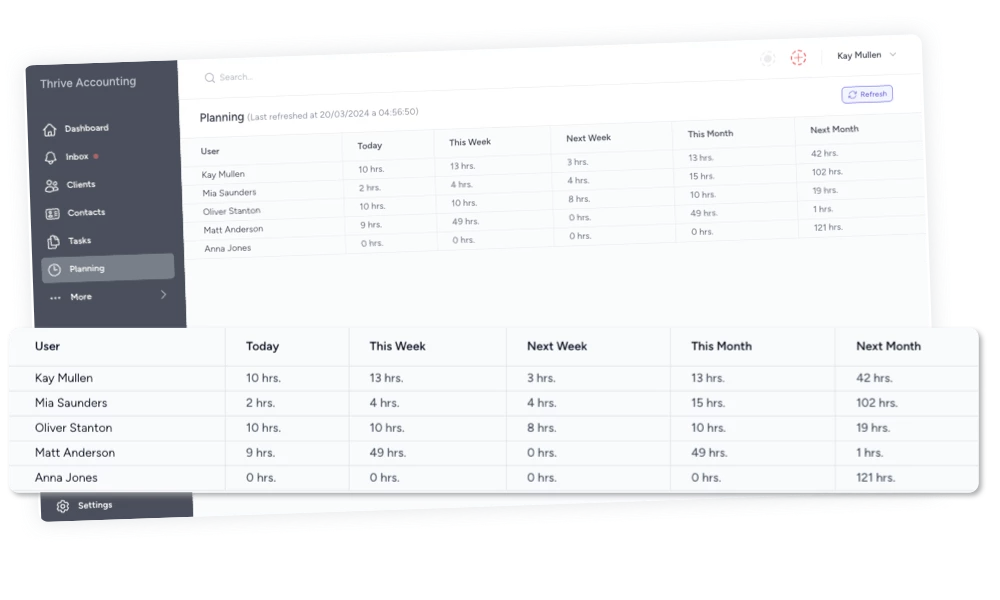
Practice management software with built-in capacity planning — like Tidyflow — solves these problems by tracking team workload in real time. You can see at a glance who’s overloaded, who has capacity, and where bottlenecks are forming. Job templates with time estimates feed directly into the capacity view, so your plan stays accurate as work progresses.
Metrics to Track
Once your capacity plan is running, track these monthly:
- Utilization rate — billable hours ÷ available hours. Target: 65–80% depending on role.
- Realization rate — billed revenue ÷ value of time spent. Shows if you’re capturing the value of your work.
- Deadline hit rate — % of jobs completed on or before deadline. Capacity problems show up here first.
- Overtime hours — consistent overtime means your capacity plan is wrong or your team is too small.
Common Mistakes
Ignoring non-billable time. If you assume everyone has 176 hours/month to do client work, your plan will fail before it starts.
Planning top-down only. Your team knows where the bottlenecks are. Involve them in the planning process.
Not adjusting the plan. A capacity plan isn’t a document you create in January and forget. Review it monthly, adjust as things change.
Treating all hours equally. A junior and a senior accountant both have ~140 available hours, but they can’t do the same work. Plan by skill level, not just headcount.
Getting Started This Week
You don’t need perfect data to start capacity planning. Here’s what to do this week:
- List your team with realistic available hours per month
- List your recurring jobs with estimated hours per client
- Subtract recurring hours from available hours — that’s your remaining capacity
- Identify the next 30 days of deadlines and check if your capacity covers them
If it doesn’t, you have 30 days to fix it. That’s the point of capacity planning — seeing problems before they become crises.
A tool like Tidyflow can speed this up significantly. Its capacity planning dashboard shows team workload at a glance, and job templates with built-in time estimates mean you’re not guessing how long things take. Start a free trial to see how it fits your firm.