
Bill faster. Get paid automatically.
Turn unbilled work into invoices that charge themselves. Clients save a payment method the moment they accept your proposal, and invoices charge it automatically. Recurring invoices and optional Xero or QuickBooks Online sync.
Turn WIP into invoices
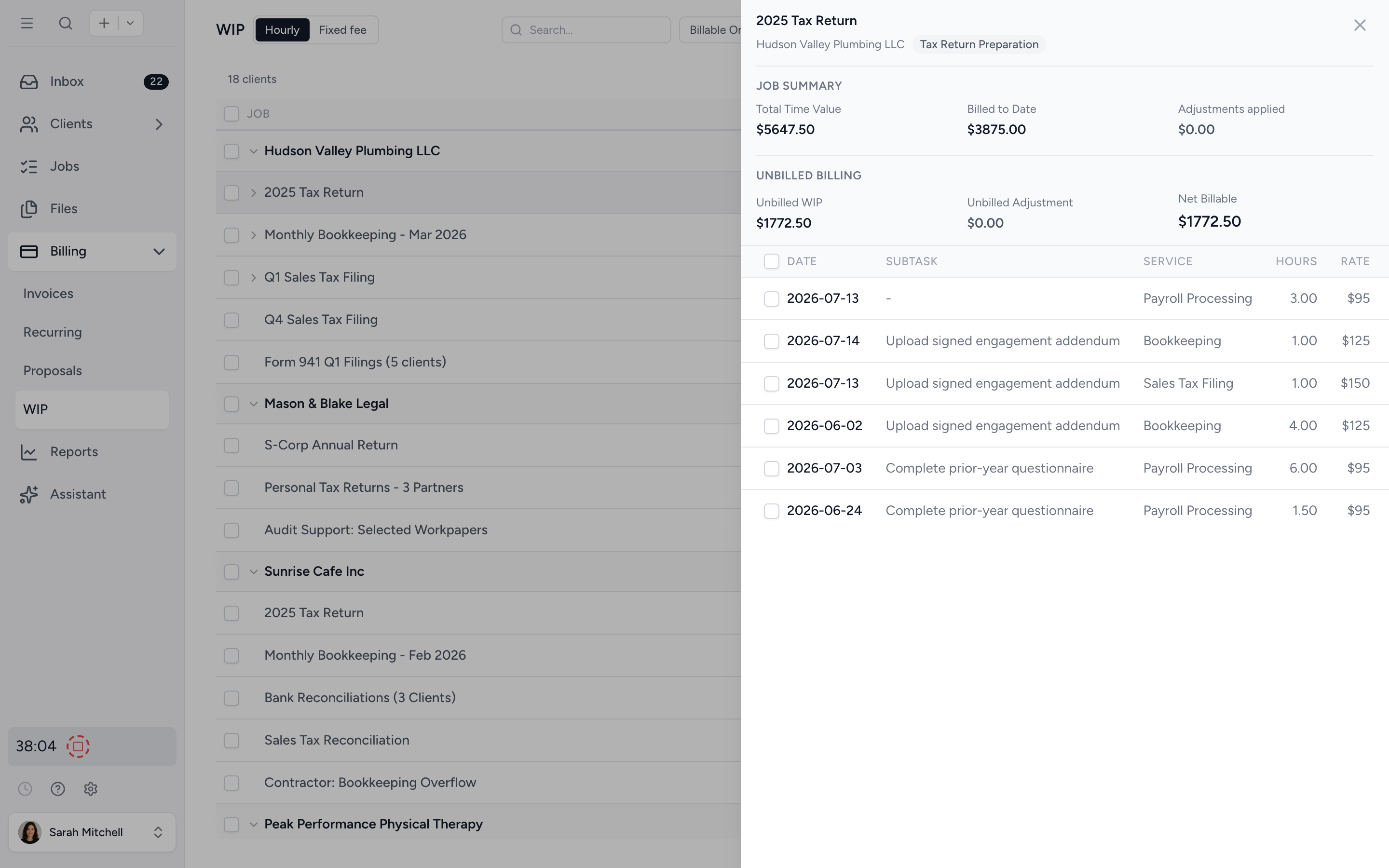
See every unbilled hour and fixed fee in one list. Adjust, batch select, and create invoices in a few clicks.
Get paid automatically
Clients save a card or bank account when they accept your proposal. Invoices charge it automatically, including work billed when the job completes. No chasing, no first-payment wait.
Keep AR under control
Aged receivables bucketed at 30, 60, 90+ days. Filter by client or owner and triage overdue accounts in seconds.
From proposal to paid, in one flow.
A three minute tour: your client accepts once, then invoicing, payment collection, and reporting run themselves.
Turn tracked time and fixed fees into invoices in one pass.
Open the unbilled WIP view to see every hour logged, every fixed fee outstanding, every client ready to be billed, grouped by client with the detail one click away. Bill all of a client's work in one click, or pick individual jobs, and the work lands on draft invoices ready for review.
- ✓ Unbilled WIP view across all jobs and clients
- ✓ Bill a client's entire unbilled balance in one click
- ✓ Batch-create draft invoices from selected jobs
- ✓ Manual and fixed-fee invoices for non-time work
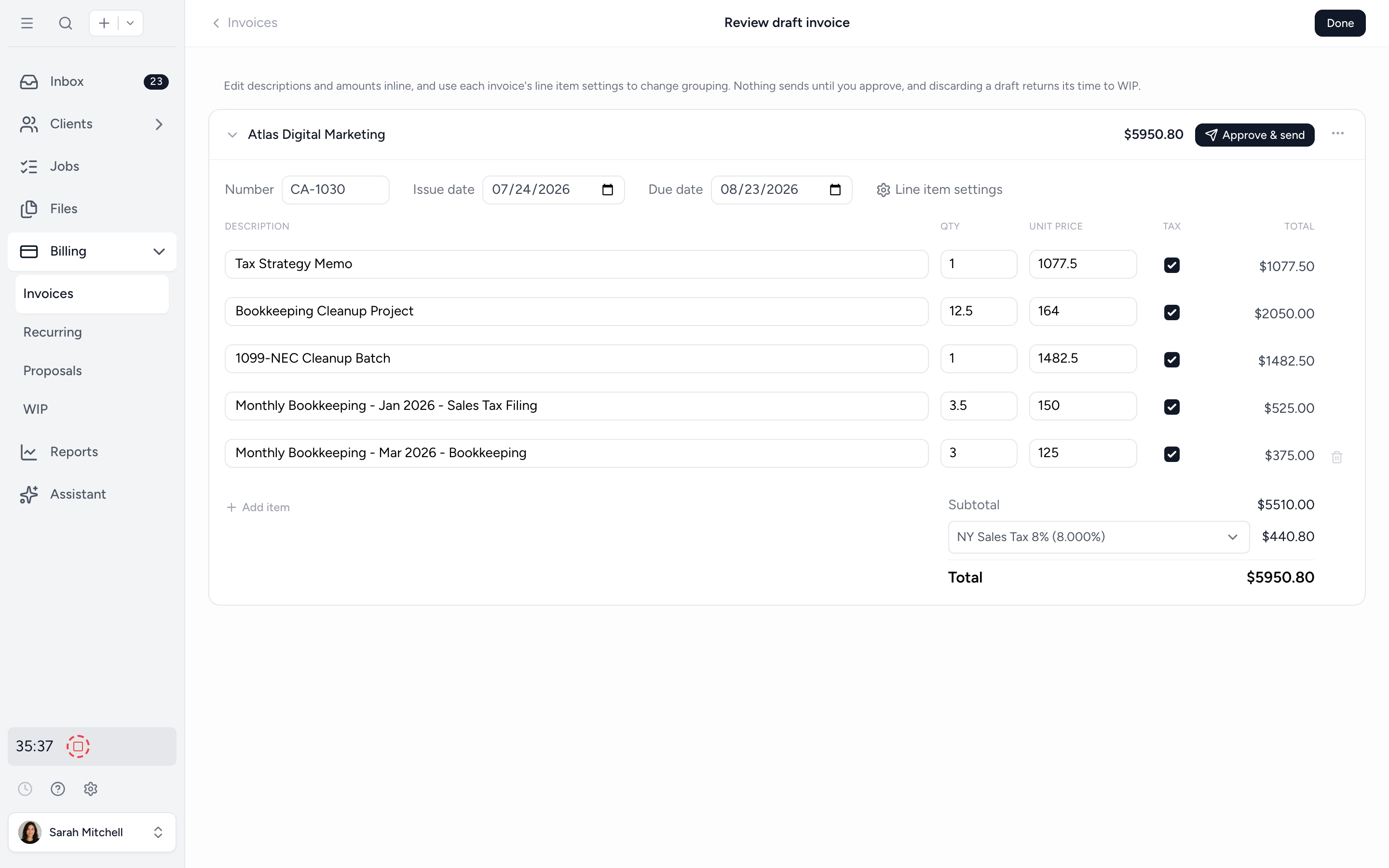
Review every draft before it sends.
Billing from WIP opens a full review screen, not a finished invoice. Group lines by service, by job, or into one line, edit descriptions and amounts inline, and watch write-ups and write-downs update live as you shape each draft. Nothing sends until you approve.
- ✓ Line grouping: by service, by job, or one line
- ✓ Write-ups and write-downs shown live per line
- ✓ Edit descriptions and amounts inline
- ✓ Discard a draft and its time returns to WIP
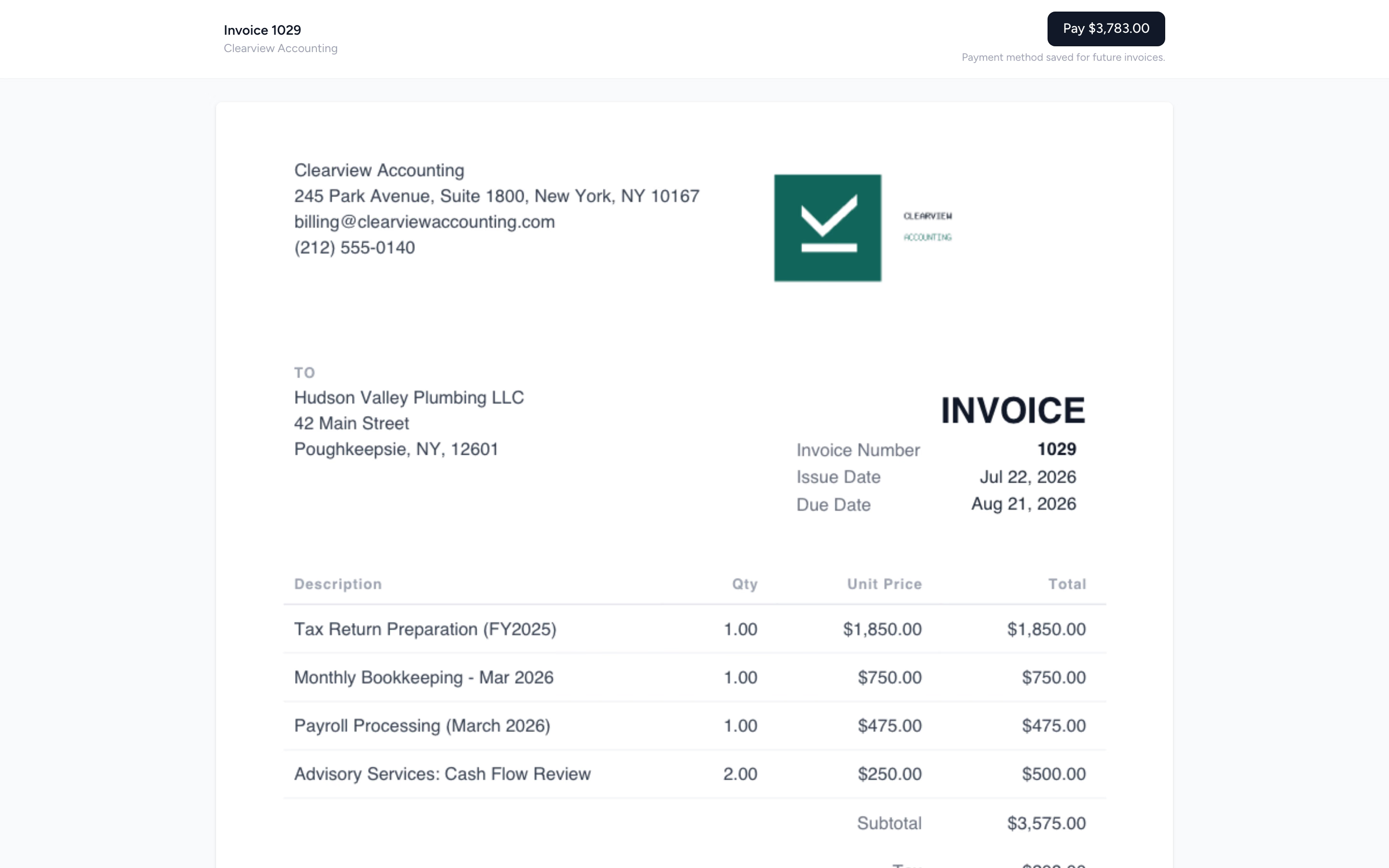
Send the invoice. Cards on file charge themselves.
Clients save a payment method when they accept your proposal, before any work starts. From then on invoices charge automatically, including jobs priced up front and billed when the work is done. Prefer cards to carry their cost? Pass the processing fee to clients who pay by card, while bank payments stay free.
- ✓ Payment method saved at proposal acceptance
- ✓ Bill on completion: price the job up front, charge when it's done
- ✓ Pass the card fee to clients who choose card. Bank payments stay free
- ✓ One-click pay link by card, or bank in the US, Canada, and Australia, plus partial and manual payments
- ✓ Lock a finished return behind its invoice: the client pays, the document unlocks
Set monthly bookkeeping retainers once. The invoices run themselves.
Build the recurring invoice once with the line items, schedule, and client. Tidyflow generates and (optionally) auto-sends each cycle. Bookkeeping, payroll, monthly close, advisory retainers. Less manual billing every period.
- ✓ Daily, weekly, monthly, quarterly, or custom cadence
- ✓ Auto-generate or auto-send each cycle
- ✓ Edit a single instance without breaking the schedule
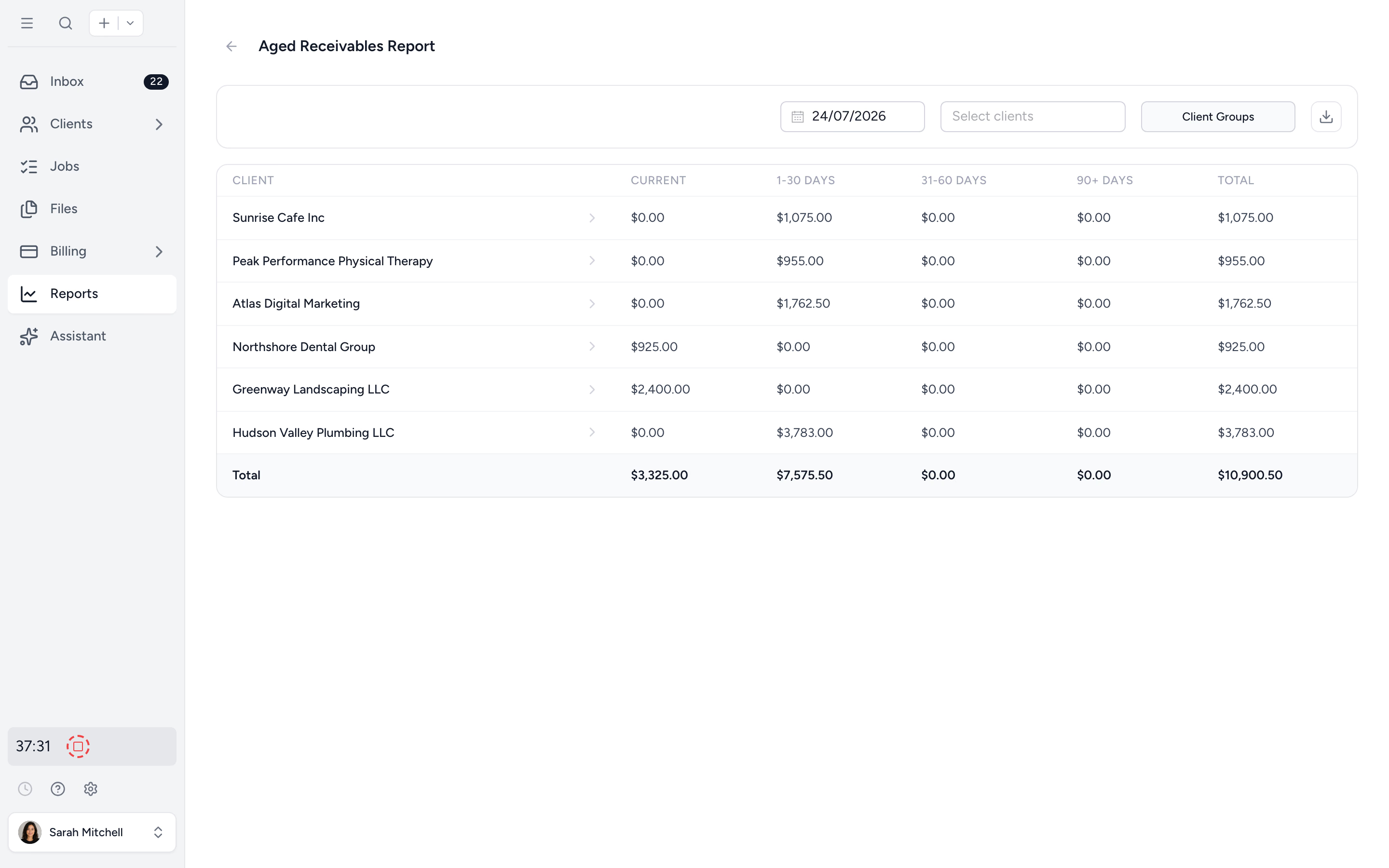
Know exactly who owes you what, and how long it's been.
Aged receivables bucketed at current, 30, 60, and 90+ days. Group by client or service. Drill in to chase the oldest balances first, or hand the list to whoever owns AR this week. No more fishing through QuickBooks for the same answer.
- ✓ Bucketed by 30 / 60 / 90+ days
- ✓ Group by client, service type, or owner
- ✓ Export to Excel for partner meetings
From WIP to paid in four steps.
- 1
Track time and fees
Log time on jobs or set fixed fees. WIP populates automatically.
- 2
Batch-create invoices
Select unbilled entries and turn them into branded invoices in seconds.
- 3
Send and get paid
Saved payment methods charge automatically. New clients pay online in one click.
- 4
Track AR
Aged receivables and revenue insights live in built-in reports.
What changes when billing lives where work lives.
Without Tidyflow
- ×Tracked time exported to spreadsheet, then to QuickBooks Online
- ×Clients pay by bank transfer, three weeks late
- ×Recurring invoices typed manually each month
- ×AR aging only visible after a partner-asks-an-export
With Tidyflow
- ✓WIP to invoice in one batch, no re-keying
- ✓Payment method saved at acceptance, invoices charge automatically
- ✓Recurring invoices on the schedule you choose
- ✓Live AR dashboard, exportable any time
Trusted by accounting firms managing thousands of invoices.
"Overall, everything just works, whether that be time recording, deadline management, monitoring WIP, billing … client portal, digital signatures, and many other features that a small accounting or bookkeeping practice needs."
"Tidyflow is easy to use, and has a simple, modern UI. Their customer support is amazing."
"The user-friendly interface and solid features have become essential in streamlining our accounting firm's operations, ensuring consistent and reliable service delivery."
"Great for team collaboration, accountability, keeping track of information and ensuring nothing falls through the cracks."


Built for the way firms actually bill.
Bill
- WIP management
- Batch create from time
- Manual & fixed-fee invoices
- Recurring invoices
- Custom invoice numbering
Collect
- Auto-charge saved payment methods
- Payment method capture at proposal acceptance
- Bill on completion of the job
- Card fee pass-on (US and Canada)
- One-click pay link via Stripe
- Partial payments and branded invoice PDFs
Report
- Aged receivables
- Billing report
- Realization report (Pro)
- Revenue insights (Pro)
- Optional Xero or QuickBooks Online sync
From $29/user/month, billed annually.
No setup fees. No per-invoice fees. Stripe processing fees apply to online payments at standard rates.
Billing questions firms ask us most.
No. You can create and send invoices directly from Tidyflow without syncing to an external accounting system. Syncing to QuickBooks Online or Xero is optional.
Yes. Compose, brand, and email invoices straight from Tidyflow. Each invoice includes a one-click pay link, so clients can pay by card without logging in.
Yes. Every invoice you send includes a secure pay link to a Stripe-powered payment page, and clients can pay by card, or by bank debit in the US, Canada, and Australia. Clients save a payment method when they accept a proposal, and invoices charge it automatically. You can still record manual payments (full or partial) when needed.
Yes, for US and Canadian firms. Clients choose at payment: bank debit at the invoice amount, or card with the processing fee added. Automatic charges of a saved credit card include the fee, disclosed before the client accepts the proposal. The fee only applies to credit cards. Debit card fees are refunded automatically.
Yes. Mark a proposal line as billed on completion. Your client agrees to the price up front, and when the job is marked completed the invoice is raised and charged to their saved payment method automatically.
Yes. Record full or partial payments against invoices and Tidyflow keeps the outstanding balance accurate.
Create tax rates manually in Tidyflow, or import them from QuickBooks Online or Xero. Set defaults per service type and override per client when needed.
Over 40 currencies. Set your workspace currency once and Tidyflow handles the formatting.
Billing, aged receivables, and time reports on every plan, plus realization and revenue insights on Pro. Filter by client, employee, service type, or date range. Export to Excel any time.
Boost your firm's cash flow today.
Start free for 14 days. No credit card. Send your first invoice in minutes.
Explore more features
Workflow management
Recurring jobs, templates, and deadlines your team can't miss.
Client management
Every client, contact, and detail in one organized place.
Proposals & Engagement Letters
Branded proposals and engagement letters, signed online.
Time tracking
Timers and timesheets that flow straight into billing.
Document management
Secure, organized document storage, shared with your clients.
Client portal & requests
Clients upload, answer, and approve in one portal. Reminders chase for you.
Tax organizers
Digital organizers with conditional questions and last year's answers.
Email Management
A shared firm inbox, connected to your clients and jobs.
Artificial Intelligence
An assistant, agent teammates, and MCP connectors on your firm's live data.
Reporting & Insights
See where your time, billing, and revenue actually go.
Capacity Planning
See your team's workload before it hits.
Integrations
Xero, QuickBooks Online, Zapier, Make, and a public API.
Electronic signatures
Legally binding e-signatures, included at no extra cost.
Collaboration
Comments, mentions, and shared visibility on every job.
See the full feature list →
Compare every capability across plans, side by side.