
A shared inbox built for the firm.
Connect Microsoft 365, Gmail, or any other mailbox via IMAP. Every client email lands next to the job, file, and request it relates to. Internal comments and saved responses keep the team aligned without forwarding chains.
Email next to the work
Conversations link to the client and the job they relate to. Open the client, see every email. Open the job, see the related thread.
Reply together, not in chains
Internal comments and @mentions on a thread, drafts handed off to a teammate. The reply ships from your firm, not from a forwarded chain.
Nothing assigned gets buried
Shared mailboxes have Open, Snoozed, and Closed queues with unassigned mail grouped first, and anything assigned or mentioned to you stays pinned in your personal inbox until you deal with it.
Email, the way an accounting firm actually runs it.
A short walkthrough of how Tidyflow turns Gmail and Microsoft 365 into a shared workspace for client conversations.
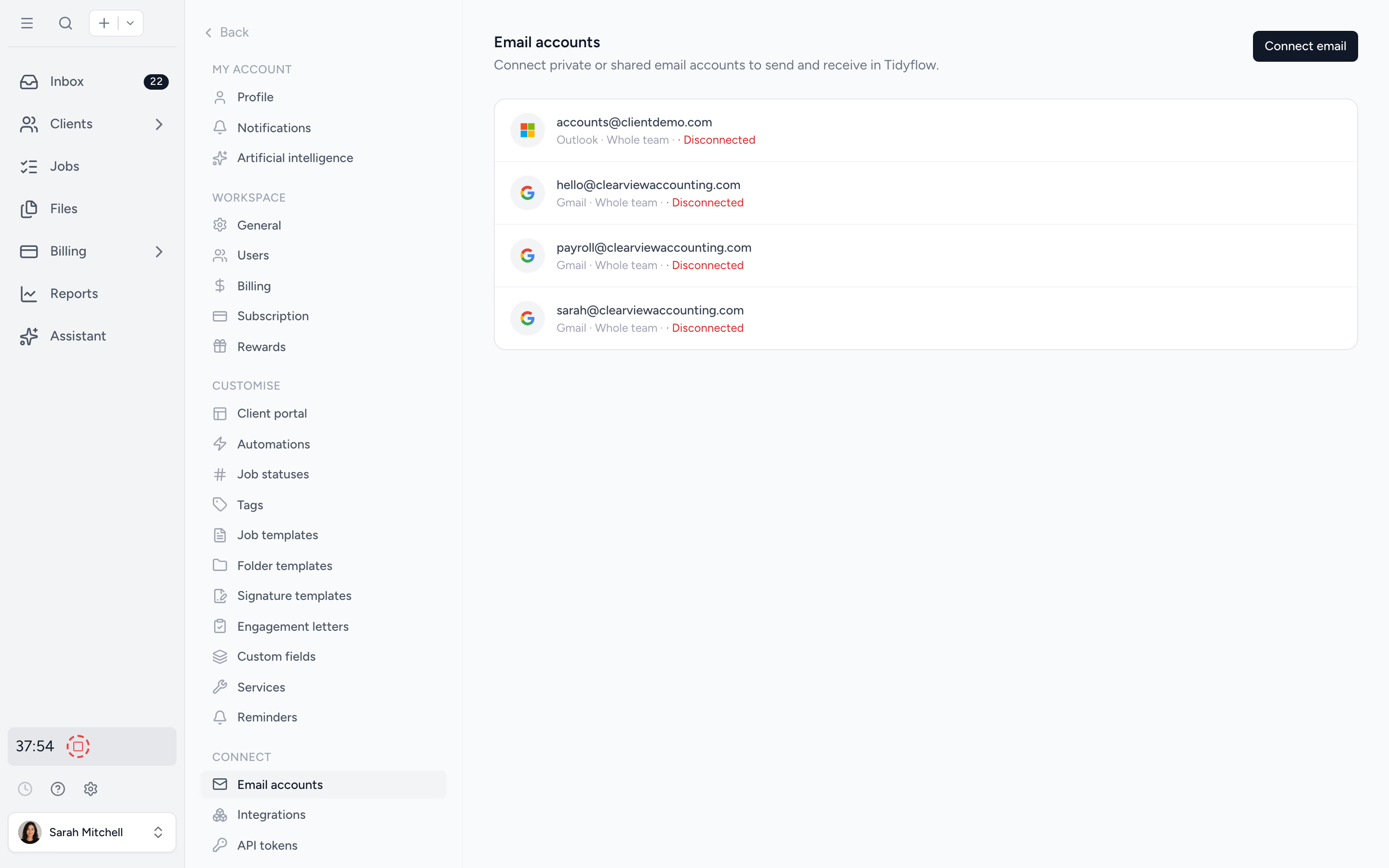
Connect Microsoft 365, Gmail, or any other mailbox.
Microsoft 365 and Gmail connect via OAuth in two clicks. Any other provider — iCloud, Fastmail, Yahoo, or a self-hosted mailbox — connects via IMAP (currently in beta). Two-way sync either way: replies sent from Tidyflow appear in your sent folder, inbound mail surfaces in your provider too. Connect personal inboxes and shared mailboxes alike.
- ✓ Microsoft 365 and Gmail via OAuth
- ✓ Any other provider via IMAP (beta)
- ✓ Two-way sync with your provider
- ✓ Personal, shared, and client mailboxes
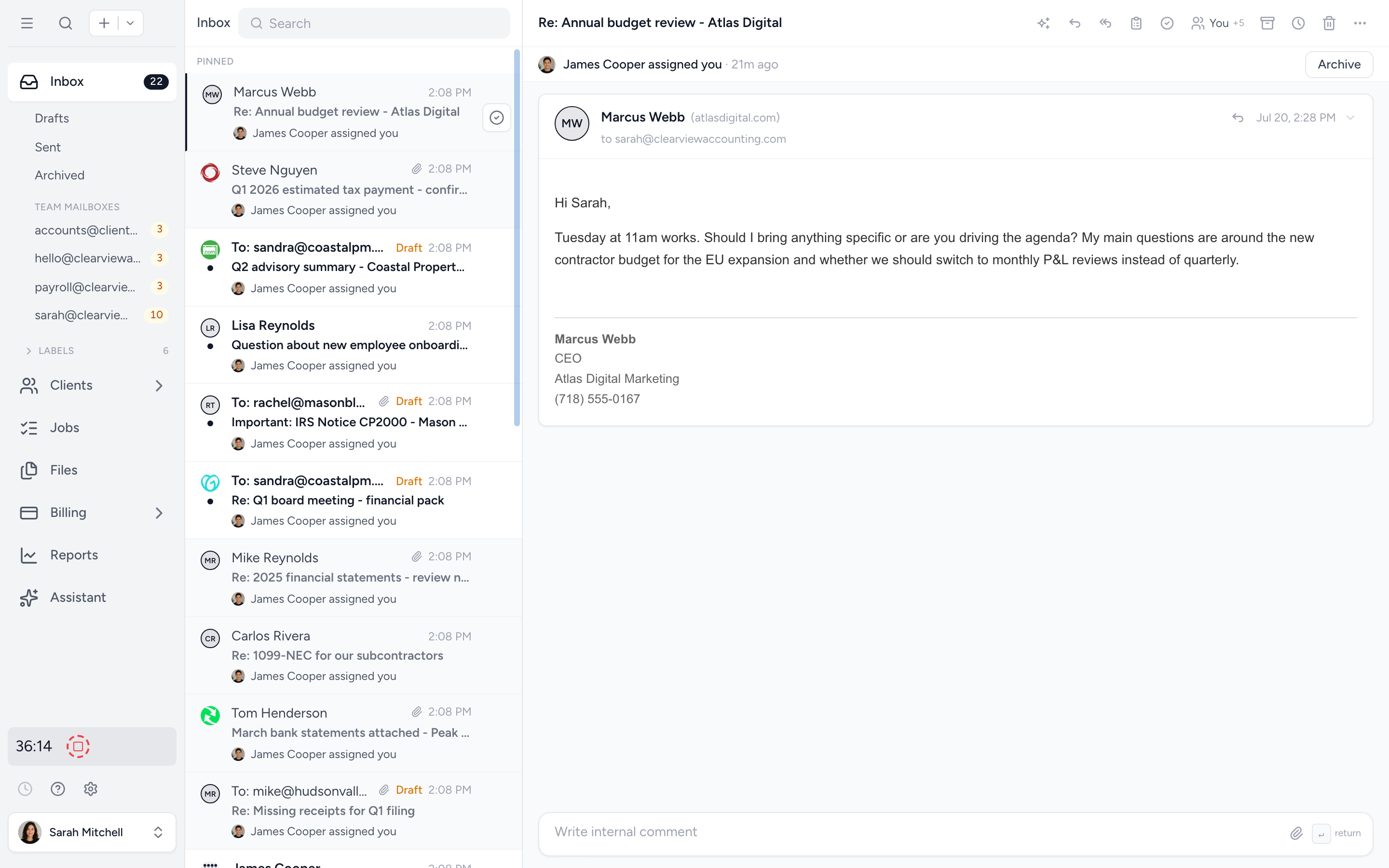
Email shows up where the work lives.
Add a contact's email to a client and future messages auto-link. Attach a conversation to a specific job and the email appears on the work history. Pick up a thread without searching a separate inbox.
- ✓ Auto-link by contact email
- ✓ Attach threads to specific jobs
- ✓ Reply from the same screen as the job
- ✓ Labels and filters for organisation
Discuss the response without the client seeing it.
Comment on an email thread, @mention a teammate, hand off a draft. Internal-only conversations stay attached to the thread and never reach the client. The reply that ships is the team's reply, not a forwarded back-and-forth.
- ✓ Internal comments per thread
- ✓ @mentions surface to the team's inbox
- ✓ Collaborate on drafts before sending
- ✓Review and send a finished draft from the mobile app (beta)
- ✓ Assign conversations to a clear owner
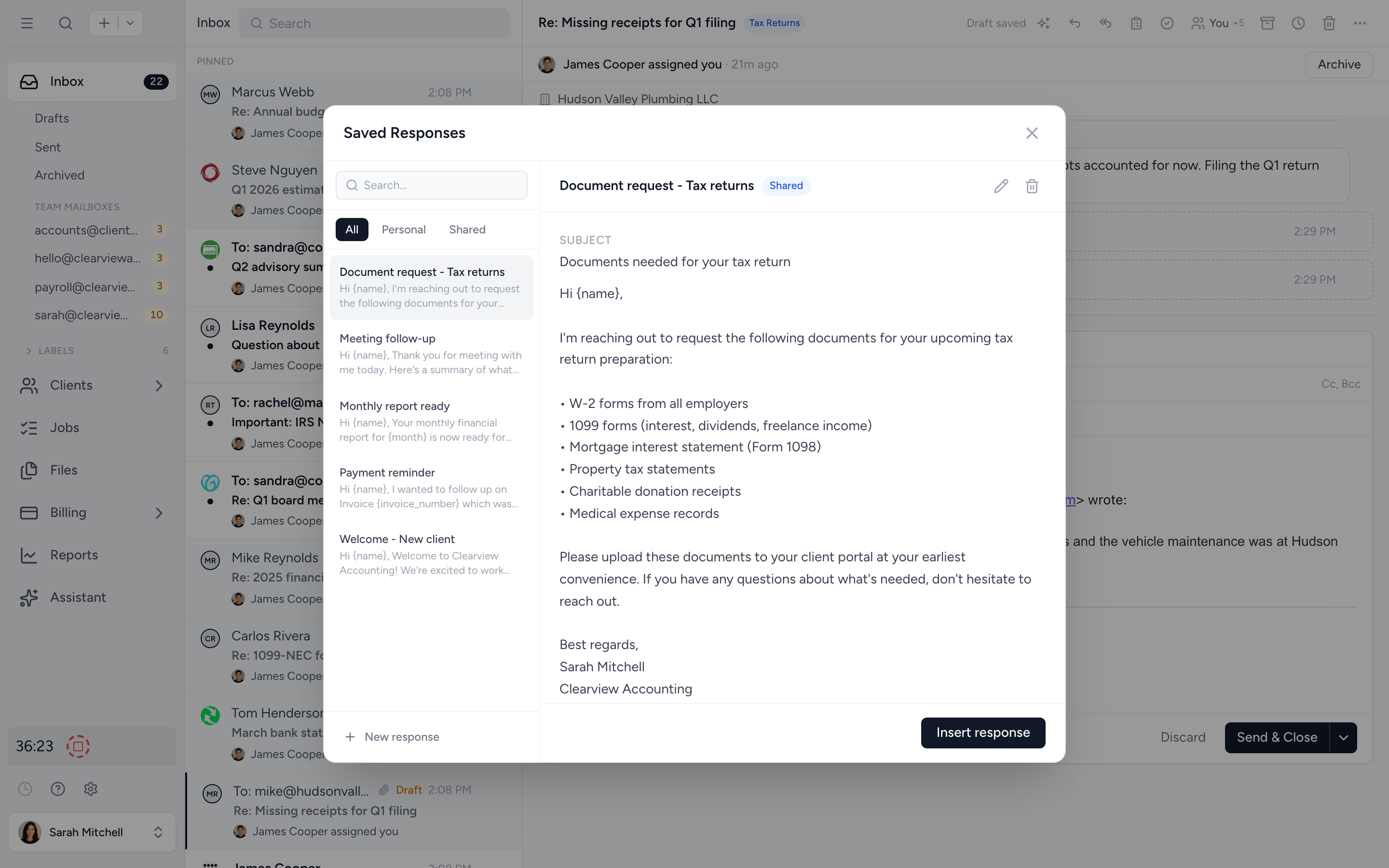
Send the onboarding email for the 200th time. Faster.
Save replies you send often: onboarding checklists, document follow-ups, end-of-year status updates. Drop them into a conversation in one click. Each saved response can use placeholders for the client name, job, and partner.
- ✓ Saved response library per firm
- ✓ Drop into any conversation in one click
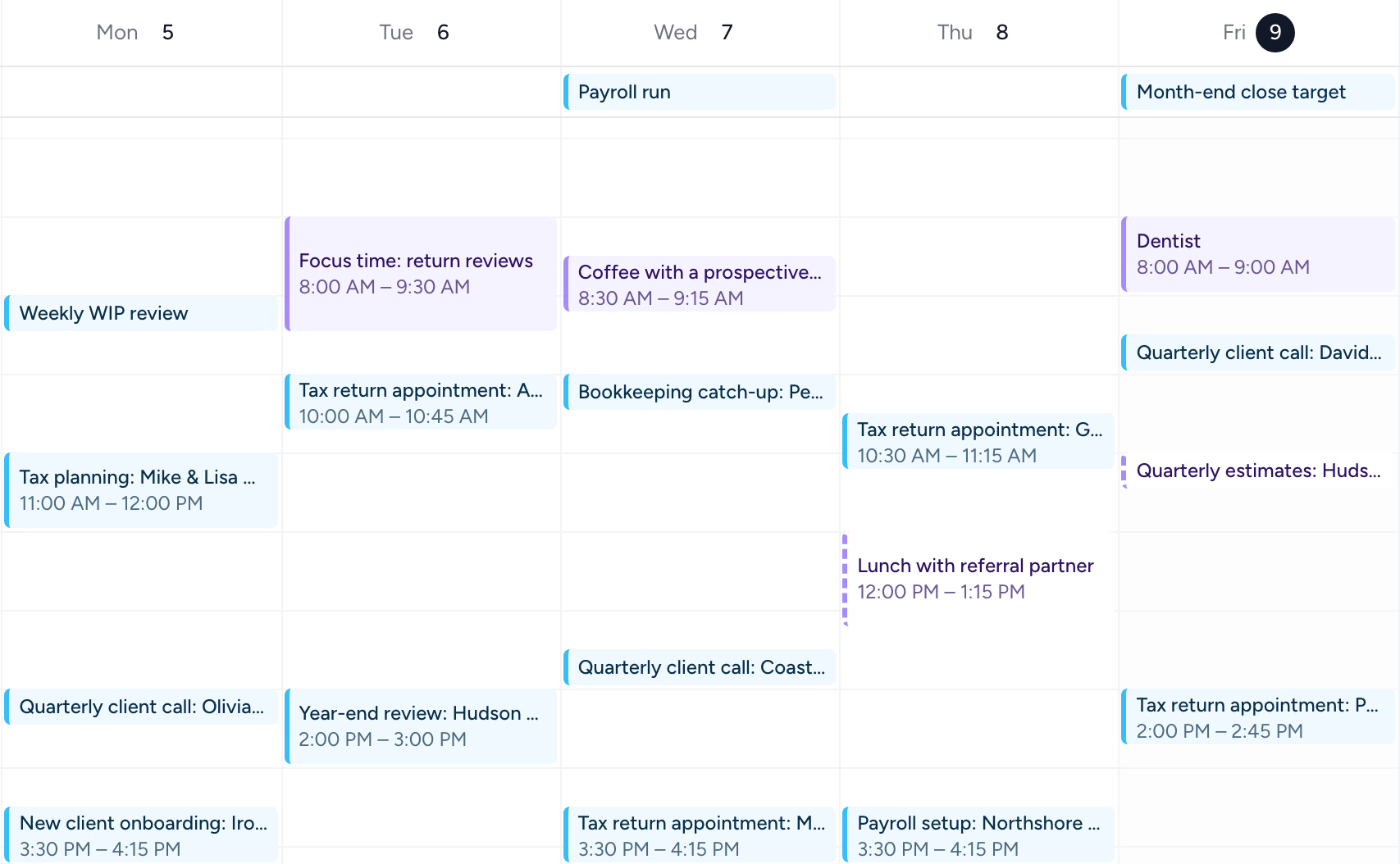
See the firm's week without another app.
Client calls and tax appointments booked on a shared mailbox sit beside each person's own calendar, under Inbox. It uses the Gmail and Microsoft 365 mailboxes you have already connected, links each meeting to its client, and lets you answer invites without leaving Tidyflow.
- ✓ Gmail and Microsoft 365 calendars
- ✓ Team and personal calendars side by side
- ✓ Meetings linked to clients by guest email
- ✓ Answer invites with Yes, Maybe or No
- ✓ Booking links that let clients book free times (Pro)
From scattered inboxes to one shared workspace, in four steps.
- 1
Connect your inbox
OAuth Gmail or Microsoft 365 in seconds, or any other provider via IMAP.
- 2
Link by contact
Add a contact's email to a client and future mail auto-links.
- 3
Assign and discuss
Set an owner, comment internally, draft together.
- 4
Reply with context
Send from the firm. Saved responses speed up the repeats.
What changes when email lives where work lives.
Without Tidyflow
- ×"FW: FW: FW: Smith trust" forwarding chains
- ×Five logins to manage five client mailboxes
- ×Notes about a thread saved in a Google Doc somewhere
- ×"Did anyone reply to this?" daily
With Tidyflow
- ✓Conversations linked to the client and job
- ✓Personal, shared, and client mailboxes in one app
- ✓Internal comments stay attached to the thread
- ✓Clear owner per conversation
Trusted by accounting firms running shared inboxes.
"Overall, everything just works, whether that be time recording, deadline management, monitoring WIP, billing … client portal, digital signatures, and many other features that a small accounting or bookkeeping practice needs."
"Tidyflow is easy to use, and has a simple, modern UI. Their customer support is amazing."
"The user-friendly interface and solid features have become essential in streamlining our accounting firm's operations, ensuring consistent and reliable service delivery."
"Great for team collaboration, accountability, keeping track of information and ensuring nothing falls through the cracks."


Built for the way firms actually run client email.
Connect
- Gmail & Microsoft 365 OAuth
- Any provider via IMAP (beta)
- Two-way sync
- Personal & shared inboxes
- Client mailboxes you manage
Collaborate
- Assign conversations
- Internal comments & @mentions
- Draft hand-offs
- Draft review on mobile (beta)
- Multiple signatures per user
Organise
- Auto-link by contact email
- Link conversations to jobs
- Saved responses
- Labels & filters
From $29/user/month, billed annually.
No per-mailbox fees. Core includes 3 shared inboxes and 1 private inbox per user. Pro is unlimited.
Email management questions firms ask us most.
Gmail (including Google Workspace) and Microsoft 365 / Outlook connect via OAuth. Any other provider — iCloud, Fastmail, Yahoo, or a self-hosted mailbox — connects via IMAP/SMTP, currently in beta. Connect your personal inbox and any client mailboxes you run on behalf of clients (bookkeeping@, payroll@, etc.).
Yes. Sync is two-way. Replies sent from Tidyflow appear in your sent folder. Inbound mail in Tidyflow updates your provider too. Gmail and Microsoft 365 sync in near real time; IMAP accounts sync every few minutes, with a manual sync available.
Yes. Answer an invitation with Yes, Maybe or No from the email in Tidyflow, or from the event in the Calendar under Inbox, and your answer reaches the organizer through Gmail or Outlook. Each mailbox's calendar appears once calendar sync is turned on for it. See our Use of Google API Services page for details.
Yes. Choose Team in the Calendar under Inbox to see one day with a column for each person, so whoever books appointments can see who is free without reading a colour-coded shared calendar. Appointments booked on a shared mailbox's calendar appear under the team members invited to them, beside each person's own calendar. It uses the calendars you already sync, and People sets whose columns you see.
Yes. Shared inboxes (info@, support@) and client mailboxes can be assigned per conversation. Owners are visible, comments are private to the team.
Add a contact email to a client and future messages from that address auto-link to the client record. You can also attach a conversation to a specific job.
Yes. Internal comments and @mentions live next to the thread, never visible to the client. Discuss the response before sending.
Yes. Save common replies (onboarding requests, document follow-ups, status updates) and drop them into a conversation in one click.
Get every client email in context.
Start free for 14 days. No credit card. Connect your inbox in minutes.
Explore more features
Workflow management
Recurring jobs, templates, and deadlines your team can't miss.
Client management
Every client, contact, and detail in one organized place.
Proposals & Engagement Letters
Branded proposals and engagement letters, signed online.
Billing & Payments
Invoice from tracked time or fixed fees, and get paid online.
Time tracking
Timers and timesheets that flow straight into billing.
Document management
Secure, organized document storage, shared with your clients.
Client portal & requests
Clients upload, answer, and approve in one portal. Reminders chase for you.
Tax organizers
Digital organizers with conditional questions and last year's answers.
Artificial Intelligence
An assistant, agent teammates, and MCP connectors on your firm's live data.
Reporting & Insights
See where your time, billing, and revenue actually go.
Capacity Planning
See your team's workload before it hits.
Integrations
Xero, QuickBooks Online, Zapier, Make, and a public API.
Electronic signatures
Legally binding e-signatures, included at no extra cost.
Collaboration
Comments, mentions, and shared visibility on every job.
See the full feature list →
Compare every capability across plans, side by side.