
Track time without thinking about it.
Persistent timer that follows you across pages. Manual entries for off-platform work. Time flows straight into WIP, billing, realization reports, and payroll exports. No spreadsheets in between.
Timer to WIP, with every Job on budget.
A short walkthrough of the timer, estimates against actual hours, and unbilled time ready for WIP.
Track in two clicks
Hit start, do the work, hit stop, assign to a job and client. Or log it after the fact, single entry or in bulk.
Bill straight from time
Tracked time feeds into WIP. Batch-create invoices from selected entries. No spreadsheet in between.
See where margin lives
Realization compares billable to actual hours so you spot scope creep, leaky margins, and pricing that needs adjusting.
The clock follows you. Stops when you do.
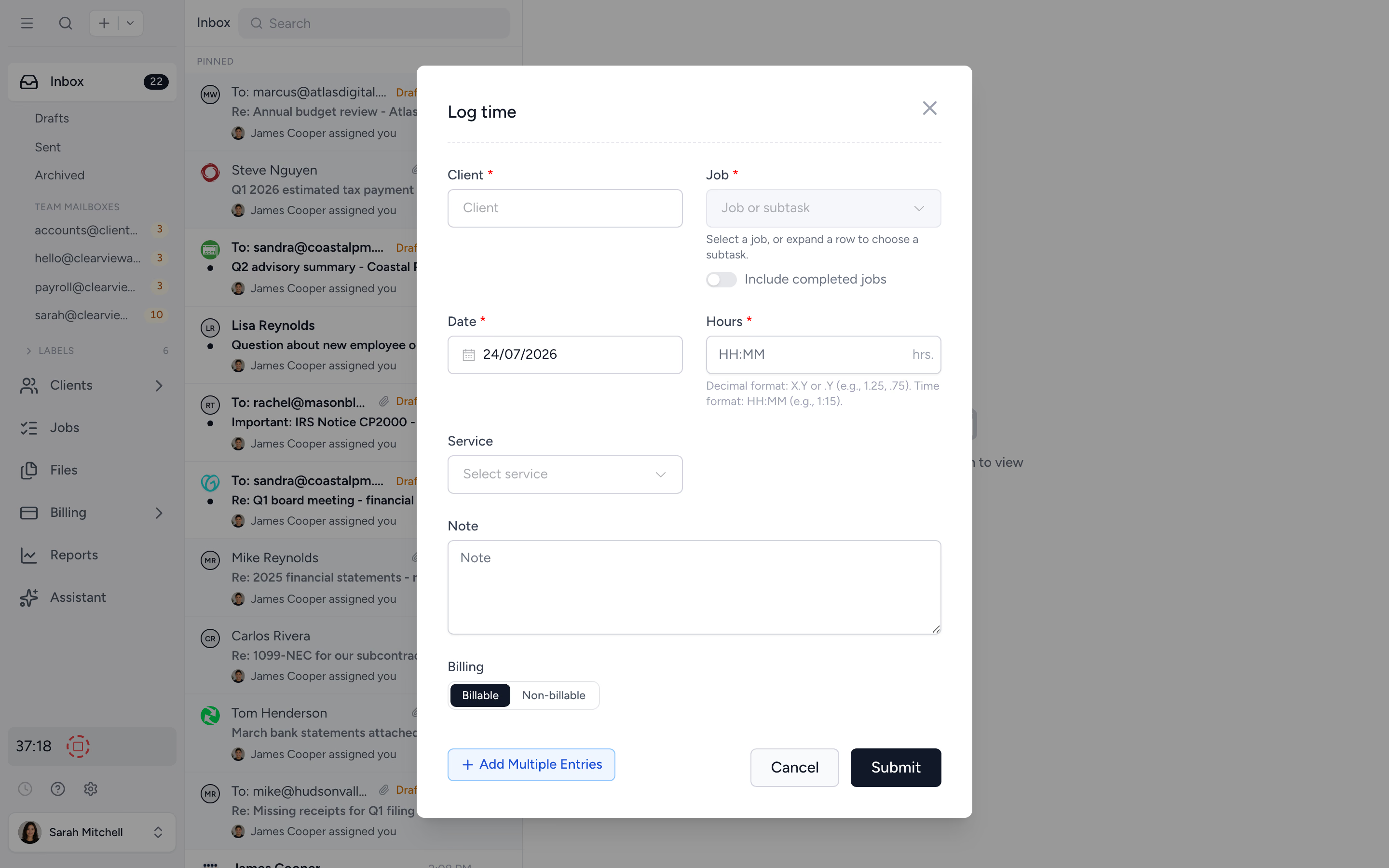
The timer sits in the left panel on every page. Click record, the work begins. Switch jobs, switch clients, the timer keeps running. Click stop, save the entry to a job and client. Off-platform work? Log manually after the fact.
- ✓ Persistent timer across pages
- ✓ Single-entry manual logging
- ✓ Multi-entry logging for whole-day catch-ups
- ✓ Adjust the recorded time before saving
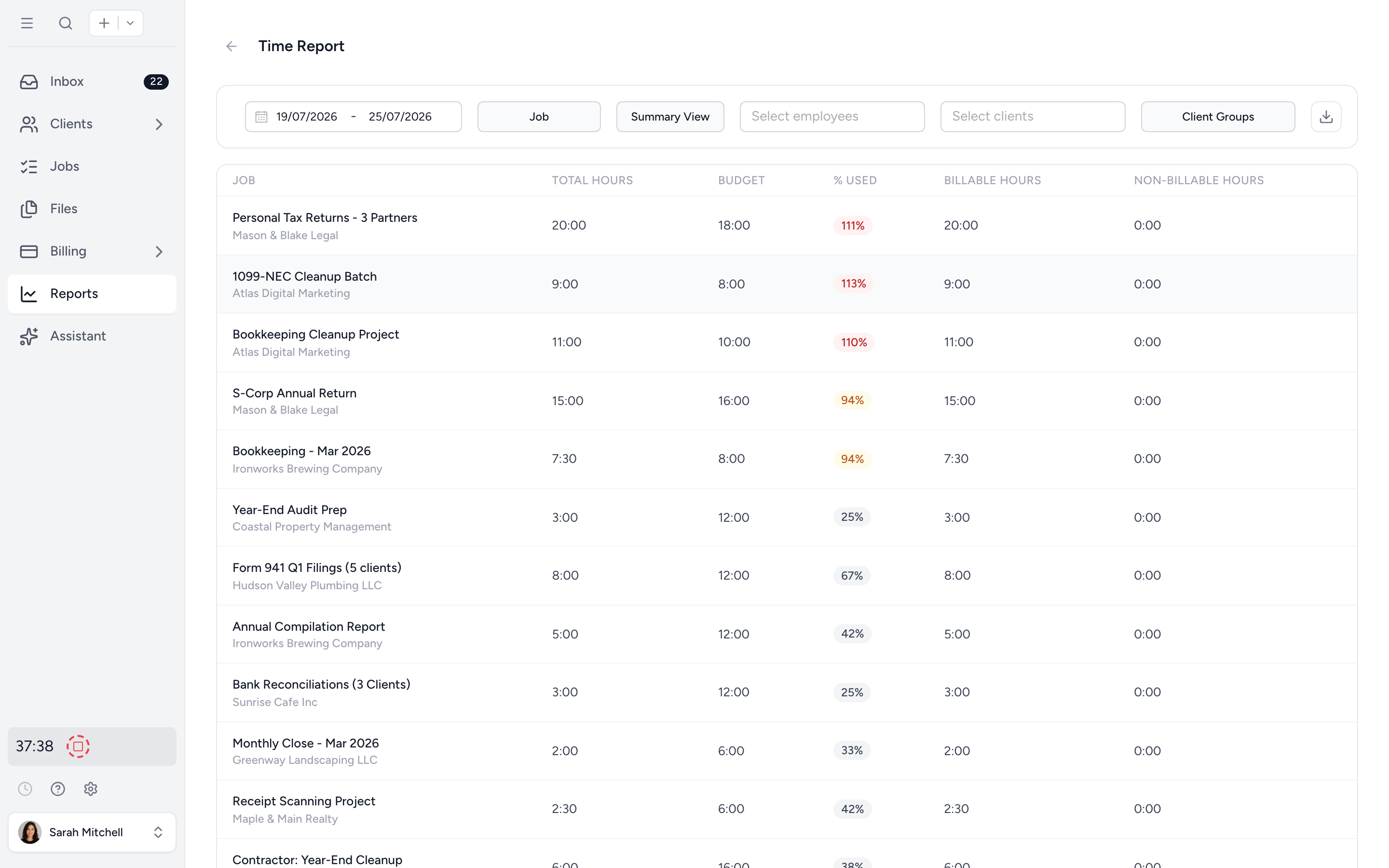
Every job, every budget, in one view.
See every active job's budget and how much of it is already used, on a single Time Summary screen. Colour coding makes overruns impossible to miss, so you can step in before the team has given the time away.
- ✓ Set a budget in hours on every job
- ✓ Catch overruns mid-engagement, not at billing
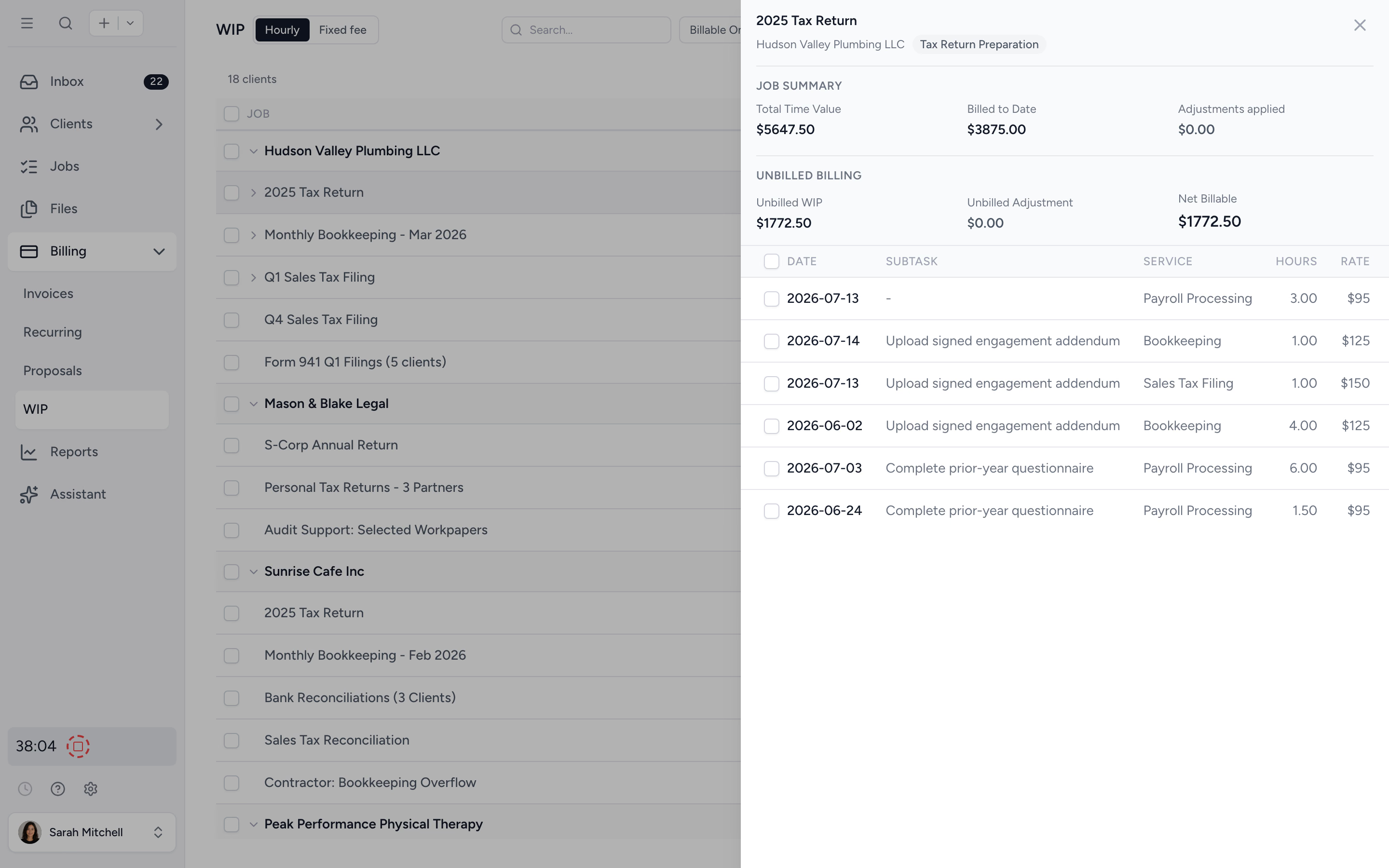
Bill from tracked time, in batch.
Time logs flow into the WIP view. Pick what's ready, adjust if needed, batch-create invoices. The hours, the rates, the descriptions are already there. No copy-paste from Excel.
- ✓ WIP view across all unbilled time
- ✓ Adjust, write off, or hold back before billing
- ✓ Batch-create invoices from selected entries
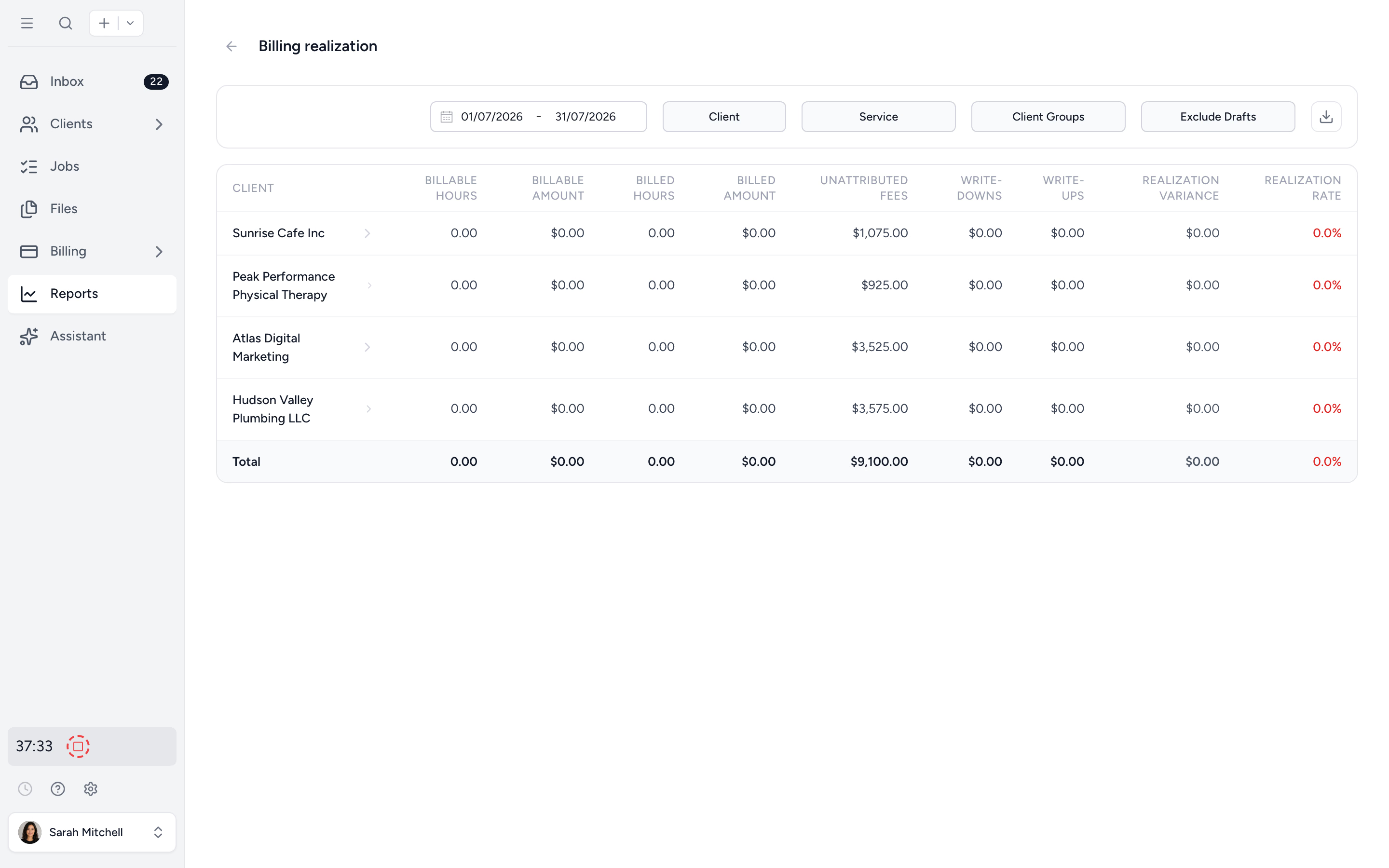
Find the engagements quietly running 40% over.
Realization compares billable to actual hours by job, client, employee, or service. The senior who consistently over-runs? The service line that always realises low? Now you can see them and adjust pricing or scope before next quarter.
- ✓ Realization by job, client, or service
- ✓ Filter by employee or date range
- ✓ Spot scope creep early
Time summaries and entries for payroll, partners, and audit.
Aggregate by user, job, client, or service for management reporting. Drill to every individual entry for payroll or audit. Filter, group, export to Excel. Your numbers, on demand.
- ✓ Time summary by user / job / client / service
- ✓ Time entries detail for audit
- ✓ Excel export every report
From a stopwatch to invoiced revenue, in four steps.
- 1
Set rates & estimates
Billable and cost rates per user, plus estimated hours per job.
- 2
Track or log
Use the timer in the day, or log entries after the fact.
- 3
Send to WIP
Time flows into the WIP view ready to invoice.
- 4
Run the reports
Time summary, realization, billing, on demand.
What changes when time and billing share a system.
Without Tidyflow
- ×Toggl + Excel + a separate billing tool
- ×Friday afternoon spent rebuilding the week
- ×Realization calculated quarterly, in PowerBI
- ×"What rate does this client get again?"
With Tidyflow
- ✓Persistent timer + multi-entry log
- ✓Time flows straight into WIP and invoices
- ✓Realization built in, on demand
- ✓Per-service and per-client rates configured once
Trusted by accounting firms billing on the time they actually track.
"Overall, everything just works, whether that be time recording, deadline management, monitoring WIP, billing … client portal, digital signatures, and many other features that a small accounting or bookkeeping practice needs."
"Tidyflow is easy to use, and has a simple, modern UI. Their customer support is amazing."
"The user-friendly interface and solid features have become essential in streamlining our accounting firm's operations, ensuring consistent and reliable service delivery."
"Great for team collaboration, accountability, keeping track of information and ensuring nothing falls through the cracks."


Built for the way firms actually log hours.
Track
- Persistent timer
- Manual entries
- Multi-entry logging
- Assign time to clients and jobs
- Estimated hours per job
Bill
- WIP & batch invoicing
- Billable rates per user
- Cost rates per user
- Per-service rate overrides
Report
- Time summary report
- Time entries report
- Realization report (Pro)
- Budget vs Actual time
- Excel export everywhere
From $29/user/month, billed annually.
Time tracking, WIP, and time reports are on every plan. Pro adds realization.
Time tracking questions firms ask us most.
The timer is always visible in the left panel. Hit record to start, stop to pause, save to assign the time to a job and client. The timer keeps running as you navigate between pages, so you never lose track.
Yes. Single time entries or multiple entries at once for off-platform work like calls, meetings, and travel.
Yes. Time logs flow into the WIP (Work in Progress) view. Select unbilled time and batch-create invoices in a few clicks. No third-party tools required.
Yes. Set default billable rates per service type and override them per client. Cost rates and billable rates can both be configured per team member.
Yes. Each job has an estimated hours field. The Time Summary report tracks logged time against the estimate with a colour-coded percentage column, so jobs running over surface mid-engagement, not at billing.
Yes. Filter by date, client, user, or group, then export to Excel for reporting, payroll, or audit.
Realization compares billable hours to actual hours by job, client, employee, or service type. It's how you find scope creep and pricing that no longer works.
Track time. Bill it. Move on.
Start free for 14 days. No credit card. Persistent timer ready from day one.
Explore more features
Workflow management
Recurring jobs, templates, and deadlines your team can't miss.
Client management
Every client, contact, and detail in one organized place.
Proposals & Engagement Letters
Branded proposals and engagement letters, signed online.
Billing & Payments
Invoice from tracked time or fixed fees, and get paid online.
Document management
Secure, organized document storage, shared with your clients.
Client portal & requests
Clients upload, answer, and approve in one portal. Reminders chase for you.
Tax organizers
Digital organizers with conditional questions and last year's answers.
Email Management
A shared firm inbox, connected to your clients and jobs.
Artificial Intelligence
An assistant, agent teammates, and MCP connectors on your firm's live data.
Reporting & Insights
See where your time, billing, and revenue actually go.
Capacity Planning
See your team's workload before it hits.
Integrations
Xero, QuickBooks Online, Zapier, Make, and a public API.
Electronic signatures
Legally binding e-signatures, included at no extra cost.
Collaboration
Comments, mentions, and shared visibility on every job.
See the full feature list →
Compare every capability across plans, side by side.