
Any document. Signed in minutes.
Send a PDF for signature. Signers click a secure link and sign in seconds, no account required. You get a Certificate of Completion with a full audit trail. Stop printing, scanning, and chasing signatures.
Sign without an account
Anyone signs with a secure link: clients, spouses, trustees, partners. No password setup, no account, no friction.
Audit-ready every time
Every send, consent, sign, and complete event is timestamped with IP. A Certificate of Completion is embedded in the signed PDF.
Live in your firm's tools
Signatures live next to client files, jobs, and engagement letters. No third-party tab, no integration to babysit.
Send. Sign. Done.
A short walkthrough of how to drop fields, send a request, and get an audit-ready signed PDF back in the same folder.
Drag, drop, send.
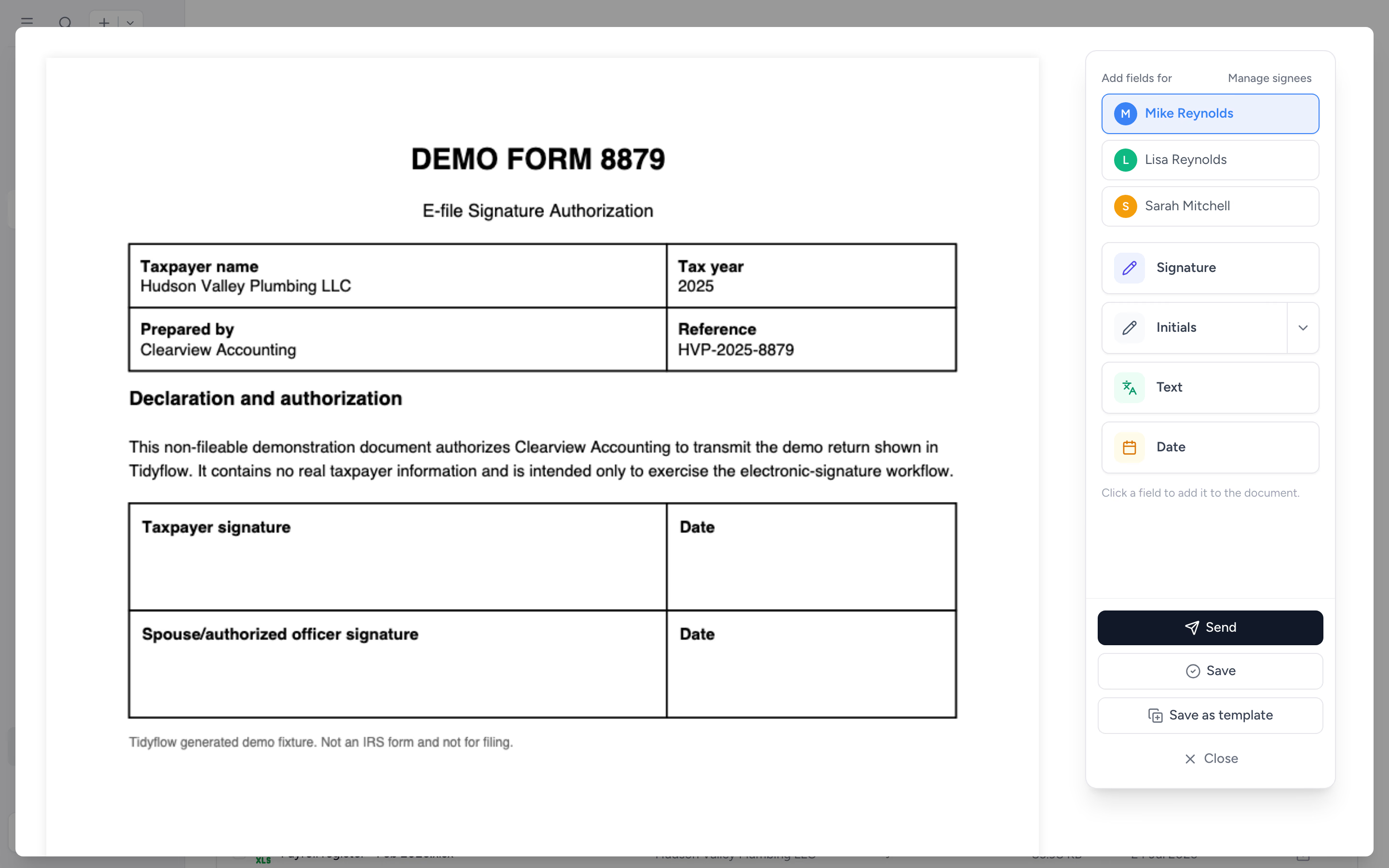
Open a PDF, drag signature fields where you need them, set who signs what. The editor sidebar handles signature, initial, date, and text fields. Save it as a re-usable template if you send the same document often.
- ✓ Signature, initial, date, and text fields
- ✓ Multiple signatories with their own fields
- ✓ Reusable PDF templates with signer roles, sent to any client
- ✓ Review the prepared draft before it goes out
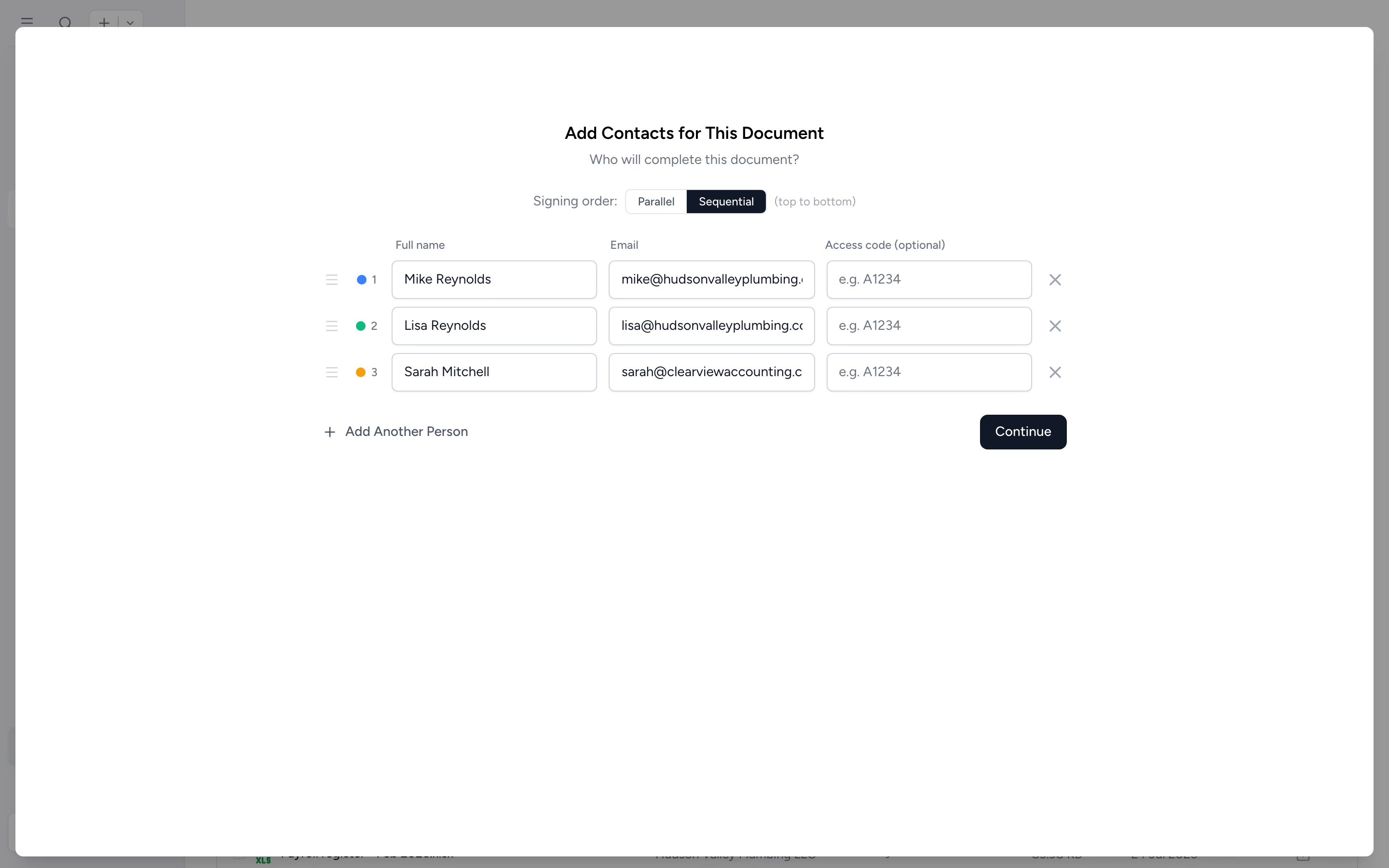
Get the partners, the spouse, and the trustee on one document.
Add multiple signatories to a request. Each signs via their own secure link. Tidyflow walks them through consent, captures the audit trail, and finalises the document when everyone is done.
- ✓ Multiple signatories per document
- ✓ Each gets their own secure link
- ✓ Consent captured for each party
- ✓ Auto-completes when all parties sign
Send any client PDF for signature in two clicks.
Open the file in the client's folder, choose "Request signature", place the fields and send. The signed document and Certificate of Completion save back to the client record. On Pro, you can also collect the signature inside a client request, alongside draft review and any payment requirement.
- ✓ Send for signature direct from the file browser
- ✓ Signed PDF auto-saved to the original folder
- ✓ Certificate of Completion attached to the document
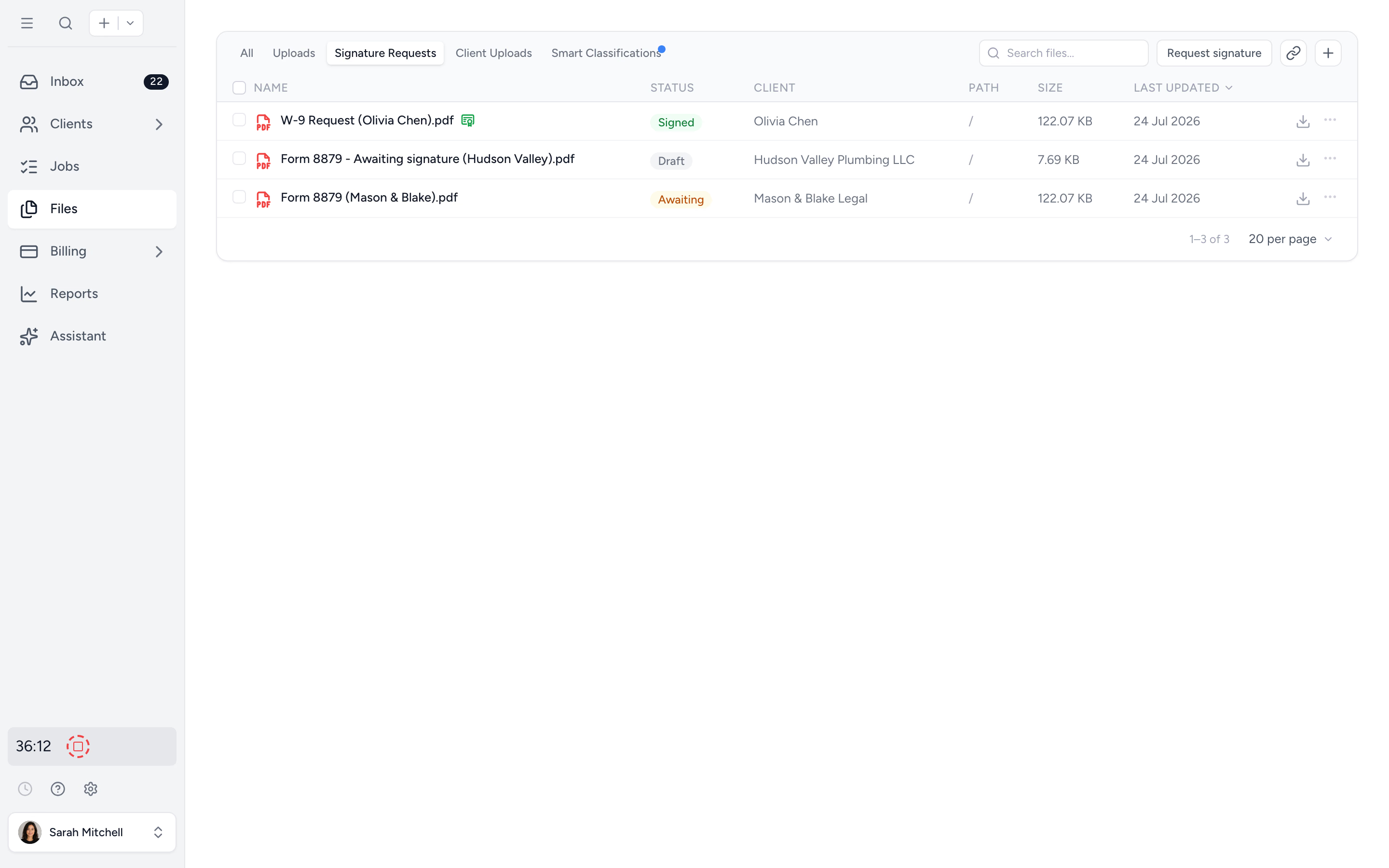
See what's signed, what's pending, and who's stalling.
The signature requests view shows every document out for signature, who's signed, who hasn't, and when each party engaged. Resend a reminder with one click, or withdraw a request if something needs to change.
- ✓ Live status per signature request
- ✓ One-click reminders
- ✓ Withdraw or resend without re-uploading
From any PDF to signed document, in four steps.
- 1
Upload the PDF
Or open one already in the client folder.
- 2
Place the fields
Drag signature, initial, date, and text fields onto the doc.
- 3
Send the request
Add signatories, hit send. Each gets a secure link.
- 4
Auto-complete and file
Signed PDF + Certificate of Completion saved to the folder.
What changes when signatures live in your firm's workspace.
Without Tidyflow
- ×Print, scan, email, chase, scan again
- ×Third-party signing tool with a separate login
- ×Audit trail buried in a download folder
- ×Spouse signature held up because they can't find the email
With Tidyflow
- ✓Send for signature from the client folder
- ✓Guest signing with no account required
- ✓Certificate of Completion auto-attached
- ✓One-click reminders for stalled parties
Trusted by accounting firms signing documents every day.
"Overall, everything just works, whether that be time recording, deadline management, monitoring WIP, billing … client portal, digital signatures, and many other features that a small accounting or bookkeeping practice needs."
"Tidyflow is easy to use, and has a simple, modern UI. Their customer support is amazing."
"The user-friendly interface and solid features have become essential in streamlining our accounting firm's operations, ensuring consistent and reliable service delivery."
"Great for team collaboration, accountability, keeping track of information and ensuring nothing falls through the cracks."


Built for the documents firms actually sign.
Send
- Drag-and-drop field editor
- Signature, initial, date, text
- Multiple signatories
- Direct from the file browser
Sign
- Guest signing, no account
- Secure per-signer links
- Consent capture
- Automatic notifications
Govern
- Identity checks (KBA) for US signers
- Audit trail with timestamps and IPs
- Certificate of Completion
- Auto-delivery of signed PDF
- Secure storage in client folder
From $29/user/month, billed annually.
No per-signature fees. Send as many requests as your firm needs.
E-signature questions firms ask us most.
Yes. Pro document approval items can request a signature on your uploaded PDF. Configure the signers and fields, then the signed document and status stay with the request. A separate approval item can collect review of the draft first. With online payments connected, an invoice can gate access to the approval document, including signing.
Yes. Upload the PDF you already have and drag signature, initials, date, and text fields onto the pages exactly where they belong. You never rebuild the document as a web form or collect the signature on a separate page, so official forms and authorizations get signed exactly as issued. Every field is assigned to a specific signer, so a document needing two signatures gets each person’s fields placed where they should sign.
A date field opens prefilled with the current date, so the signer confirms it in one tap instead of working out the format. They can still pick a different date if the document needs one.
No. Standalone PDF signing is included on every plan and the number of signature requests you send is unlimited. There are no per-signature credits, no envelope packs to buy up front, and nothing that expires if you do not use it. Reusable signature-template limits vary by plan. Adding signatures or approvals to a client request workflow requires Pro.
No. Signers click a secure link and sign. Works for clients, spouses, trustees, partners, or anyone else who needs to sign. No login, no password, no friction.
Yes. Signers must explicitly agree to use electronic records and signatures before they can sign. The consent is captured in the audit trail. Read what makes an electronic signature legally binding.
Yes, for signers in the United States. Switch on an identity check for a signer and they answer knowledge-based authentication (KBA) questions before the document opens. Each signer gets three attempts, then can sign by hand and upload the signed copy instead. The result is recorded in the audit trail and the Certificate of Completion. Identity checks are free while in beta. Read how identity checks work or watch the video.
When the document was sent, when consent was given, when it was signed, and when it was completed. Each event includes timestamps, signer details, and IP address.
Yes. Every signee and the user who sent the request receive the completed document by email.
Yes. A "Certificate of Completion" is added to the signed document with the full audit trail embedded.
PDF documents are supported. Most accounting documents (engagement letters, tax returns, year-end packs) can be saved as PDF before signing.
Yes. Add multiple signatories with their own fields. Each signs in turn, with a complete audit trail of every party.
Yes. Signature templates let you set up a document once, with signer roles and field placements, and send it to any client. You review the prepared draft before it goes out. Engagement letters and annual authorization forms are typical uses.
Ditch DocuSign. Sign in your workspace.
Start free for 14 days. No credit card. No per-signature fees.
Explore more features
Workflow management
Recurring jobs, templates, and deadlines your team can't miss.
Client management
Every client, contact, and detail in one organized place.
Proposals & Engagement Letters
Branded proposals and engagement letters, signed online.
Billing & Payments
Invoice from tracked time or fixed fees, and get paid online.
Time tracking
Timers and timesheets that flow straight into billing.
Document management
Secure, organized document storage, shared with your clients.
Client portal & requests
Clients upload, answer, and approve in one portal. Reminders chase for you.
Tax organizers
Digital organizers with conditional questions and last year's answers.
Email Management
A shared firm inbox, connected to your clients and jobs.
Artificial Intelligence
An assistant, agent teammates, and MCP connectors on your firm's live data.
Reporting & Insights
See where your time, billing, and revenue actually go.
Capacity Planning
See your team's workload before it hits.
Integrations
Xero, QuickBooks Online, Zapier, Make, and a public API.
Collaboration
Comments, mentions, and shared visibility on every job.
See the full feature list →
Compare every capability across plans, side by side.