
Know what's due before it's due.
Tax filings, payroll, monthly bookkeeping. Every job your firm owes a client lives on one pipeline with the right owner, the right date, and the right reminders. Nothing slips because nothing hides.
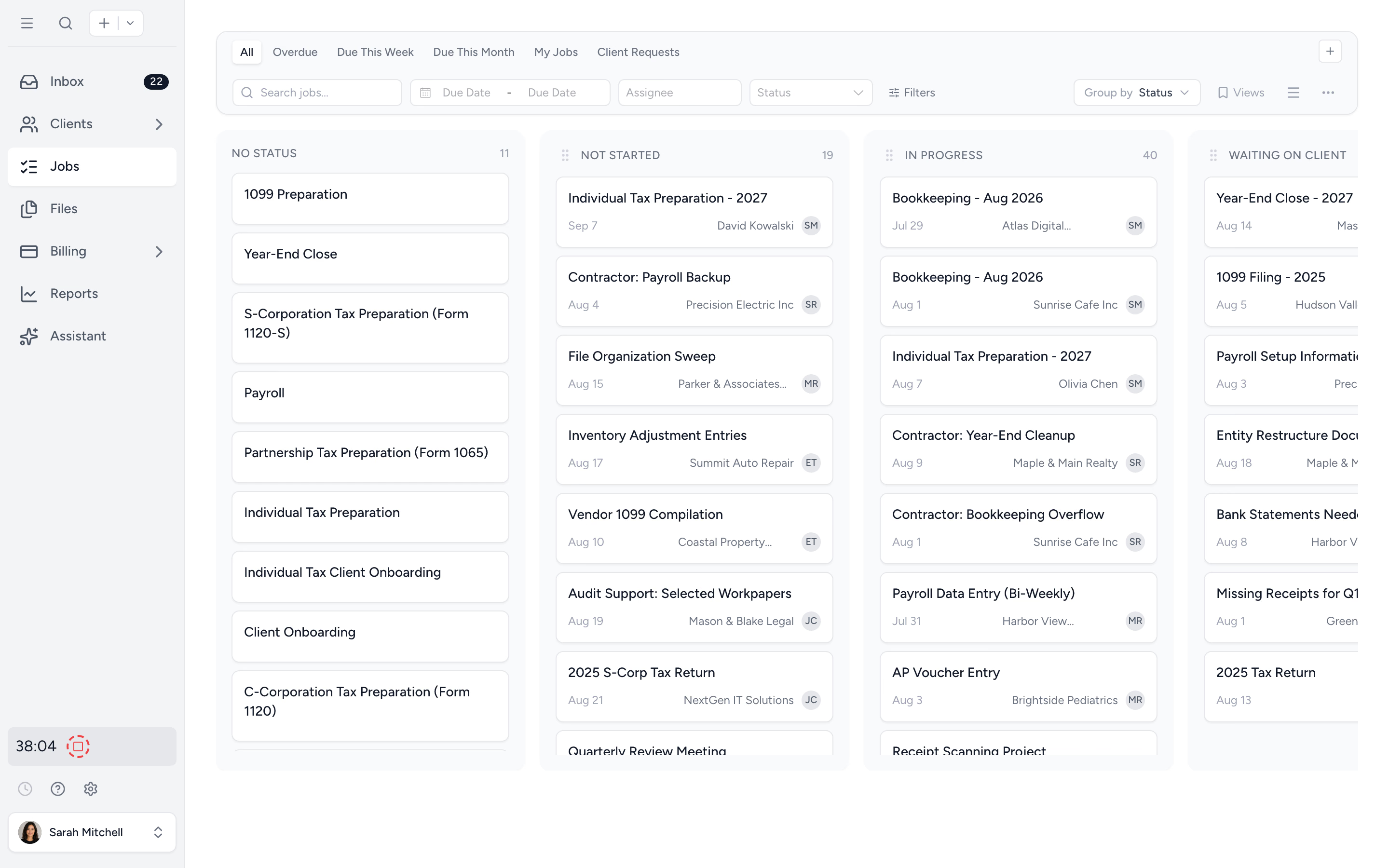
One pipeline, every job
Every client engagement, every recurring task, every internal job sits on a single board with a status, an owner, and a due date. No more "is this on someone's list?"
Clients get nudged for you
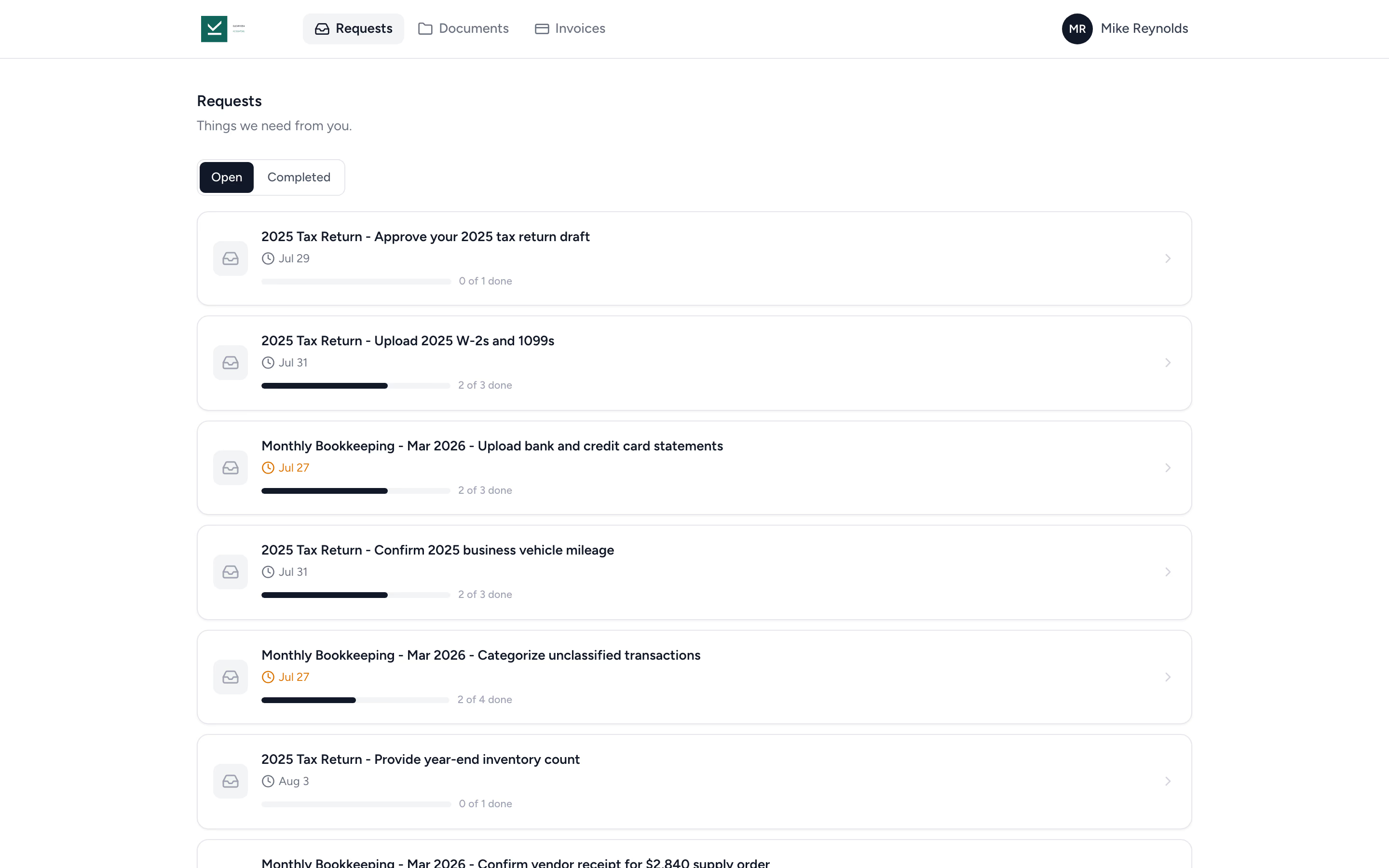
Outstanding requests chase themselves. Tidyflow reminds the client on the schedule you set and lets your team know if ten reminders go unanswered.
Spot the wave early
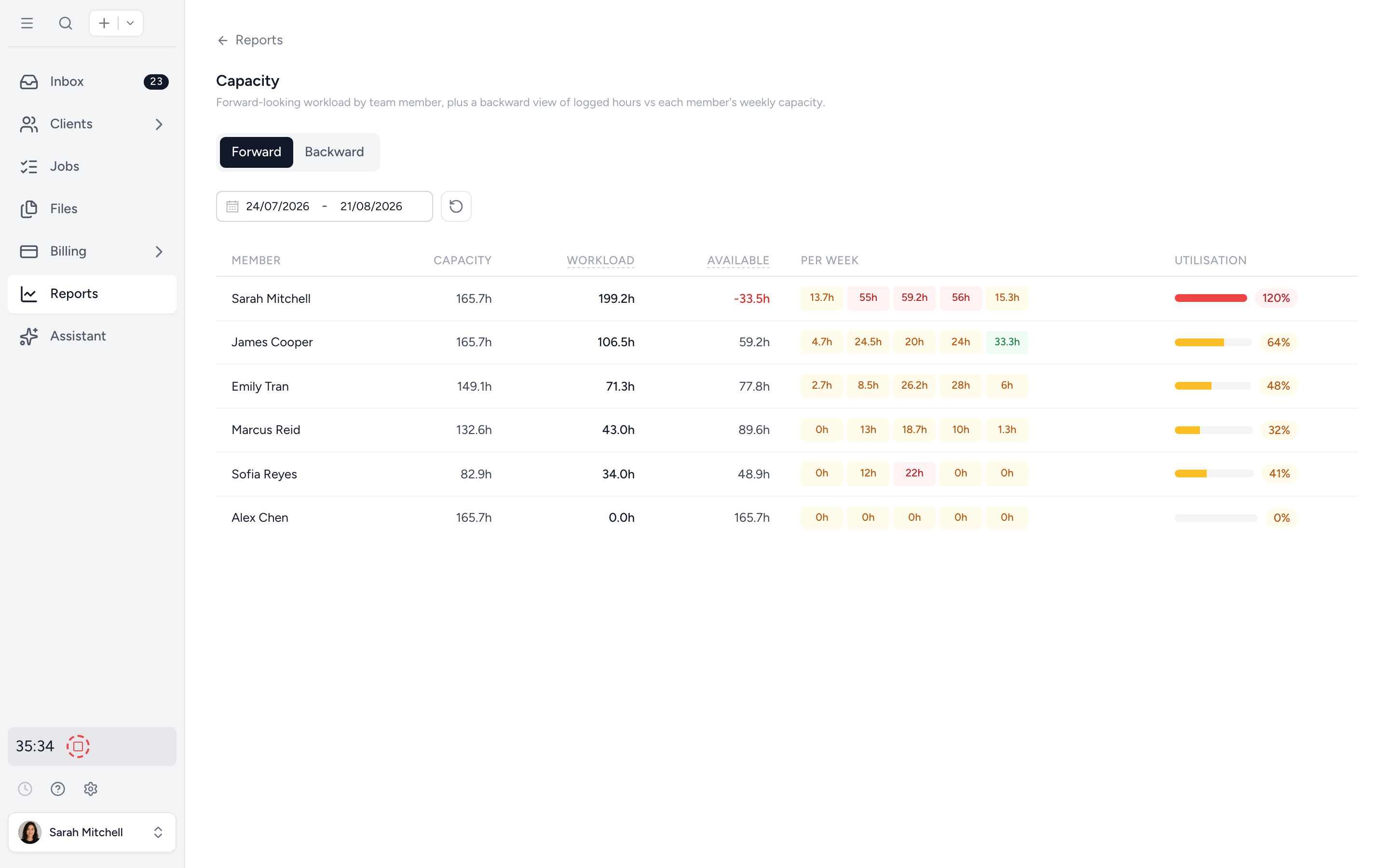
Capacity Planning projects assigned and recurring work forward into weekly buckets. Spot the bottleneck early and reassign while you can.
Every deadline on one pipeline.
Drag jobs through the statuses your firm actually uses (In Progress, Waiting on Client, Review, Done). Each card shows the client, the assignee, the due date, and how close it is. The team works the board; nothing waits in someone's head.
- ✓ Custom statuses that match how your firm runs work
- ✓ Filter by assignee, due date, service type, or client group
- ✓ Overdue jobs surface at the top automatically
- ✓ Drag-and-drop status changes, no extra clicks
Stop chasing clients for documents.
Send a client request once and Tidyflow handles the follow-up on the schedule you set. Each email opens the request without a login, so the client uploads the missing items and the request closes itself. Reminders pause while your team reviews a reply, and if ten go unanswered they stop and your team is notified.
- ✓ Automated reminders on a custom schedule
- ✓ Clients open the request from the email, no login needed
- ✓ Files route directly to the right client folder
- ✓ Request status updates in real time
Spot the bottleneck weeks out.
Capacity Planning projects every job forward by team member, week by week. Spot the senior at 130% before deadlines hit, not at the exit interview.
- ✓ Forward view by team member and week
- ✓ Recurring jobs projected on their cadence
- ✓ Backward utilisation report to ground hiring decisions
- ✓ Per-member drill-down to every committed job
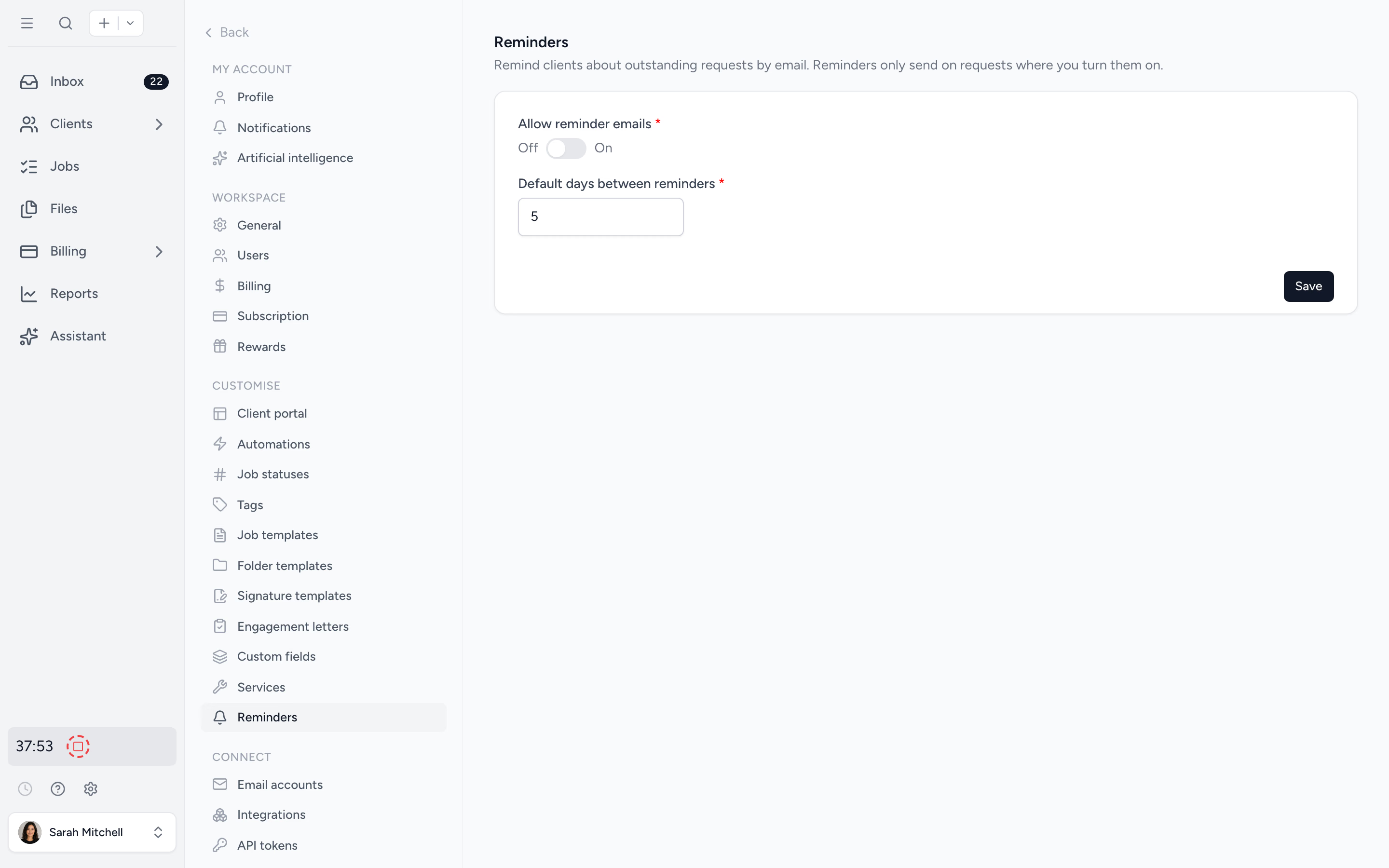
The reminders the team actually needs.
Configure how often staff get nudged about overdue work, when assignees get notified about new jobs, and how clients hear from you. The defaults are sensible. The controls are yours. No more "I never got an email about that."
- ✓ Per-firm reminder schedules for clients and staff
- ✓ In-app inbox for every new assignment, mention, and update
- ✓ Email notifications so nothing waits for the next login
From scattered deadlines to a calm pipeline in four steps.
- 1
Import your clients
Pull from Xero, QuickBooks Online, or an Excel file. Five minutes, not five days.
- 2
Build job templates
One template per service type (monthly bookkeeping, year-end, tax returns). Set the cadence, subtask stages, and assignees once; they carry through every repeat.
- 3
Turn on reminders
Configure client request schedules and staff notifications. Sensible defaults, fully customisable.
- 4
Work the board
The team picks from the pipeline. You watch capacity. Deadlines stop being a surprise.
What changes when deadlines stop being a fire drill.
Without Tidyflow
- ×"Did anyone file the return for ABC Corp?"
- ×Spreadsheet planner that nobody opens after week two
- ×Partner chases clients personally for missing docs
- ×Senior burns out in March, partner finds out in April
- ×Recurring jobs forgotten until the deadline arrives
With Tidyflow
- ✓Every job on a single board with an owner and a date
- ✓Capacity Planning shows the workload weeks out
- ✓Auto-reminders chase clients on your schedule
- ✓Overdue work surfaces at the top, every morning
- ✓Recurring jobs roll forward automatically
Trusted by accounting firms who used to live in a calendar app.
"Overall, everything just works, whether that be time recording, deadline management, monitoring WIP, billing … client portal, digital signatures, and many other features that a small accounting or bookkeeping practice needs."
"Tidyflow is easy to use, and has a simple, modern UI. Their customer support is amazing; anytime we need something fixed or even added, it is actioned within 24 hours."
"Great for team collaboration, accountability, keeping track of information and ensuring nothing falls through the cracks."
"The user-friendly interface and solid features have become essential in streamlining our accounting firm's operations, ensuring consistent and reliable service delivery."


Built so nothing falls between the cracks.
Plan
- Job templates per service
- Recurring schedules
- Subtask stages and checklists
- Time and hour estimates
Track
- Kanban job board
- Filterable job list
- Custom statuses
- Overdue surfacing
- Recurrence filter and export
- Per-client job view
Chase
- Auto-reminders for clients
- Staff notifications and inbox
- Email notifications
- Capacity Planning (Pro)
From $29/user/month, billed annually.
Job board, recurring jobs, and auto-reminders on every plan. Capacity Planning is on Pro.
Deadline questions firms ask us most.
Set a job to repeat on any cadence (weekly, monthly, quarterly, annually, or specific months of the year) and Tidyflow generates the next instance automatically with a fresh due date. You also choose when the next instance is created: when the job completes, when it goes overdue, or a set number of days before it is due. Tax returns, monthly bookkeeping, and payroll all roll forward without you ticking a box.
Yes. The job board and job list both pull every job across every client into one view. Filter by assignee, due date, status, service type, or recurrence to surface this week, this month, or just yours. A recurrence column and export make it easy to audit that every recurring engagement is actually scheduled.
Yes. Client requests send automated email reminders on the schedule you set, listing the items still missing. Reminders pause while your team reviews a reply, and after ten unanswered rounds they stop and your team is notified to take over. The request closes itself once everything is in.
On the Pro plan, Capacity Planning projects every assigned and recurring job forward into weekly buckets per team member. You see the wave coming weeks out, not the morning it lands. More on capacity planning →
Yes. You can set internal due dates on jobs.
Make missed deadlines a story you used to tell.
Start free for 14 days. No credit card. Your job board is ready in under ten minutes.
Explore more features
Artificial Intelligence
An assistant, agent teammates, and MCP connectors on your firm's live data.
Billing & Payments
Invoice from tracked time or fixed fees, and get paid online.
Capacity Planning
See your team's workload before it hits.
Client management
Every client, contact, and detail in one organized place.
Client portal & requests
Clients upload, answer, and approve in one portal. Reminders chase for you.
Collaboration
Comments, mentions, and shared visibility on every job.
Document management
Secure, organized document storage, shared with your clients.
Electronic signatures
Legally binding e-signatures, included at no extra cost.
Email Management
A shared firm inbox, connected to your clients and jobs.
Integrations
Xero, QuickBooks Online, Zapier, Make, and a public API.
Proposals & Engagement Letters
Branded proposals and engagement letters, signed online.
Reporting & Insights
See where your time, billing, and revenue actually go.
Tax organizers
Digital organizers with conditional questions and last year's answers.
Time tracking
Timers and timesheets that flow straight into billing.
Workflow management
Recurring jobs, templates, and deadlines your team can't miss.