
Plan forward. Stop reacting to bottlenecks.
See workload by team member by week, before deadlines hit. Spot the bottleneck three weeks out and reassign. Built from job estimates and assignees you're already tracking, not a separate plan to maintain.
Forecast the next quarter
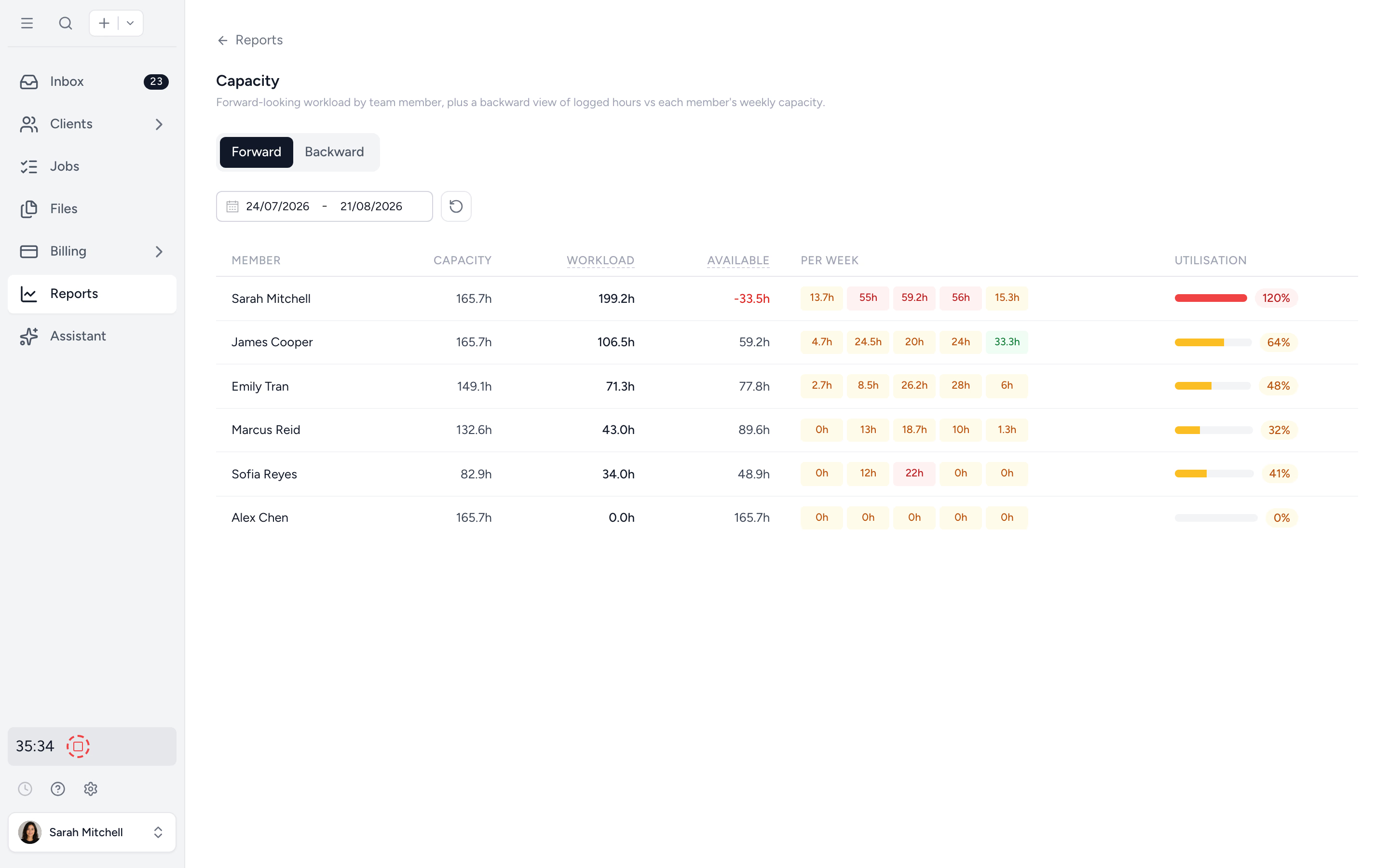
Workload by team member, broken into weekly buckets. See who's overcommitted before the deadline lands, and who has room for more.
Look back to plan better
Backward view of logged hours vs capacity. Utilisation trends and sparklines flag who's consistently overrun or underused.
Drill into one person
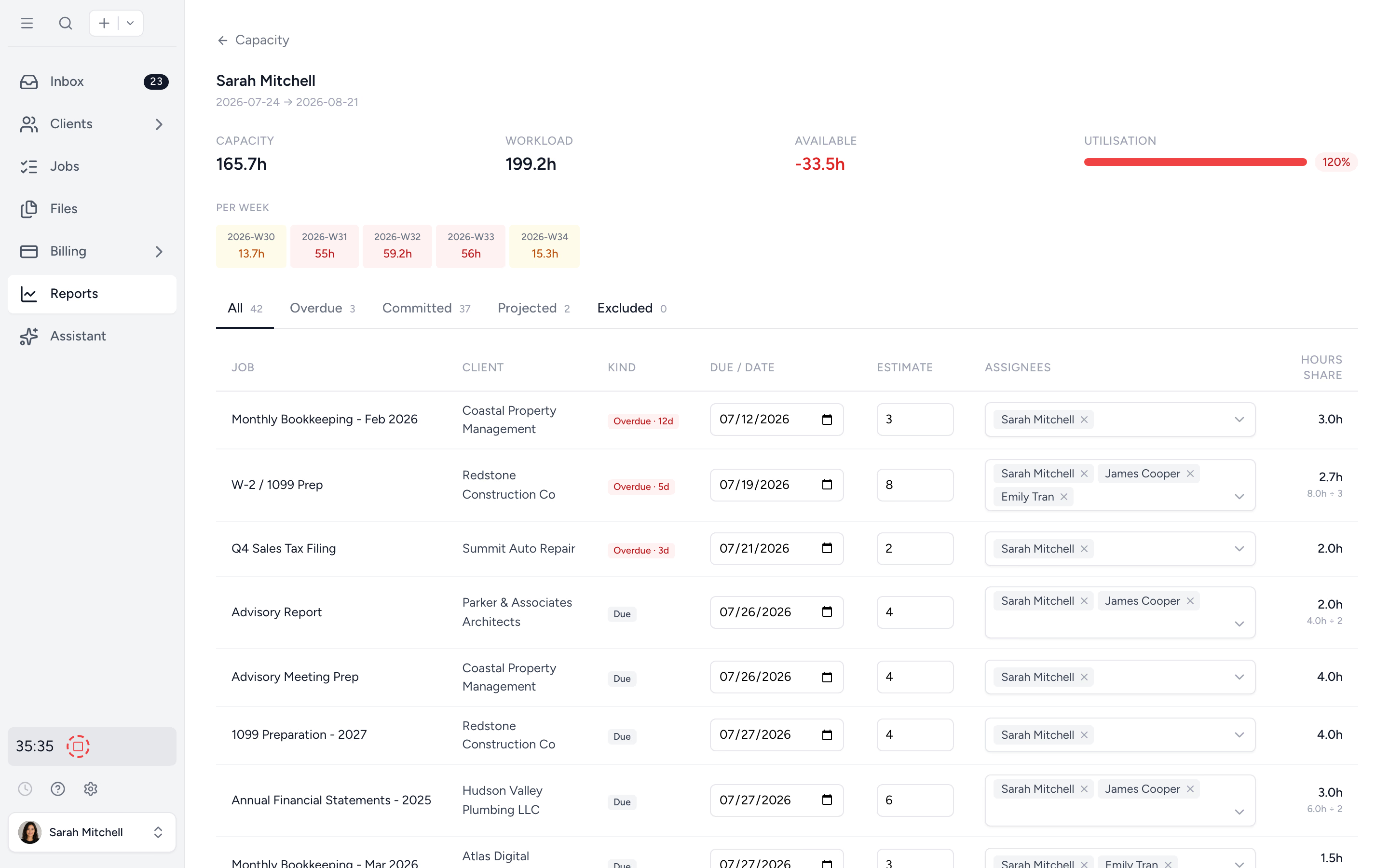
Click any team member to see every job they're committed to: overdue, committed, projected, excluded. Numbers stay honest.
Know who has bandwidth before you commit a deadline.
Pick the period (next month, next quarter, tax season) and see workload spread across your team in weekly buckets. Drag a bottleneck off one staffer and onto another. Plan with hours, not gut feel.
- ✓ Workload by team member across any period
- ✓ Weekly buckets so you know exactly when load lands
- ✓ Hour shares split proportionally on multi-assignee jobs
- ✓ Recurring jobs projected on their schedule
Spot who's been quietly overrun for months.
Logged hours vs capacity for any period. Average utilisation per member with trend sparklines. Find the senior who's been at 130% for a quarter and make the hiring case with real data.
- ✓ Logged vs capacity for any selected period
- ✓ Trend sparklines per team member
- ✓ Find the patterns spreadsheets hide
Click into anyone. See every job on their plate.
Open a team member to see every job assigned: overdue, committed, projected, excluded. Hour shares are calculated automatically when a job has multiple assignees, so the numbers reflect reality, not optimism.
- ✓ Per-member job list with status buckets
- ✓ Multi-assignee hour shares calculated automatically
- ✓ Filter to overdue or projected only
Tax season won't sneak up on you.
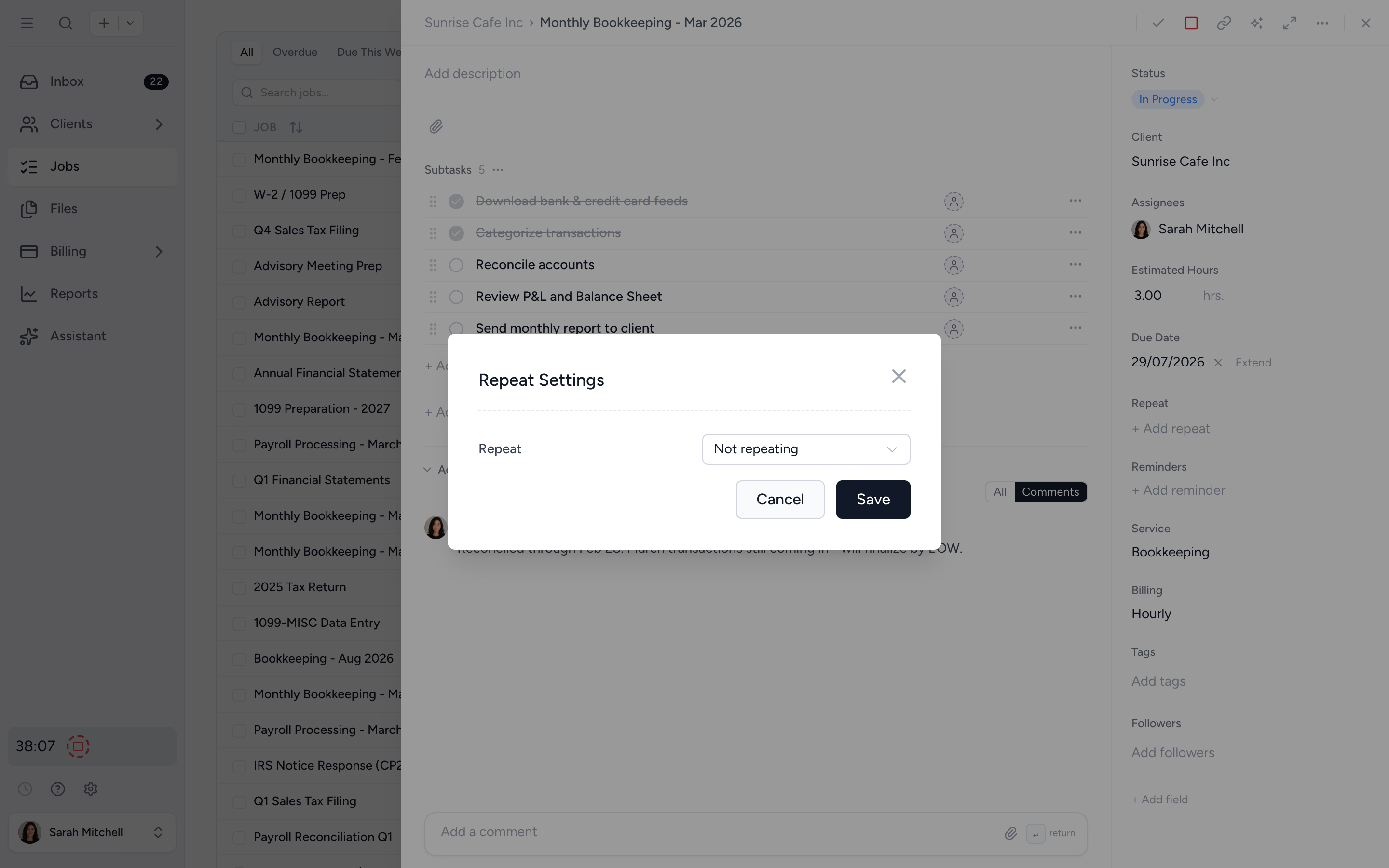
Repeating jobs are projected forward based on the cadence you set. Monthly bookkeeping in March, May, July is already on the chart. So is the quarterly BAS run and the annual return. Plan against the work that's actually coming.
- ✓ Daily, weekly, monthly, quarterly, annual cadences
- ✓ Recurring estimates roll forward automatically
- ✓ Forecast informed by your real workflow rhythm
From job estimates to a real plan in four steps.
- 1
Set weekly capacity
Configure each team member's hours: full-time, part-time, or contractor.
- 2
Estimate your jobs
Add hours to tasks and subtasks. They roll up automatically.
- 3
Open the report
Forward view shows the next quarter. Backward view shows the last one.
- 4
Reassign before it bites
Drag work between staff. Capacity updates instantly.
What changes when capacity is a live view.
Without Tidyflow
- ×Spreadsheet planner that nobody opens after week two
- ×"How busy is March?" gets a shrug
- ×Senior burns out, partner finds out at exit interview
- ×Recurring jobs forgotten until the deadline arrives
With Tidyflow
- ✓Live capacity view drawn from real jobs
- ✓Forecast next quarter, backward-check last quarter
- ✓Spot overruns before they become resignations
- ✓Recurring jobs projected automatically
Trusted by accounting firms planning for tax season, every season.
"Overall, everything just works, whether that be time recording, deadline management, monitoring WIP, billing … client portal, digital signatures, and many other features that a small accounting or bookkeeping practice needs."
"Great for team collaboration, accountability, keeping track of information and ensuring nothing falls through the cracks."
"Tidyflow is easy to use, and has a simple, modern UI. Their customer support is amazing."
"The user-friendly interface and solid features have become essential in streamlining our accounting firm's operations, ensuring consistent and reliable service delivery."


Built for the rhythm of an accounting firm.
Forecast
- Forward-looking workload
- Weekly bucketed view
- Recurring jobs projected
- Multi-assignee hour shares
Reflect
- Backward utilisation report
- Trend sparklines per member
- Logged vs capacity
- Configurable team capacity
Drill
- Per-member job list
- Status buckets (overdue, committed, projected)
- Subtask estimates roll up
- Excel export
Pro plan: $55/user/month, billed annually.
Capacity Planning is included on the Pro plan. No setup fees, no minimums.
Capacity planning questions firms ask us most.
Workload is calculated from job estimates, due dates, and assignees. When a job has multiple assignees, estimated hours are split proportionally across the team. Recurring jobs are projected forward based on their schedule.
Yes. Estimate time at the task or subtask level and totals roll up automatically.
Yes. Capacity Planning projects recurring jobs forward based on their schedule, so the workload reflects the work actually coming.
Yes. Each team member's weekly capacity can be configured to match their actual hours: full-time, part-time, or contractor.
Capacity Planning is included on the Pro plan. See the pricing page for full details.
Yes. The backward view compares logged hours to capacity for any period, with utilisation trends per member. Spot patterns before they become a hiring decision.
Plan your firm's capacity, not its overtime.
Start free for 14 days. No credit card. See your team's workload from week one.
Explore more features
Workflow management
Recurring jobs, templates, and deadlines your team can't miss.
Client management
Every client, contact, and detail in one organized place.
Proposals & Engagement Letters
Branded proposals and engagement letters, signed online.
Billing & Payments
Invoice from tracked time or fixed fees, and get paid online.
Time tracking
Timers and timesheets that flow straight into billing.
Document management
Secure, organized document storage, shared with your clients.
Client portal & requests
Clients upload, answer, and approve in one portal. Reminders chase for you.
Tax organizers
Digital organizers with conditional questions and last year's answers.
Email Management
A shared firm inbox, connected to your clients and jobs.
Artificial Intelligence
An assistant, agent teammates, and MCP connectors on your firm's live data.
Reporting & Insights
See where your time, billing, and revenue actually go.
Integrations
Xero, QuickBooks Online, Zapier, Make, and a public API.
Electronic signatures
Legally binding e-signatures, included at no extra cost.
Collaboration
Comments, mentions, and shared visibility on every job.
See the full feature list →
Compare every capability across plans, side by side.