The best Drake alternative depends on why you want to leave. Compare TaxAct for a lower desktop license price, ProSeries for a different forms-based preparation experience, ProConnect for browser access and QBO-connected work, and Lacerte or UltraTax CS for demanding entity and review workflows.
First check whether a different Drake package or its own workflow tools solve the problem. A new engine is a substantial change if the real frustration is a growing pay-per-return bill or an unclear list of outstanding documents.
Choose an alternative by the problem
| Your reason for reconsidering Drake | First alternative to evaluate | What should improve enough to justify switching |
|---|---|---|
| Lower desktop license cost | TaxAct Professional | Savings after conversion and training |
| Preference for preparing directly on forms | ProSeries Professional | Entry and review time on familiar return types |
| Browser preparation with QBO clients | ProConnect | Remote access and the books-to-tax process |
| Specialist forms or difficult reviews | Lacerte | Coverage and reviewer productivity |
| Related entities and substantial multistate work | UltraTax CS | Transfers, allocations and review across the client group |
| Missing documents or unclear job ownership | Drake Workflow, or a separate firm workflow | Less chasing and clearer handoffs without changing the engine |
This is a research-based shortlist checked September 10, 2026, not a claim that we have run these products side by side in a tax practice. Tidyflow publishes the guide and sells client and job management software. Its role alongside Drake is explained below.
If Drake handles the returns but your team still runs intake through email and spreadsheets, there is another option: keep Drake and use Tidyflow for the client work around it.
First check whether you have outgrown pay-per-return
Drake’s current desktop pay-per-return offer costs $379.99, includes ten individual returns, and charges $49.99 for each additional individual return. The displayed 150-individual-return package costs $1,895. See Drake’s pricing.
For an individual-only practice, the arithmetic is revealing:
| Individual returns | Pay-per-return calculation | Total |
|---|---|---|
| 40 | $379.99 + 30 × $49.99 | $1,879.69 |
| 41 | $379.99 + 31 × $49.99 | $1,929.68 |
| 60 | $379.99 + 50 × $49.99 | $2,879.49 |
At the displayed prices, the 150-return package becomes cheaper at the 41st individual return. For 60 returns, the difference is $984.49. This example excludes business returns, optional services and taxes, and does not assume any credit for upgrading an existing purchase. It compares purchases at the September 10 snapshot; Drake identifies December 1 as the effective date for its displayed retail prices.
The first action for a growing solo practice should therefore be a package calculation. You may be paying for flexibility you no longer need.
For a mixed practice, count business returns separately: the current individual-focused packages charge $74.99 per business return. Compare that combined bill with Pro Unlimited before seeking a replacement solely to lower costs.
TaxAct Professional: start here for a lower desktop price
TaxAct’s current Complete bundle is $2,095 for a single user or $2,495 for multiple users, with unlimited supported individual and business returns. Its published range covers common individual, corporate, partnership, fiduciary and exempt-organization work. See TaxAct Professional pricing.
This makes it a relevant alternative for a firm whose main objection is the annual software bill. The case is strongest when the practice has stable volumes and routine coverage needs, and the team can confirm that preparation and review remain efficient.
Do not switch for a headline saving without measuring the transition. Record how long it takes to reconstruct a representative client, reconcile opening balances and get the reviewer comfortable with the new output. Multiply that effort across the clients with similar complexity. Even modest additional staff time can absorb a few hundred dollars of license savings.
Also distinguish document storage from preparation access. A product mentioning cloud storage does not, by itself, establish that you can prepare entirely in a browser. If that is your requirement, evaluate it directly rather than assuming a desktop price comparison addresses it.
ProSeries: evaluate the forms-based workflow
ProSeries Professional is worth trying when you want to work from the tax form to supporting worksheets, with QuickZoom and a client list in HomeBase. The relevant question is whether your preparers and reviewers can find and explain figures more easily than in their current process. See the Professional product details.
Use Professional for a mixed-return comparison. Basic’s individual-return packages are a different purchasing decision. Network access is also a separate consideration for a team that needs simultaneous users.
A useful trial starts with a routine individual return and ends with a reviewer tracing a changed figure on a more involved business return. Count interruptions, missing inputs and review questions. Familiar-looking forms are an advantage only if they make that complete process easier.
If remote access is part of the reason for leaving Drake, price ProSeries hosting as well. Our ProSeries vs ProConnect guide shows how the hosting assumption changes a 50-return comparison.
ProConnect: evaluate browser access and the QBO connection
ProConnect is a candidate for a distributed team that wants to prepare in a browser. For QBO clients, Intuit documents reviewing the books, mapping accounts and starting the return from QuickBooks Online Accountant.
That is a concrete reason to compare it with a desktop workflow: fewer separate access and transfer steps may be valuable across a large enough QBO client base. Test a year-end adjustment and verify the resulting tax inputs, not just the initial connection.
Drake’s own online product should be in the same evaluation. Its published documentation says the Windows desktop mode is required for 1120, 1041, 990 and 706 preparation in tax year 2025. The page does not establish that those exact restrictions apply to tax year 2026. Have the required year’s entity workflow demonstrated on the Mac or Windows setup your team will actually use.
ProConnect’s return mix and licensing are different from an unlimited Drake desktop purchase. Get a total containing all individual and business returns and the staff roles that need paid access. Changing the access model can justify a higher software bill, but the benefit should be explicit.
Lacerte: evaluate specialist coverage and review effort
Lacerte deserves a trial when your difficult returns are consuming disproportionate staff time. Intuit positions it around complex preparation and publishes a broader specialist module range, including estate-tax and employee-benefit filings. See Lacerte’s product overview.
Avoid assuming that Drake cannot handle a category simply because a client has become more complicated. Identify the exact missing form, repeated override or review problem in the current system. Then require the proposed replacement to handle it in the trial.
The economic case is more likely to come from staff time and required coverage than the entry license. Compare a Lacerte volume package against your complete Drake bill; a low pay-per-return license price leaves the actual return charges outside the headline.
For a firm choosing between specialist desktop preparation and browser convenience, see Lacerte vs ProConnect.
UltraTax CS: evaluate the whole group of related returns
UltraTax is a particularly relevant candidate when partnerships and S corporations feed many owner returns, with state allocation work across the group. Its support documentation describes pass-through data sharing and state allocation spreadsheets.
Do not frame this as “Drake has no K-1 transfer.” Drake documents exporting pass-through K-1 data to individual returns. The comparison is how each product handles your complete sequence of changes, transfers, exceptions and review.
Take one entity and two owners through the process. Change an entity input after an owner’s draft is complete, then trace the revised data and remaining review work. That is where a more expensive configuration needs to demonstrate value. Our Lacerte vs UltraTax comparison provides a fuller client-group trial.
When keeping Drake is the better decision
Keep Drake on the shortlist if it supports your actual forms, the team knows its review tools and changing package resolves the cost problem. A familiar system that produces dependable work has value even if another product looks more modern in a demonstration.
For workflow problems, Drake offers a native option: Drake Workflow advertises status updates driven by activity across Drake tools, assignment by status and a $299.99 annual subscription. That connection is a meaningful advantage for a Drake-centered tax process.
Keep Drake and get the client chasing off your desk
If Drake prepares your returns well, you can improve the process around it without converting your tax files. Use Tidyflow to collect the organizer, follow up on missing documents and give each tax job an owner and a next step.
Start with a ready-made tax job and organizer template. Templates cover 1040, 1120-S, 1065, 1120 and 1041. Clients answer and upload together; unfinished documents can be marked for later and remain in reminders. Returning clients can reuse answers from their previous completed Tidyflow organizer, and completed responses export to PDF for your workpapers.
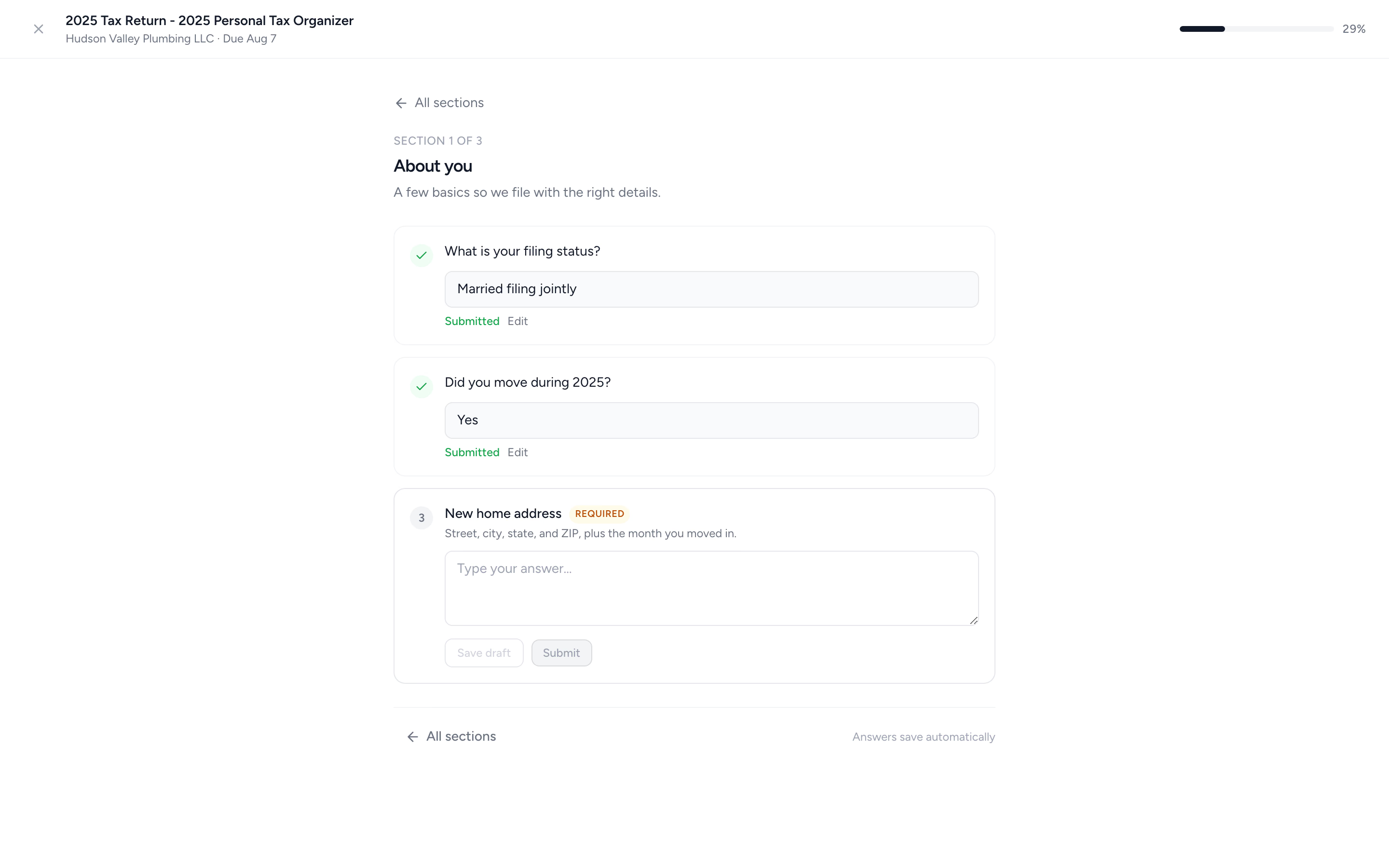
The job carries preparation and review tasks, due dates and the client correspondence. Engagement letters establish the work and fee; time tracking and billing help you invoice it. Pro adds document approvals, signatures within requests and payment requirements for linked invoices when online payments are connected. You can use the same client record for recurring bookkeeping and other services too.
Drake Workflow’s native return-status updates are a reason to choose it for a Drake-centered process. Tidyflow’s case is connecting client requests, team work and billing across your services. Your team maintains the handoff: Tidyflow does not import Drake tax data, update jobs from Drake preparation activity or e-file returns. Configurable conditional questions and document approvals require Pro, and Tidyflow does not provide KBA.
Start with one Drake client and one Tidyflow job. Send the organizer, follow the missing items and use the PDF in your existing preparation process. You can assess that workflow before changing the firm’s tax software. See Tidyflow’s plans for the capabilities and staff seats you need.
Try Tidyflow
Try Tidyflow alongside Drake with one client.
Send a ready-made organizer and follow the job through preparation and review. No tax-file conversion needed for this trial.
Before switching: check the actual conversion path
Conversion coverage is specific to the source and destination. For example, Intuit’s ProConnect matrix lists four Drake source modules: 1040, 1065, 1120 and 1120-S. It excludes state information and does not list Drake 1041 conversion.
Build a migration list around your own clients: which modules convert, which opening figures need reconciliation and which clients need manual rebuilding. Retain historical returns, acknowledgments and workpapers independently of the new program. A successful file upload is the start of that review.
The switch is justified when the new product solves an identified problem and its recurring benefit exceeds the cost of software, training and migration. If the reason is still “Drake feels limiting,” turn that into one reproducible return or workflow problem before choosing a replacement.
See the full US tax software comparison for the wider shortlist, including CCH Axcess Tax.