Try Tidyflow
Get your firm organized.
Watch a 4-minute demo, or start a free trial. No credit card required.
Short answer: yes. In the US, an electronic signature is as legally binding as a handwritten one for almost every document an accounting firm sends, from engagement letters to proposals to client consents. The longer answer matters for tax firms, because a few documents, most importantly the IRS e-file authorizations on Form 8879 and Form 8878, come with extra identity verification rules that a basic e-signature tool does not meet.
This guide covers the legal basis, what makes an e-signature hold up, which accounting documents you can e-sign, where to be careful, and what to keep on file.
This article is general information for accounting firms, not legal advice. For a specific document or dispute, talk to an attorney in your state.
The legal basis: the ESIGN Act and UETA
Two laws make electronic signatures binding in the US.
The ESIGN Act (2000). The federal Electronic Signatures in Global and National Commerce Act says that for transactions in or affecting interstate commerce, a signature, contract or other record may not be denied legal effect solely because it is in electronic form. It defines an electronic signature broadly: an electronic sound, symbol or process attached to or logically associated with a record and adopted by a person with the intent to sign. A typed name, a drawn signature, a click-to-sign button and a PIN can all qualify.
The Uniform Electronic Transactions Act (UETA). UETA is a 1999 model law from the Uniform Law Commission that almost every state has adopted, giving electronic records and signatures the same standing under state law. New York did not adopt UETA and relies on its own Electronic Signatures and Records Act instead. UETA applies only where the parties have agreed to conduct the transaction electronically, and that agreement can be shown by the context and the parties’ conduct.
For an accounting firm, the practical effect is simple. An engagement letter your client signs electronically is as enforceable as one they sign in ink, provided the signing process does a few things well.
What makes an e-signature valid
Courts and the statutes look at the same handful of elements. A signing process that covers all four is defensible.
- Intent to sign. The signer must mean to sign. A clear “Sign” action, placed next to the signature field on the actual document, shows intent better than an ambiguous checkbox buried in a form.
- Consent to do business electronically. Under UETA, the parties must agree to transact electronically. Where a law requires information to be given to a consumer in writing, ESIGN goes further: the consumer must affirmatively consent after being told they can have paper, how to withdraw consent, and what hardware or software they need. Asking every signer to accept an electronic records and signatures disclosure before they sign covers both.
- Association with the record. The signature has to be attached to, or logically associated with, the document being signed. Signing on the PDF itself, then locking it, is far stronger than collecting a signature on a separate page and stapling it on later.
- A record you can keep and reproduce. ESIGN lets electronic records satisfy retention rules only if they accurately reflect the signed document, stay accessible to the people entitled to them, and can be accurately reproduced for later reference. A signed PDF stored with its audit trail does this; a signature buried in an email thread does not.
The fifth element is not in the statute but decides most disputes: attribution. If a client later says “I never signed that,” you need evidence of who signed. That is what an audit trail is for.
What accounting documents can be e-signed
Most of what a tax and bookkeeping firm sends for signature is an ordinary business record, and an e-signature with consent and an audit trail is enough.
| Document | Can it be e-signed? | Notes |
|---|---|---|
| Engagement letters | Yes | Standard practice. Send them on their own or as part of a proposal and engagement letter workflow. |
| Proposals and fee agreements | Yes | Same rules as any contract. |
| Client consents and acknowledgements | Yes | Check any form-specific rules first, for example IRS forms with their own signature instructions. |
| Management representation letters | Yes | Keep the signed copy with the workpapers for the engagement. |
| Form 8879 and Form 8878 (IRS e-file signature authorizations) | Yes, with IRS identity verification | See the next section. A basic e-signature is not enough for a remote signature. |
| Other IRS and state forms | It depends | Each form’s instructions set its own rules. Check before you send. |
If you need a starting point, use the free tax preparation engagement letter template.
Form 8879: the IRS rules for electronic signatures
Form 8879 authorizes your firm, as the electronic return originator (ERO), to enter the taxpayer’s PIN and e-file the return. Form 8878 does the same for an extension when the taxpayer authorizes an electronic funds withdrawal. The IRS lets taxpayers sign both electronically, but only through a process that meets the requirements in Publication 1345 (Rev. 12-2025) and the IRS e-file signature authorization FAQs.
Acceptable signature methods. No specific technology is required. A drawn signature, a typed name, a PIN or password, a digital signature or a digitized image of a handwritten signature all qualify.
Identity verification. This is where tax e-signatures differ from an engagement letter.
- Remote signing (you are not physically with the taxpayer): you must record the taxpayer’s name, SSN, address and date of birth, and verify them against records from an agency, a credit bureau or a similar database. In practice, tax software does this with knowledge-based authentication (KBA) questions generated from the taxpayer’s credit file. The process must meet NIST Special Publication 800-63 Level 2 with KBA, or a higher assurance level.
- In-person signing (the taxpayer signs electronically in your office): you must inspect a valid government photo ID, compare it to the taxpayer and record their name, SSN, address and date of birth. You can skip this if you have a multi-year relationship with the taxpayer and verified their identity this way in a prior year.
- Failed KBA: if the taxpayer fails the KBA questions after three attempts, you must get a handwritten signature.
- Joint returns: each taxpayer must be identified and authenticated separately.
What the signing system must record. A digital image of the signed form, the date and time of signature, the taxpayer’s IP address and login username (for remote signing), the identity verification result, and the signing method or an audit trail showing the signer completed the process. You must give this to the IRS on request.
Tamper-proof storage. Once signed, the record must be locked against changes, held in storage with secure access control, and retrievable as a legible hard copy.
Retention. Keep Forms 8878 and 8879 for three years from the return due date or the date the IRS received the return, whichever is later. Do not send them to the IRS unless the IRS asks.
The handwritten route. Publication 1345 notes that a remote e-signature does not include a handwritten signature on the form returned by hand delivery, mail, fax, email or an internet website. So a client who prints the 8879, signs it in ink and uploads a scan through your portal has given a handwritten signature, and the KBA rules for remote e-signatures do not apply.
In practice, firms usually take one of three routes for the 8879: the IRS-compliant e-signature tool inside their tax software, a dedicated tax e-signature service with KBA, or a hand-signed copy returned through the client portal.
What cannot be e-signed, or needs care
ESIGN does not apply to a short list of records, including:
- Wills, codicils and testamentary trusts
- Adoption, divorce and other family law matters
- Most of the Uniform Commercial Code (sales and leases of goods under Articles 2 and 2A are still covered)
- Court orders, notices and pleadings
- Certain consumer notices, such as utility shutoffs, default, foreclosure and eviction notices on a primary residence, health or life insurance cancellations, and product recalls
A few other situations need care in an accounting firm:
- Notarized or witnessed documents. Electronic and remote notarization rules are set by each state.
- Government forms. IRS and state agencies decide what they accept and how. Read the form instructions rather than assuming an e-signature is fine.
- Third parties’ own policies. A bank, lender or landlord can refuse electronic documents even where the law would allow them.
Why the audit trail matters
The audit trail is what turns a signature into evidence. When a client disputes an engagement letter’s fee terms, or the IRS asks for your 8879 records, the questions are the same: who signed, when, from where, and was the document changed afterward?
A defensible audit trail records:
- When the document was sent, and to whom
- When each signer viewed the document and accepted the electronic records disclosure
- When each signer signed, with their name, email and IP address
- When the document was completed and locked
Keep it attached to the signed document. An audit trail stored separately is easy to lose, and an auditor or opposing counsel will want to see both together.
A note for Australian, Canadian and New Zealand firms
The same principles apply outside the US, under different statutes: the Electronic Transactions Act 1999 (Cth) and matching state and territory acts in Australia, Part 2 of PIPEDA and provincial electronic commerce acts in Canada, and Part 4 of the Contract and Commercial Law Act 2017 in New Zealand. Exclusions and tax authority rules differ, so check local requirements for tax lodgment declarations and anything that needs witnessing.
How Tidyflow handles electronic signatures
Tidyflow includes electronic signatures on every plan, built for the documents firms sign most: engagement letters, consents, authorizations and approvals. Here is how it lines up with the elements above.
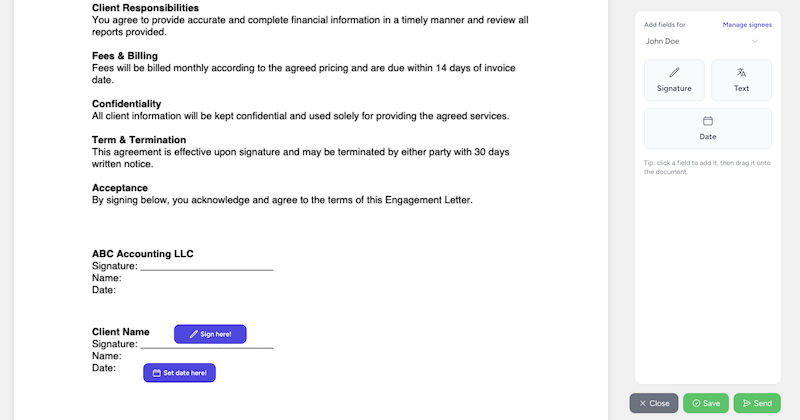
- Signed on your own PDF. Upload the document, or open one already in the client’s folder, and drag signature, initials, date and text fields onto the page. The signature sits on the document it belongs to.
- Consent before signing. Every signer must agree to use electronic records and signatures before they can sign, and that consent is recorded in the audit trail.
- No account needed. Signers open a secure link from their email and sign in the browser. That matters for the client who still prints everything.
- An optional access code per signer. Set a code and share it separately, by phone or text, so a forwarded email alone is not enough to open the document.
- Audit trail and Certificate of Completion. Sent, consent, signed and completed events are recorded with timestamps, signer details and IP addresses. A Certificate of Completion with the full audit trail is added to the signed PDF.
- Locked and filed. Once everyone has signed, the document is locked, emailed to every signer and to the sender, and saved back to the client’s folder.
- Multiple signers. Spouses, partners and trustees each get their own link and fields, in parallel or in a set order.
What Tidyflow does not do is knowledge-based authentication. For a remote e-signature on Form 8879, use your tax software’s IRS e-signature tool, or have the client sign the 8879 by hand and upload it to a client request so the signed copy lands on the return’s job. With the request route, reminders go out on your schedule until the signed copy arrives, so nobody has to chase it by email.
If you are comparing tools for tax-specific signing, the SafeSend alternatives and DocuSign alternatives guides cover which ones offer KBA.
Frequently asked questions
Are electronic signatures legally binding in the US?
Yes. The federal ESIGN Act (2000) says a signature, contract or record cannot be denied legal effect just because it is electronic, and almost every state has adopted UETA, which says the same for state law. A valid e-signature still needs intent to sign, the parties’ agreement to do business electronically, a signature tied to the record being signed, and a record that can be kept and accurately reproduced.
Can accountants use electronic signatures on engagement letters?
Yes. An engagement letter is an ordinary business contract, so an e-signature backed by consent to sign electronically and an audit trail is enough. Many firms now send engagement letters and proposals for e-signature as standard.
Can a client e-sign Form 8879?
Yes, if the e-signature process meets the IRS identity verification and record requirements in Publication 1345. For a remote signature, the ERO must record the taxpayer’s name, SSN, address and date of birth and verify them through a record check, which tax software typically does with KBA. If the taxpayer fails KBA three times, you need a handwritten signature. A hand-signed 8879 returned by email, fax or website upload is not a remote e-signature and does not need KBA.
What documents cannot be signed electronically?
The ESIGN Act excludes wills, codicils and testamentary trusts, adoption, divorce and other family law matters, most of the Uniform Commercial Code, court documents, and certain consumer notices such as utility shutoffs, foreclosure and eviction notices. Anything that must be notarized or witnessed also needs care, because state rules apply.
How long do you need to keep a signed Form 8879?
Three years from the return due date or the date the IRS received the return, whichever is later. Do not send it to the IRS unless asked. If it was e-signed, the stored record must be tamper-proof, access controlled and able to produce a legible copy.
Does Tidyflow use knowledge-based authentication?
No. Tidyflow records consent, timestamps, signer details and IP addresses in an audit trail and attaches a Certificate of Completion, and you can add an optional access code for each signer. It does not run KBA, so firms collecting a remote e-signature on Form 8879 use their tax software’s IRS e-signature tool, or collect a hand-signed copy through the client portal.