Try Tidyflow
Get your firm organized.
Watch a 5-minute demo, or start a free trial. No credit card required.
Most of the work that stalls in a firm is not big work. It is one status change, one answer in a comment, one finished draft that needs a human to press send. It sits there because the only person who can clear it is in a client meeting, in a car, or already home for the day.
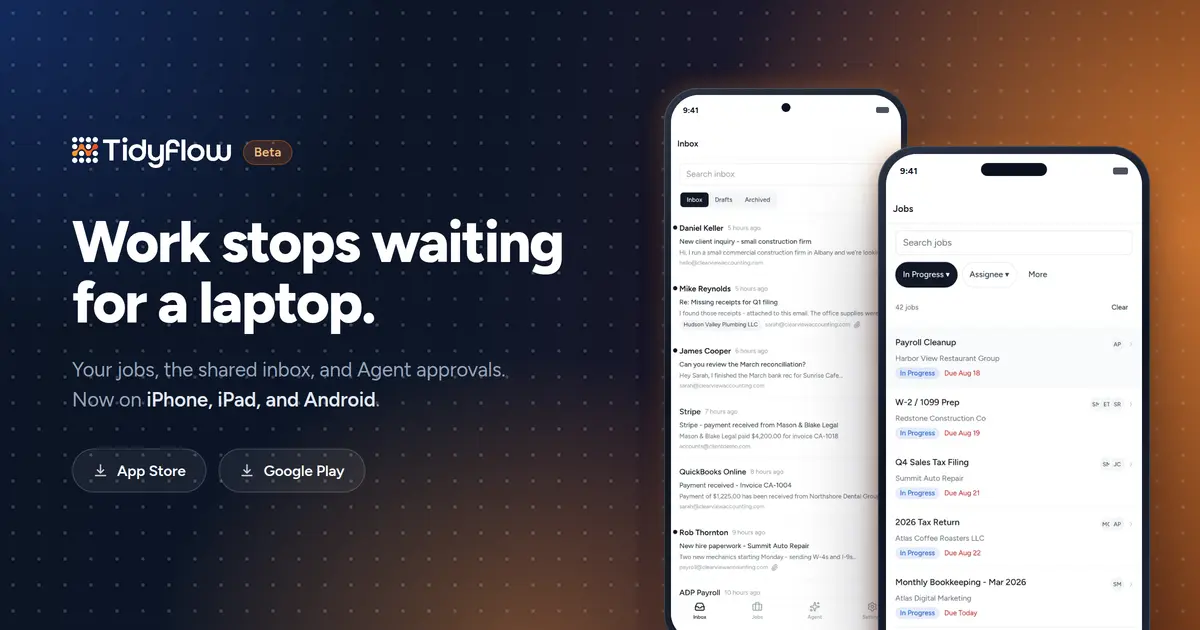
Tidyflow is now on iPhone, iPad, and Android, so that work stops waiting for a laptop. Both apps are live today, and both are free to download.
They are in beta. Everything below works and is safe to use on real client work, but the apps cover a deliberately narrow slice of Tidyflow, and they will change quickly. We would rather ship the part that clears blocked work now than hold it back for a year to match the web app feature for feature.
These are companion apps, not a second product. The app opens on Jobs, with Inbox, Jobs, Agent, and Settings along the bottom, and it uses the same account and workspace as Tidyflow on the web. There is nothing to set up and nothing to sync.
Jobs you can actually move
Open Jobs to see what is in flight. Search the list, or narrow it by status, assignee, client, due date, and tags. Status and Assignee sit as chips above the list, and everything else is one tap away in the filter sheet.
From a job you can change status and assignees, edit the title and description, and see the client, dates, tags, and subtasks. Complete a job with one tap, and if it still has open subtasks, Tidyflow asks whether those should close too. If the job repeats, the next occurrence is created right then, and the confirmation tells you so. Every completion comes with Undo, because thumbs are less precise than a mouse.
Comments live on the job, so the discussion stays attached to the work instead of scattering into a chat app. Reply, mention a teammate, attach a file. You can also create a job straight from the list, which is the difference between capturing something on the walk back to the car and remembering it on Monday.
The shared inbox, and the draft that is waiting on you
The mobile Inbox reads from the same connected accounts as email management on the web. Search conversations, move between Inbox, Drafts, and Archived, open attachments, and swipe to archive a conversation or mark it read. Recently read threads stay cached, so a patchy signal on the train does not leave you with an empty screen.
Sending is deliberately narrow. When Tidyflow Agent prepares an outgoing email it never sends it. It writes a draft and tells you one is waiting for review. Those complete drafts can now be read and sent from your phone, with Send, or Send and close on a reply, and a short undo window for second thoughts. You can delete a draft from the app too.
Writing a new email, or finishing a half-written one, still belongs on the web. The app says so plainly rather than handing you a cramped composer at the wrong moment.
Tidyflow Agent, and the approvals it is waiting on
Agent is the same assistant with the same conversations you have on the web. Pick up a recent thread or start a new one, ask what needs attention today, and read the answer as it streams in.
The part that matters on a phone is the pause. Agent stops for explicit approval before a sensitive change, and it puts up a confirmation card that lists every Job when it wants to apply one edit across a batch. Before today, those cards sat untouched until someone opened a laptop. You can read exactly what Agent is proposing and approve or cancel it from wherever you are. Proposal previews and consent steps arrive the same way.
What is not in the apps yet
These are beta apps, so the list is longer than it will be. Worth stating up front, so nothing catches you out:
- There is no email composer. You can review, send, or delete a complete draft, not write one.
- There are no push notifications in this release.
- There is no separate client app. Clients keep using the client portal in their browser.
- Changing a job or sending a draft needs a connection. Reading cached inbox conversations does not.
Signing in
There is no sign-up inside the apps. Your firm needs an existing Tidyflow account, and you sign in the way you already do on the web: Google, Microsoft, an emailed sign-in link, or your password.
If your firm does not use Tidyflow yet, start on the web with a free 14-day trial and the apps will be there when you want them.
Frequently asked questions
Are the Tidyflow mobile apps finished?
Not yet. Both apps are in beta. They work today and you can use them on real client work, but they cover a deliberately narrow slice of Tidyflow, and improvements are shipping frequently. Tell us what is missing and it goes on the list.
Is the Tidyflow mobile app free?
Yes. Both apps are free to download from the App Store and Google Play, and there is no separate mobile charge on top of your Tidyflow plan. They are companion apps, so you sign in with an existing Tidyflow account.
Do I need a Tidyflow account to use the app?
Yes. There is no sign-up inside the apps. Your firm needs a Tidyflow account first, and you sign in the way you already do on the web with Google, Microsoft, an emailed sign-in link, or your password. New firms can start a 14-day trial on the web.
Can I reply to client email from the app?
Not from scratch. The mobile Inbox is for reading and triage, and for reviewing drafts that are already complete, including drafts Tidyflow Agent prepared for a human to send. Writing a new email or finishing a half-written one stays on the web app.
Do my clients need to download the app?
No. The apps are for your team. Clients keep using the client portal in their browser, with nothing to install.
Does the Tidyflow app work offline?
Partly. Recently read inbox conversations stay cached so a weak signal does not empty the screen. Changing a job, adding a comment, or sending a draft needs a connection.
Does the app send push notifications?
Not yet. The App Store and Google Play apps do not send notifications in this release. For new inbox email on your phone, add the Tidyflow web app to your Home Screen and turn on notifications there; see Choose how Tidyflow notifies you. Other notifications reach you by email and in the web app’s inbox.