Try Tidyflow
Get your firm organized.
Watch a 5-minute demo, or start a free trial. No credit card required.
Accounting workflow software keeps every client job, task, and deadline visible in one place, so nothing slips and you always know what’s happening across the firm. This guide explains what accounting and CPA workflow software actually does, the features that matter, and how to choose the right tool in 2026.
What is accounting workflow software?
Accounting workflow software tracks the work your firm does for clients: the jobs, the tasks inside each job, who owns them, and when they’re due. Instead of a spreadsheet of clients, a shared inbox, and a lot of it’s-in-my-head, you get one live view of every engagement and its status.
For accounting and bookkeeping firms the key difference from a generic to-do app is that the work repeats. Monthly bookkeeping, quarterly filings, annual tax returns, and payroll runs come around on a schedule, for every client. Good workflow software understands recurrence and deadlines as first-class concepts, not something you rebuild by hand each period.
What accounting workflow software should do
When you evaluate options, look for these:
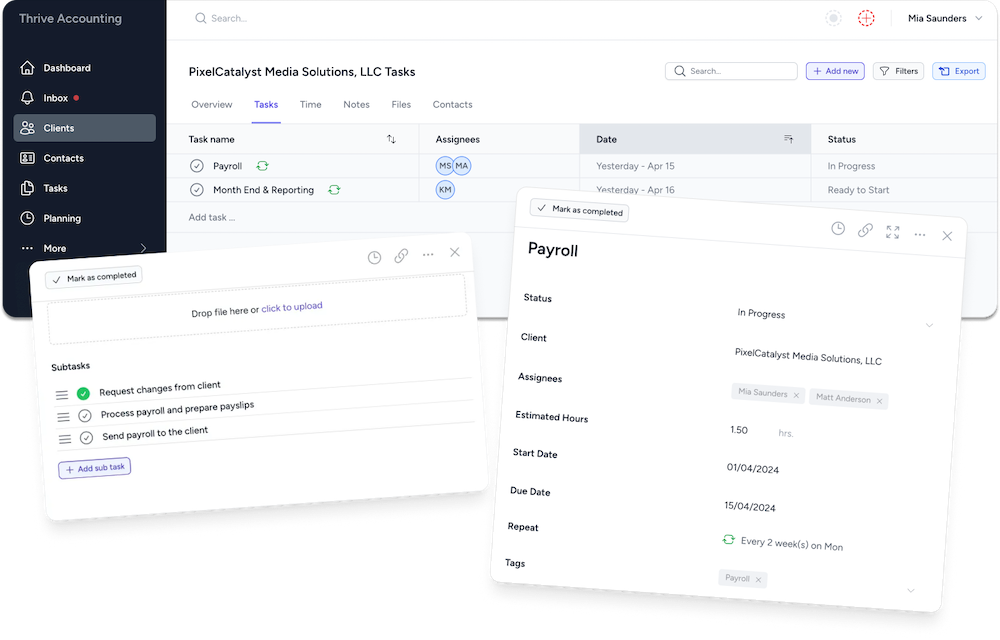
- Recurring jobs and task templates. Set up a job once (say, monthly bookkeeping) and have it regenerate on schedule with every step pre-loaded. This is the single biggest time-saver and the thing generic tools do worst.
- Deadline visibility. A clear view of what’s due this week across the whole firm, with statutory dates you don’t have to remember.
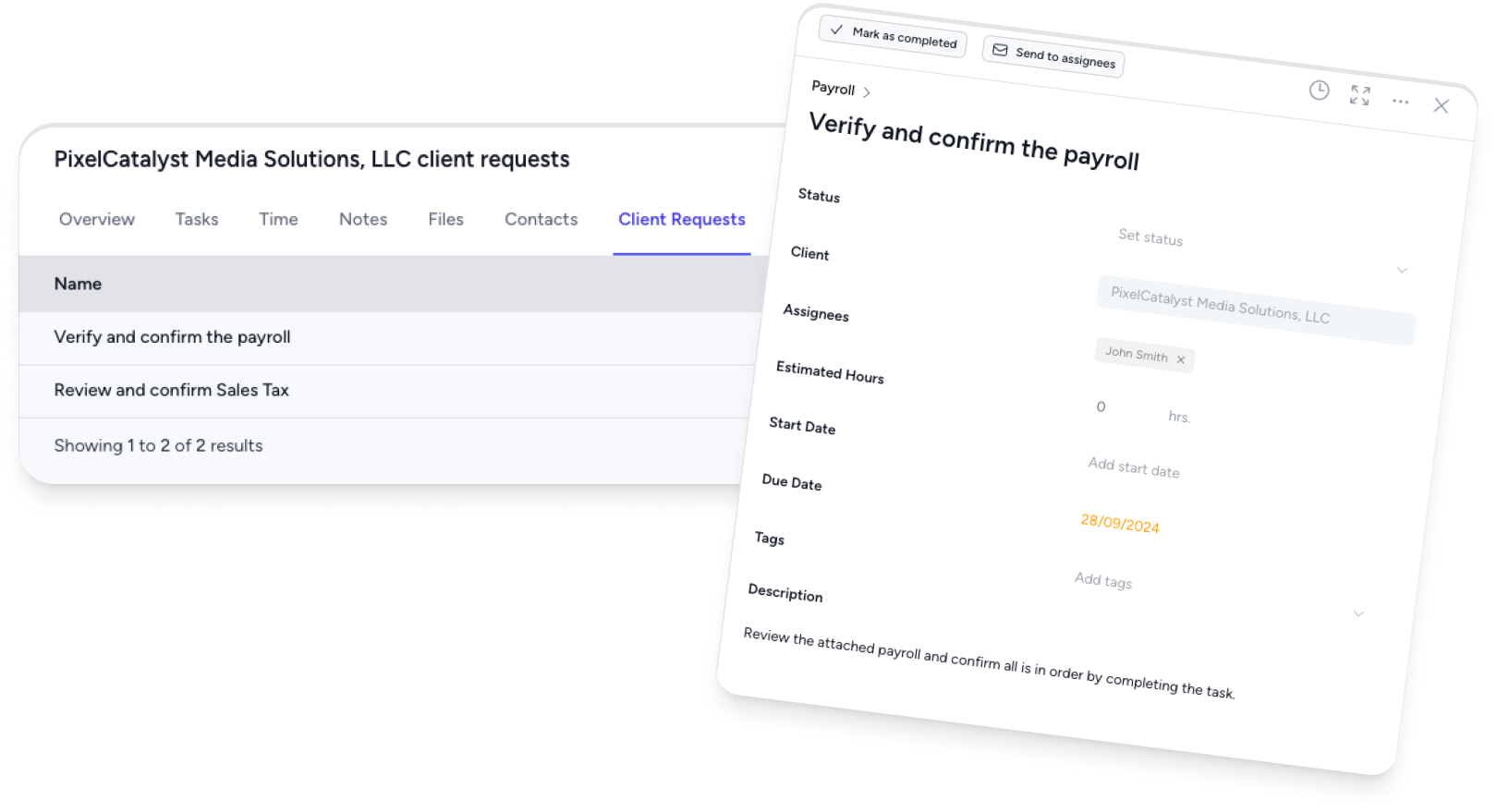
- Client requests and document collection. Chasing documents is where jobs stall. The best tools let clients upload directly and track what’s outstanding automatically.
- Capacity and assignment. See who’s overloaded and who has room before you assign the next job, not after.
- Integrations. A live connection to QuickBooks Online or Xero, plus your email, so the workflow reflects reality instead of drifting out of date.
- A client portal. So the back-and-forth, approvals, and files live with the job rather than scattered across inboxes.
If a tool nails recurring work and deadline visibility, it will solve most of the pain most firms feel. The rest is polish.
CPA workflow software vs generic project management
Plenty of firms start in Asana, Trello, ClickUp, or a spreadsheet. It works until it doesn’t. Generic project tools have no concept of a recurring compliance job, a statutory deadline, a client document request, or firm-wide capacity, so you end up rebuilding those by hand and maintaining them forever.
Accounting-specific workflow software builds those ideas in. That’s why firms comparing options often search for alternatives to generic tools once they’re managing recurring work for more than a handful of clients.
How Tidyflow handles workflow
In Tidyflow, a tax job starts from a reusable template with its checklist, owners, deadlines and client requests. Ready-made US tax organizers collect answers and documents; reminders chase outstanding items and tell the firm when a human needs to take over. Annual repeats and bulk deployment make the same process reusable across clients.
The workflow continues after preparation. On Pro, clients can approve an attached draft or request changes, sign supplied PDFs inside the request and pay an invoice to unlock a gated document. Pro also adds service-specific statuses and capacity planning. Proposals, time tracking and billing connect the work to the agreed fee. Check plan inclusions for the sequence you want to run, and keep calculation and e-filing in your chosen tax software.
It also connects to the adjacent work, so onboarding a new client or automating repetitive steps happens inside the same system rather than across a stack of disconnected apps.
How to choose accounting workflow software
- Start with recurring work. If a tool can’t regenerate your monthly and quarterly jobs automatically, stop there.
- Check deadline visibility. Can you answer “what’s due this week, across the firm?” in one screen?
- Look at document collection. How does the client actually send you things, and how do you track what’s missing?
- Test the integrations you rely on (QBO, Xero, email) with real data, not a demo account.
- Weigh workflow-only vs all-in-one. A standalone workflow tool is simpler; an integrated practice management platform avoids stitching workflow to billing, documents, and the client portal yourself.
Frequently asked questions
What’s the difference between workflow software and practice management software?
Workflow is the core of practice management. Workflow software focuses on jobs, tasks, recurrence, and deadlines; practice management software wraps that together with client records, documents, time and billing, and a client portal. Most firms want them integrated.
Can I run accounting workflows in Asana or Trello?
You can start there, but generic project tools don’t understand accounting work, they have no concept of recurring compliance jobs, statutory deadlines, client document requests, or firm-wide capacity. Firms usually outgrow them quickly.
Do small accounting firms need workflow software?
Once you’re past a handful of clients with recurring work, yes. The point at which a spreadsheet stops being enough usually arrives earlier than firm owners expect.