Try Tidyflow
Get your firm organized.
Watch a 4-minute demo, or start a free trial. No credit card required.
Time and billing software helps accounting firms capture every billable hour and turn it into invoices without re-keying, so the work your team does actually makes it onto a bill. This guide explains what time and billing software does for a firm, the features that matter, and how to choose in 2026.
What time and billing software does for accounting firms
At its simplest, time and billing software records the time your team spends on client work and helps you bill for it. For an accounting firm that means two connected jobs:
- Capture the time spent on each client and job, whether you bill hourly, fixed-fee, or on a value basis.
- Bill that work by turning it into invoices, tracking what’s unbilled, and getting paid.
The value isn’t the timer, it’s what the data tells you: which clients and services are actually profitable, where scope creep is eating your margin, and how much unbilled work is sitting in progress right now.
The features that matter
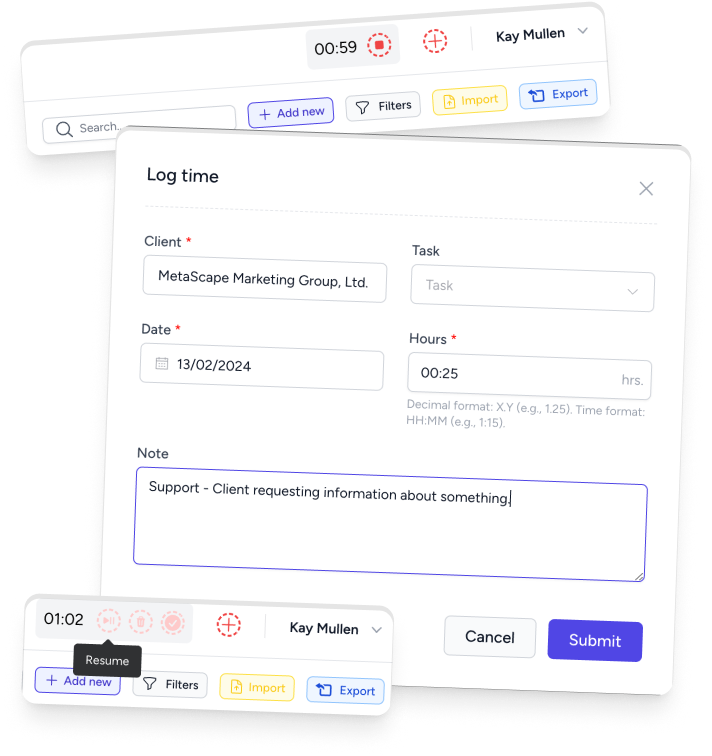
- Fast time capture. If logging time is painful, your team won’t do it, and your data is worthless. Look for quick entry against a job, plus timers if your staff prefer them.
- WIP and unbilled visibility. A live view of work in progress and time not yet billed is where firms find money they were leaving on the table.
- Flexible billing. Support for hourly, fixed-fee, and recurring invoices, because most firms use a mix across clients.
- Realization and write-offs. See the gap between time recorded and time billed, so you can price better next time.
- Invoicing and payments. Clean invoices, online payment, and a record of what’s outstanding.
- Ledger integration. A live connection to QuickBooks Online or Xero so invoices and payments reconcile without double entry.
Best time and billing software for accountants: match the operating model
There is no useful universal ranking. A tool can have more features and still be the wrong choice if it does not match how your firm prices work or how staff record time.
| Your firm’s operating model | Prioritize | Watch out for |
|---|---|---|
| Hourly billing | Fast timers, rate tables, WIP review and invoice creation | Time recorded without enough detail to bill confidently |
| Fixed monthly fees | Time budgets, effective hourly rate and client profitability | Treating time as irrelevant because it is not shown on the invoice |
| Mixed billing models | Hourly, fixed-fee and recurring invoices in one system | Separate processes for each billing method |
| Tax or seasonal work | Rapid entry, bulk review and clear unbilled-work queues | A system that becomes slower when volume peaks |
| Multi-service firms | Reporting by client, service, job and team member | Firm-wide averages that hide an unprofitable service line |
For most growing firms, the deciding question is whether time and billing should be standalone or part of practice management. Standalone software can suit a small firm with an established stack. An integrated platform is usually stronger when time must connect to recurring jobs, capacity, client requests and billing approvals.
Why integrated beats a standalone timer
The most common mistake is bolting a standalone time tracker onto a separate invoicing tool. Time gets logged in one place, then someone copies it into invoices in another, which is slow, and every copy is a chance to miss billable work.
When time and billing sit inside the same system as your workflow, time is captured against the actual jobs your team is doing, and it flows straight into billing. Nothing is re-keyed, and you can see unbilled time against every client without exporting anything.
How Tidyflow handles time and billing
Tidyflow keeps time tracking and billing and payments in the same place as the work. Your team logs time against the jobs they’re already working on, you get a firm-wide view of WIP and unbilled time, and you turn that into invoices, fixed-fee, hourly, or recurring, that sync with QuickBooks Online and Xero. Because it’s part of the wider practice management platform, the time behind an invoice is never disconnected from the job it came from.
How to choose time and billing software
- Start with capture. If logging time is slow, adoption fails and the data is useless. Test entry speed with your actual team.
- Check unbilled visibility. Can you see, in one view, what work is done but not yet billed?
- Match your billing model. Make sure it handles the mix you actually use, fixed-fee, hourly, and recurring.
- Confirm the ledger integration with QuickBooks Online or Xero using real data.
- Decide standalone vs integrated. A separate timer is simpler to buy but leaves you re-keying; an integrated platform captures time against the work and bills it without the copy-paste.
Run a real-work trial before switching
Do not evaluate software from a polished demo alone. Test it with one hourly job, one fixed-fee client and one recurring engagement. Ask two staff members to record time for a week, then have the person responsible for billing review WIP and produce draft invoices.
At the end of the trial, check:
- How many clicks did common time entries take?
- Could the reviewer see missing or questionable entries quickly?
- Did fixed-fee work show an accurate effective hourly rate and realization?
- Could unbilled time move into an invoice without being copied?
- Did invoices and payments sync with the ledger correctly?
- Could you explain the process to a new employee in ten minutes?
The best system is not the one with the longest feature list. It is the one that produces reliable time and profitability data without turning Friday afternoon into an administrative catch-up session.
Frequently asked questions
Do accounting firms need separate time-tracking and billing tools?
Not ideally. When time tracking and billing live in separate apps, someone re-keys hours into invoices, which is slow and error-prone. Firms get the most value when time captured against a job flows straight into billing.
How do fixed-fee firms use time and billing software?
Even fixed-fee firms track time, they just use it to measure profitability and price the next engagement rather than to bill by the hour. The billing side then issues the fixed-fee or recurring invoices.
What should accounting time and billing software integrate with?
At minimum your accounting ledger (QuickBooks Online or Xero) so invoices and payments reconcile, and ideally your workflow, so time is captured against the jobs your team is actually working on.
Is a spreadsheet enough for time and billing?
For a solo practitioner with a few clients, maybe. Once you have staff, recurring work, and want firm-wide visibility of write-offs, realization, and unbilled time, a spreadsheet stops being enough.
What is the best time and billing software for accountants?
The best option is the one your team will use consistently and that connects time to clients, jobs, WIP and invoices. Firms with recurring workflows usually benefit from an integrated practice-management platform, while a solo accountant with a simple stack may only need a standalone timer and invoicing tool.