Try Tidyflow
Get your firm organized.
Watch a 4-minute demo, or start a free trial. No credit card required.
Most month-end close guides, including the ones from Xero and QuickBooks, are written for a single business closing its own books. An accounting firm has a different problem. You already know how to reconcile a bank account. What makes the close slip is doing it for 40 or 60 clients at once: chasing statements, working out which clients are stuck, and keeping every bookkeeper closing the same way.
This guide covers how to run the month-end close across a whole client list. For the line-by-line checks, use the free month-end close checklist.
What month-end close means for a firm
For one business, the month-end close is the set of steps that finalize a month’s books: record everything, reconcile the accounts, post adjustments, review the numbers, and lock the period.
For a firm, it’s that same process repeated per client, every month, by different people, with clients who answer at their own pace. The accounting is the easy part. The hard part is the coordination around it:
- Who is waiting on what. Which clients haven’t sent statements, receipts or answers yet.
- Where each close stands. Not started, in progress, ready for review, or reported.
- Who owns it. Which bookkeeper is closing each client, and who reviews it.
- What’s at risk. Which clients will miss your target, and why.
Why the close slips at accounting firms
When a firm’s close runs late, the cause is rarely the accounting. It’s usually one of these:
- Waiting on clients. A missing bank statement or an unanswered question about a $4,200 transfer holds up an otherwise finished close.
- Status lives in people’s heads. The only way to know where a client stands is to ask whoever is working on it.
- Every bookkeeper closes differently. One reconciles to the statement, another to the feed. One posts accruals, another doesn’t. Review takes longer because the reviewer can’t assume anything.
- Everything lands on the reviewer at once. If every close reaches review in the same two days, the owner becomes the bottleneck.
- Problems are found late. A broken bank feed or a new account the client never mentioned only shows up halfway through the close.
- Deadlines collide. Sales tax, payroll filings and quarterly returns fall in the same weeks as the close.
Each step below is aimed at one of these.
1. Standardize the close into one checklist
Every client’s close should follow the same checklist, in the same order. That’s what lets a new hire close a client without asking how, and what lets a reviewer trust that the bank was reconciled to the statement rather than the feed.
Start from a full checklist and remove what doesn’t apply to a client, rather than building a new one per client. A service business with no inventory skips the inventory section. A client with no payroll skips payroll. Keep client-specific notes, such as “loan statement comes from the lender by email on the 5th”, with that client’s close so the next person sees them.
Our month-end close checklist covers ten sections, from the documents to collect before you start to locking the period, with what each check should catch.
2. Set a close calendar for the whole firm
A firm-wide close calendar turns “close the books” into dated targets. Every client moves through the same stages:
- Requests out. Client requests go out on the first business day, and bank feeds are checked.
- Collection and reconciliation. Clients send documents and answers while bank and card reconciliations are done as feeds and statements arrive.
- Adjustments. Accruals, prepayments, depreciation and payroll are posted.
- Review.
- Reporting. Reports are delivered and the period is locked.
How many days each stage takes depends on the client. Group clients by complexity, for example simple, standard and complex, and give each group its own target date for each stage. Then don’t schedule every client for the same days. Close the clients with the earliest downstream deadlines first, such as sales tax filings or lender reporting, and spread the rest so review doesn’t pile up at the end. If a client consistently responds late, move their target rather than letting them hold up everyone else’s.
3. Request everything from the client at once
The biggest delay in a firm’s close is waiting on clients. The fix is to ask for everything in a single request on day 1, with a due date, instead of discovering what’s missing halfway through and emailing one question at a time.
A month-end request typically includes:
- Statements for any bank, card or loan account without a working feed
- Payroll reports if payroll is run outside the firm
- Receipts for spend over the client’s threshold
- Questions about transactions you can’t identify
- Confirmation of new bank accounts, cards, loans or large purchases
- A W-9 for any new contractor (US)
Keep it easy to answer. Your least technical client should be able to reply from their phone without a manual. Automatic reminders matter more than a perfectly worded request: most clients don’t ignore the first ask, they forget it. For more on getting answers faster, see how to get information from accounting clients faster.
4. Give every close an owner and a reviewer
Each client’s close needs one named owner and one named reviewer every month. “The team” doesn’t count. When ownership is clear, nothing sits untouched because everyone assumed someone else had it.
Assigning both up front also shows you capacity before the month starts. If one bookkeeper owns 25 closes and another owns 10, you’ll see it on day 1, not on day 12.
5. Track every client’s close in one place
You should be able to answer “where does every client’s close stand?” without asking anyone. That means each close is its own job with a status your whole team uses the same way, for example:
- Waiting on client. Request sent, answers or documents outstanding.
- In progress. Being worked.
- Ready for review. Preparer finished, reviewer not yet started.
- Reviewed. Notes resolved, ready to lock and report.
- Reported. Reports sent, period locked.
Scan that list daily. The clients stuck in “waiting on client” past their due date need a phone call, not another email. The pile in “ready for review” tells you whether review is about to become the bottleneck.
6. Run the checks that catch real errors
A close that ticks “reconcile the bank” can still miss the duplicate feed line or the payout booked gross. The checks that catch most errors at small-business clients:
- Reconcile to the statement closing balance, not the feed. Feeds can miss or duplicate lines, especially after a reconnect.
- Clear the clearing accounts. Stripe, Square, PayPal and Shopify payouts should be recorded net with fees expensed. In QuickBooks, Payments to deposit (Undeposited Funds) should only hold money not yet banked.
- Tie control accounts to their source. Aged receivables and payables to the balance sheet, payroll liabilities to the payroll provider, and the sales tax, GST or VAT account to the tax report.
- Zero the holding accounts. Suspense, Ask My Accountant and uncategorized income and expense should be empty.
- Check for double-entered bills. A bill captured by Dext or Hubdoc and also coded by a bank rule is a common double count.
- Compare the P&L to last month and the same month last year. Explain anything above your materiality threshold.
- Confirm prior periods haven’t changed. Opening balances should agree to last month’s signed-off balance sheet.
The checklist has the full list, including payroll, fixed assets, loans and regional tax checks.
7. Review before you lock
Every close should be reviewed by someone who didn’t prepare it. To keep review from becoming the bottleneck:
- Review against the same checklist the preparer used, so the reviewer checks the work rather than redoing it.
- Scale review to the client. A simple service business needs a shorter review than a client with inventory, payroll and loans.
- Resolve every note before locking. A note left open becomes next month’s surprise.
Once reviewed, lock the period: set the lock date in Xero, or turn on Close the books with a closing date and password in QuickBooks. Next month, check whether anything was changed after the lock. QuickBooks has an Exceptions to Closing Date report, and Xero records changes in History and notes.
8. Deliver the reports and carry the lessons forward
Send each client the same report pack, in the same format, around the same day each month. Predictable delivery is a big part of what clients are paying for.
Before you mark the close done, record two things:
- Open questions for the client, so they’re asked at the start of next month’s close, not forgotten.
- Recurring issues, such as a supplier that always arrives late or a card the owner keeps using for personal spend. Add them to that client’s checklist notes so next month’s preparer handles them up front.
What decides how long a close takes
There’s no single right length for a month-end close. It depends on the client:
- Transaction volume. A few dozen transactions a month is a different job from a few thousand.
- Number of accounts. Each bank account, card, loan and payment processor is another reconciliation.
- What the business has. Payroll, inventory, fixed assets, multiple entities or foreign currency each add steps.
- How clean the books are. Bank rules, receipt capture and consistent coding make the close faster every month.
- How fast the client responds. Often the biggest factor, and the one that varies most between clients.
Set targets by client group rather than one deadline for the whole firm, and track how long each client actually takes. When closes run late, look at where they sit longest. It’s usually “waiting on client” or “ready for review”, not the accounting itself.
Running the month-end close in Tidyflow
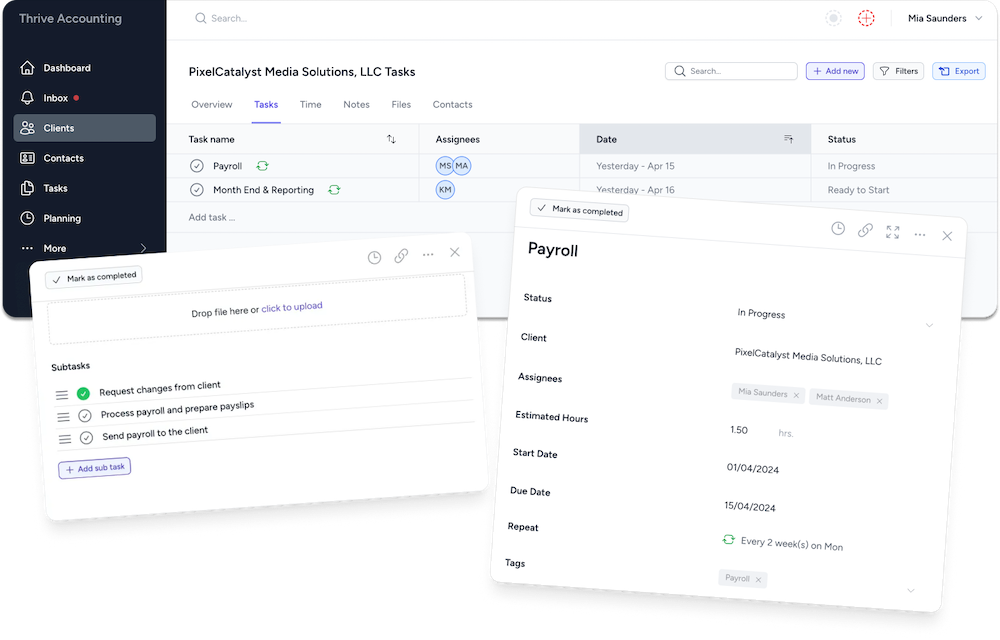
Tidyflow sits around QuickBooks Online and Xero. It doesn’t change how you do the accounting. It handles the coordination: who’s closing which client, what you’re waiting on, and where every close stands.
- A recurring close job per client. Set the checklist up once as a job template and deploy it to all your bookkeeping clients, or a client group, at once. Each month’s job is created automatically with the same steps and assignees.
- One request to the client, with reminders. Each close includes a client request for statements, receipts and answers, with a due date. Tidyflow sends automatic follow-up reminders, and stops once the client replies. Clients answer in a simple portal, no download needed. New US workspaces include ready-made requests such as “Confirm month-end details” and “Provide details for unknown or unclear transactions”.
- Every client’s status on one screen. Filter the jobs list or board by status, owner or due date to see which closes are waiting on the client, which are ready for review, and which are late.
See how it works on the workflow management and client requests pages, or start with the month-end close checklist.