Try Tidyflow
Get your firm organized.
Watch a 4-minute demo, or start a free trial. No credit card required.
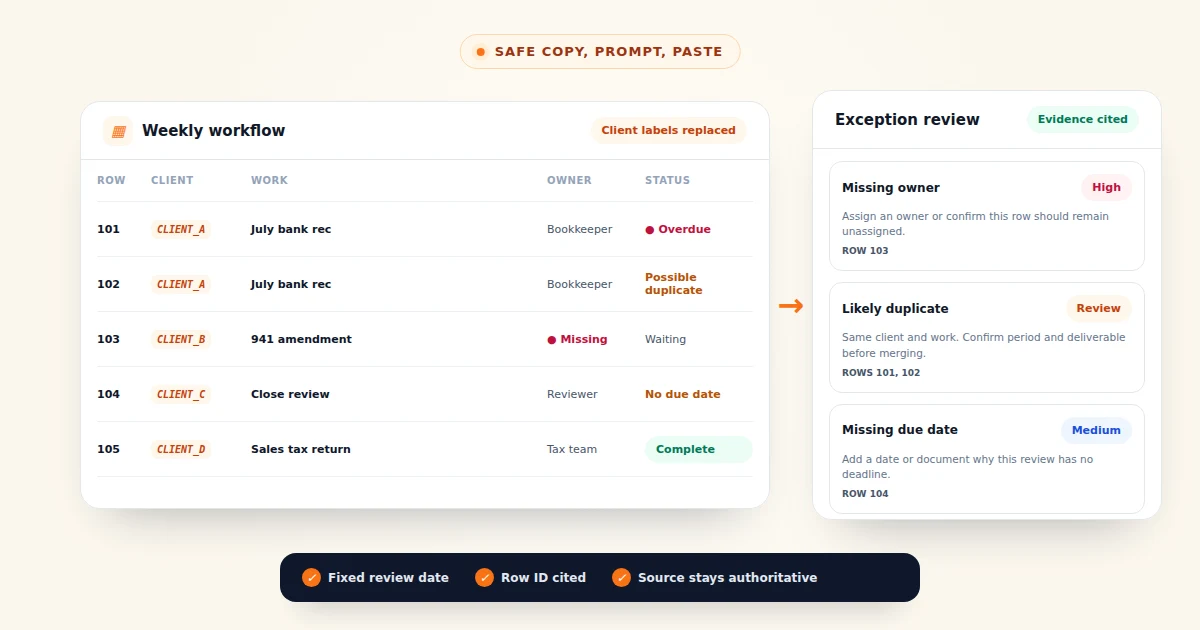
The useful output from an AI review is a row-referenced exception queue: Row 103 has no owner, Rows 101 and 102 may be duplicates, and Row 104 has no due date or next action. Each item points back to the spreadsheet so the job owner can verify it before changing anything.
ChatGPT or Claude can produce that queue from a reduced, redacted table. It can apply checks you define for missing owners, overdue work, duplicate rows, inconsistent statuses, and blocked jobs.
What this workflow can and cannot do
Use AI to apply explicit checks and create a review queue from a table. It cannot know whether a status is correct, whether a deadline changed elsewhere, or whether a client has a valid reason for a delay. It may also misread a date or treat separate work as a duplicate.
The output is not an audit conclusion, and the assistant does not turn a spreadsheet into a reliable workflow system. Your team owns the source data, the review, and every decision that follows.
Good checks include:
- rows with no owner or due date
- due dates before the review date when status is not complete
- blocked work with no next action
- likely duplicate rows
- inconsistent status labels such as “Waiting”, “Awaiting client”, and “Client hold”
- work due soon that still depends on missing client information
Do not ask for broad instructions such as “find anything wrong.” Define what counts as an exception.
Export only the columns you need
A typical workflow sheet may contain far more data than the assistant needs. For this review, start with a narrow export:
| Column | Keep it? | Reason |
|---|---|---|
| Row ID | Yes | Lets the assistant cite a finding without relying on a client name |
| Client | Replace | Preserve which rows belong together without exposing the identity |
| Job or task | Yes | Needed to understand the work |
| Owner | Replace if it contains a person’s name | The role may be enough for the review |
| Status | Yes | Needed for exception rules |
| Due date | Yes | Needed for overdue and upcoming work |
| Blocker or next action | Yes | Needed to find stalled work |
| Email, phone, tax ID, account number | No | Not needed for this task |
| Fees or balances | Usually no | Include only when the question genuinely depends on them |
The safest field is the one you never share. Removing unnecessary columns is more reliable than trying to detect every sensitive value inside them.
Redact the remaining identifiers locally
Copy the reduced table and paste it into Tidyflow’s Client Data Redactor. Review the findings, then copy the safe version.
The tool replaces values it recognizes with reversible placeholders inside your browser. It can still miss a business name, an unusual identifier, or a value without enough context. Read the table before you send it to any AI assistant.
If client names are essential for grouping rows, replace them with stable labels such as CLIENT_A, CLIENT_B, and CLIENT_C. Use the same label for every row belonging to that client. The assistant can then find duplicate or related work without seeing the real identity.
A small fictional input might become:
Row ID | Client   | Work                  | Owner       | Status          | Due       | Blocker / next action
101    | CLIENT_A | July bank rec         | Bookkeeper  | In progress     | 2026-08-05| Waiting for statement
102    | CLIENT_A | July bank rec         | Bookkeeper  | Started         | 2026-08-05| Waiting for statement
103    | CLIENT_B | 941 amendment         |              | Waiting         | 2026-08-12| Client must approve draft
104    | CLIENT_C | Monthly close review  | Reviewer     | Awaiting client |           | No next action listed
Give the assistant a fixed review date
Relative words such as “today” can produce inconsistent results if the chat is reopened later. Put the date in the prompt and use ISO format, YYYY-MM-DD, throughout the table. Replace the date placeholder before you paste the prompt.
Paste this prompt above the redacted spreadsheet:
You are reviewing an accounting firm's workflow spreadsheet.

Review date: [YYYY-MM-DD]

Use only the data in the table. Do not invent a client, owner, date, status,
blocker, or next action.

Run these checks:
1. Missing owner
2. Missing due date
3. Due date before the review date while status is not complete
4. Blocked or waiting work with no clear next action
5. Likely duplicate rows for the same client and work
6. Status labels that appear to mean the same thing but are written differently
7. Work due within 7 calendar days that still depends on client input

Return three sections:

A. Exception table with columns:
- Severity: High, Medium, or Low
- Row ID
- Check failed
- Evidence
- Suggested review action

B. Possible duplicates, grouped together with the reason they look duplicated.

C. Suggested status labels, using the smallest clear set supported by the data.

Rules:
- Cite at least one Row ID for every finding.
- Write "Cannot determine" when the table does not contain enough evidence.
- Do not describe a row as wrong. Describe what a person should verify.
- Preserve all placeholders exactly as written.

Spreadsheet:
[PASTE REDACTED TABLE HERE]
Change the checks to match your actual workflow. If your firm treats “Waiting for client” as an active status rather than a blocker, say so. If due dates are optional for internal housekeeping, remove that check.
Triage the exception queue
A clean summary can still be wrong. Work through every exception and compare it with the source sheet or practice management system.
Review the highest operational risk first: filing and payroll commitments, dated client or lender deliverables, and work blocked without a next action. The assistant does not know which commitments carry the greatest risk, so a person must set the order.
Confirm date formats and timezone assumptions. A date without a time should not be treated as late at the start of that day. Check possible duplicates for different periods, entities, or deliverables, and confirm whether a blank owner is intentional before intake is complete. For blocked work, identify the specific outstanding item and the next follow-up instead of relying on a “Waiting for client” label.
If the assistant suggests changing data, apply the change in the source system. Do not maintain a corrected copy inside the chat.
Fix the source workflow behind recurring exceptions
Keep the checks that match your firm’s workflow:
- every active job has one owner
- every client dependency names the missing item
- every blocked job has a next action and date
- status labels come from an agreed list
- completed work is closed rather than left in progress
Repeated exceptions usually point to a missing control in the source workflow. A blank owner needs an assignment rule. A blocked row without a next action needs a required follow-up field. Inconsistent statuses need a controlled list, and recurring client dependencies need a defined request and reminder process.
A periodic AI review can surface exceptions, but it cannot enforce the fix. Workflow management software can require owners, statuses, and dates as work moves, and once the work lives there, Tidyflow’s built-in AI assistant can answer questions like these against live data, with no export or redaction step. For other focused reviews, 55 ChatGPT prompts for accountants offers more copy-paste patterns, and ChatGPT and Claude for accounting work compares the assistants.
Frequently asked questions
Can ChatGPT or Claude analyze an accounting workflow spreadsheet?
Yes. Paste a redacted table and ask for specific exceptions such as missing owners, overdue dates, duplicate rows, blocked work, and inconsistent statuses. Give the assistant a fixed review date and require it to cite the row number for every finding.
Should an accounting firm upload a client workflow spreadsheet to AI?
Do not upload a sheet containing identifiable or confidential client data unless your firm’s approved policy and account terms allow it. A safer copy-paste workflow replaces identifiers first, shares only the columns needed for the task, and checks the redacted table manually.
What can AI miss in a workflow audit?
AI can misread dates, misunderstand firm-specific statuses, overlook duplicates, or flag intentional exceptions. Treat its output as a review queue, not an audit conclusion, and have the job owner verify every finding in the source system.