Try Tidyflow
Get your firm organized.
Watch a 4-minute demo, or start a free trial. No credit card required.
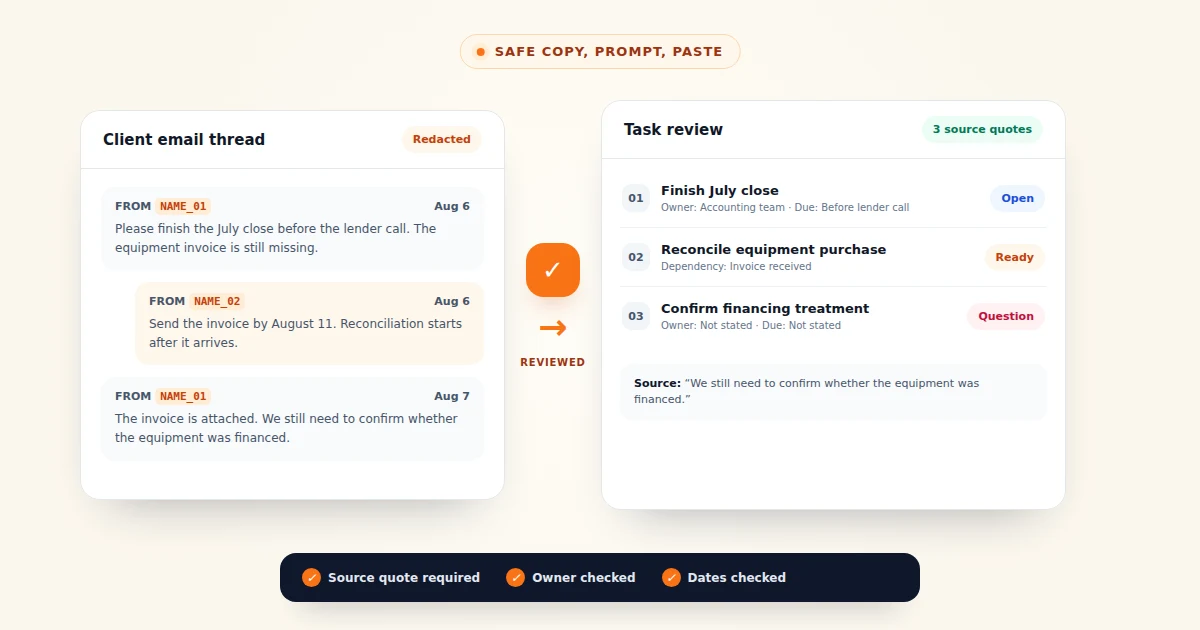
A client writes that the July close must be finished before a lender call. A later reply says the bank statement arrived, the equipment invoice is still missing, and the firm needs to confirm whether the purchase was financed. The work is present in the thread, but it is not yet organized for the team.
Here is that fictional thread:
Subject: July close and equipment purchase

Hi Jordan,

Please finish the July close before our lender call on August 14.
I uploaded the First County Bank statement. The equipment invoice is still
with our operations manager, Priya Shah.

Thanks,
Melissa Grant

---

Hi Melissa,

We have the bank statement. Please send the equipment invoice by August 11.
Jordan will finish the reconciliation after it arrives. I will prepare the
lender package, but I still need to know whether the equipment was financed.

Best,
Alex Morgan
Everything in the example is invented. A real thread may contain names, emails, phone numbers, bank details, tax identifiers, or other client information, so do not copy it into an assistant unchanged.
Start with the complete source
Copy the full thread in chronological order, including the subject line and dates. Do not use only the last message. Later replies can change an earlier instruction, clarify an attachment, or move a deadline.
Repeated legal footers can be removed if they add no working context. Keep every sentence that changes the work, owner, timing, dependency, or approval. Use only an assistant your firm has approved, and follow your firm’s AI policy.
Redact identifiers before opening ChatGPT or Claude
Run the thread through Tidyflow’s free Client Data Redactor before opening the assistant. The page works locally in your browser and swaps detected identifiers for placeholders you can restore later.
Scan the result line by line before you copy it. Unusual identifiers and names without enough context can slip through. The placeholders also reduce exposure rather than guarantee anonymity; a distinctive set of facts may still identify the client.
A redacted version of the sample will look roughly like this. The real tool adds a session code to each placeholder so it can restore the right values later.
Hi ⟪NAME_0001⟫,

Please finish the July close before our lender call on August 14.
I uploaded the First County Bank statement. The equipment invoice is still
with our operations manager, ⟪NAME_0002⟫.

Thanks,
⟪NAME_0003⟫
Keep the redactor tab open. The replacement map stays in that browser session and is needed if you want to restore names in the final output.
Use a prompt that requires evidence
Paste the redacted thread below this prompt:
You are helping an accounting firm turn a client email thread into an internal
task list.

Use only facts stated in the thread. Do not infer a deadline, owner, status, or
completed action. If a field is missing, write "Not stated."

Return two sections.

1. Tasks, as a Markdown table with these columns:
   - Task
   - Owner
   - Due date
   - Status
   - Dependency
   - Source quote

2. Open questions, as a bullet list. Include anything the firm must clarify
before work can continue.

Rules:
- Preserve every placeholder exactly as written.
- Treat later messages as newer instructions when they conflict with earlier ones.
- Do not mark a task complete merely because someone said they planned to do it.
- Keep each task small enough for one person to own.
- Quote the exact sentence that supports every task.

Email thread:
[PASTE REDACTED THREAD HERE]
The source quote ties each task back to the thread. It lets the reviewer check whether the task, owner, date, and status are supported by the same source text.
Review the output before creating tasks
Read every source quote and confirm that it supports the task, owner, date, and status in that row. Then check that later instructions replace earlier ones only where the conflict is clear. Look separately for attachments, approvals, and unresolved questions that may have been missed.
Keep client-owned actions as open questions or client requests unless your team owns the work. Confirm each calendar date; “Friday” is not a safe due date unless the thread makes the date unambiguous.
Do not ask the AI to decide whether the client’s accounting treatment is correct. This workflow extracts work from the thread. It does not replace professional judgment.
Restore only what the task system needs
After the draft is approved, decide whether the task table needs client names at all. Internal tasks may work better with a client record link than with names repeated in each description.
If names are required, paste the approved output back into the same redactor session and restore the original values. Check the restored text again, then create the tasks in your practice management system. Assign owners, set confirmed dates, and link each task to the client and job. The source system, not the AI chat, should remain the record of work.
Once the tasks are approved, keep them beside the client, files, and conversation instead of leaving the result in the chat. Workflow management software gives a growing firm that shared record. For more reusable prompts, see 55 ChatGPT prompts for accountants and the practical comparison of ChatGPT vs Claude for accounting work.
Frequently asked questions
Can ChatGPT or Claude turn an email thread into a task list?
Yes. Paste a redacted email thread with a prompt that asks for tasks, owners, dates, dependencies, and open questions. Require a source quote for every task so you can check the result against the original thread.
What should an accounting firm remove before pasting a client email into AI?
Remove or replace names, email addresses, phone numbers, tax identifiers, account numbers, routing numbers, and any other information that could identify the client. Review the redacted text manually because automated detection can miss unusual formats.
How do you stop AI from inventing tasks or deadlines?
Tell it to use only facts stated in the thread, write Not stated when an owner or date is missing, and include the source sentence for each task. A team member should still compare the output with the original before creating work.