Try Tidyflow
Get your firm organized.
Watch a 4-minute demo, or start a free trial. No credit card required.
AI agents for accounting firms can genuinely draft client emails, categorize transactions, chase missing documents, and prepare research — with a human reviewing every output. They can’t yet run bookkeeping unsupervised, file returns, or give client advice on their own. This guide covers what agents actually do in 2026, what’s marketing fiction, and how to pilot one safely.
If you’re still getting oriented on AI generally, start with our practical guide to AI for accounting firms. This piece goes one level deeper: tools that act, not just answer.
What is an AI agent? (And how is it different from a chatbot?)
A chatbot answers a question and stops. An AI agent takes a goal, breaks it into steps, and works through those steps using tools — email, files, calendars, your accounting software — until the job is done or it needs your input.
The practical difference: with a chatbot, you run the workflow and the AI helps with individual steps. With an agent, you define the workflow and the AI runs the steps while you review the result.
| Chatbot | AI agent | |
|---|---|---|
| You provide | A prompt | A goal, rules, and access to tools |
| It returns | One answer | A completed multi-step task |
| It can touch | Only the conversation | Email, files, and connected software |
| It runs | When you ask | On triggers or schedules |
| A mistake looks like | A bad draft you catch | An action taken on your behalf |
“Agentic AI in accounting” is the same concept in vendor language. When a marketing page says agentic, ask one question: what actions can it take without a human clicking approve? The answer tells you both how useful and how risky the tool is.
What can AI agents actually do in accounting firms today?
Four categories of agent work genuinely function in 2026 — all of them with a human reviewing output.
1. Draft client communication from context
An agent can read an email thread, check the status of the related job, and produce a draft reply, reminder, or status update without you pasting anything in. That’s the step change from prompting: the agent gathers the context itself. You still read and send. The same discipline that makes a good prompt makes a good agent instruction — role, context, constraints, format — and our ChatGPT prompts for accountants library is a useful base for the standing instructions you give an agent.
2. Categorize transactions and flag exceptions
Transaction categorization is the most mature agent use case in accounting. Bookkeeping platforms now suggest or post categorizations from bank feeds, learn from your corrections, and route low-confidence items to a human. The pattern that works is confidence-based: routine items get a fast pass, exceptions get a person.
3. Chase missing documents
Following up on outstanding documents is ideal agent work: repetitive, rule-based, low-judgment, and universally disliked. An agent can monitor which requests are still open, send polite scheduled reminders, and escalate non-responders to you instead of letting them sit. Nothing about a third reminder email requires professional judgment — it just requires that it actually gets sent.
4. Prepare research and turn conversations into tasks
An agent can assemble source material on a tax question into a brief for you to verify, turn meeting notes into a task list with owners and deadlines, or draft a workpaper summary from documents you point it at. The key word is prepare. Agents are good at gathering and structuring; the conclusion is still yours, verified against primary sources.
What’s real and what’s marketing fiction
| Claim you’ll see | Verdict |
|---|---|
| ”Drafts client emails from thread and job context” | Real — with review before sending |
| ”Categorizes routine transactions, escalates exceptions” | Real — with a human on the exceptions |
| ”Chases missing documents until they arrive” | Real — this works today |
| ”Fully autonomous bookkeeping, no human in the loop” | Fiction — exceptions and judgment calls remain human work |
| ”AI agent prepares and files returns end to end” | Fiction — and a liability problem even if it worked |
| ”Replaces a junior accountant” | Fiction — it changes what juniors do, it doesn’t remove them |
The fiction column fails for the same reasons every time: edge cases, professional judgment, and accountability. An agent that handles the routine ninety percent of a workflow is genuinely valuable. But the remaining slice is where the risk lives, and someone with a license still signs the work. For the deeper question of what this means for accounting careers, see will AI replace accountants.
Seven practical AI agent workflows for an accounting firm
An agent becomes useful when it can work with structured information in your practice management system, inbox, and billing records. The safest starting mode depends on the action: reading is lower risk than drafting, and drafting is lower risk than changing a live record.
| Workflow | What the agent does | Safest starting mode |
|---|---|---|
| Morning workload brief | Finds overdue jobs and work due soon, groups it by assignee and status, and flags missing owners or next steps | Read-only |
| Inbox-to-job triage | Reviews recent inbox threads, matches them to a client or job when possible, and drafts the next reply or internal action list | Draft-only; never send automatically |
| Approved request to job | Creates a job only after you confirm the job name, client, assignee, due date, status, and tags | Confirmed write |
| Stalled-job follow-up | Finds jobs that have not moved, checks available job and email context, and drafts a concise client follow-up | Draft-only |
| Proposal first draft | Uses the approved client, contact, services, and tax rates to prepare a draft and preview the totals | Draft-only; review scope and totals |
| Weekly billing exceptions | Lists overdue invoices, recent payments, and jobs whose billing information needs attention | Read-only |
| Review and handoff summary | Summarizes job activity and comments, lists open decisions, and prepares an internal handoff comment | Read-only first; confirm before adding the comment |
These are operating patterns, not reasons to give an agent blanket access. Where a connected product offers granular scopes, grant only the data and actions needed for the workflow. If a connector inherits the user’s existing permissions, choose the connecting user carefully. In every case, make the agent show its assumptions before it changes anything.
Three copy-paste starter instructions
Use instructions like these with an agent connected to your approved practice management system:
Morning brief
Find all jobs that are overdue or due in the next seven days. Group them by assignee, then by due date. Flag jobs with no assignee, no status, or no clear next step. Do not modify any records.
Inbox triage
Review the inbox threads visible to me from the last two business days. Match each thread to a client and related job when the evidence is clear. Draft a reply where a response is needed, but do not send email. List any uncertain matches or missing context separately.
Proposal draft
For [client], prepare a draft proposal using [approved services]. Use the current service and tax-rate records, preview the totals, and list every assumption. Do not publish or send the proposal.
Can an AI agent do bookkeeping?
Parts of it, yes — a bookkeeping AI agent can do categorization, matching, and anomaly flagging well. It cannot reliably make accrual decisions, resolve unusual transactions, or close a period on its own. The honest framing: an agent compresses the routine work inside bookkeeping; a qualified person still owns the books.
If you run bookkeeping services and want to use agents, this sequence works in practice:
- Pick one client with clean books and mostly routine transactions.
- Run the agent in suggestion mode and review every categorization for the first month.
- Track the correction rate by category so you know where it’s reliable and where it isn’t.
- Loosen selectively. Let consistently accurate categories through with spot-check sampling; keep exceptions and anything unusual fully human.
- Keep month-end human. Accruals, adjustments, and anything requiring client knowledge stay with your team.
- Add clients gradually, one at a time, repeating the review month for each.
What are the risks of AI agents for accounting firms?
Three, and they’re bigger than chatbot risks precisely because agents act.
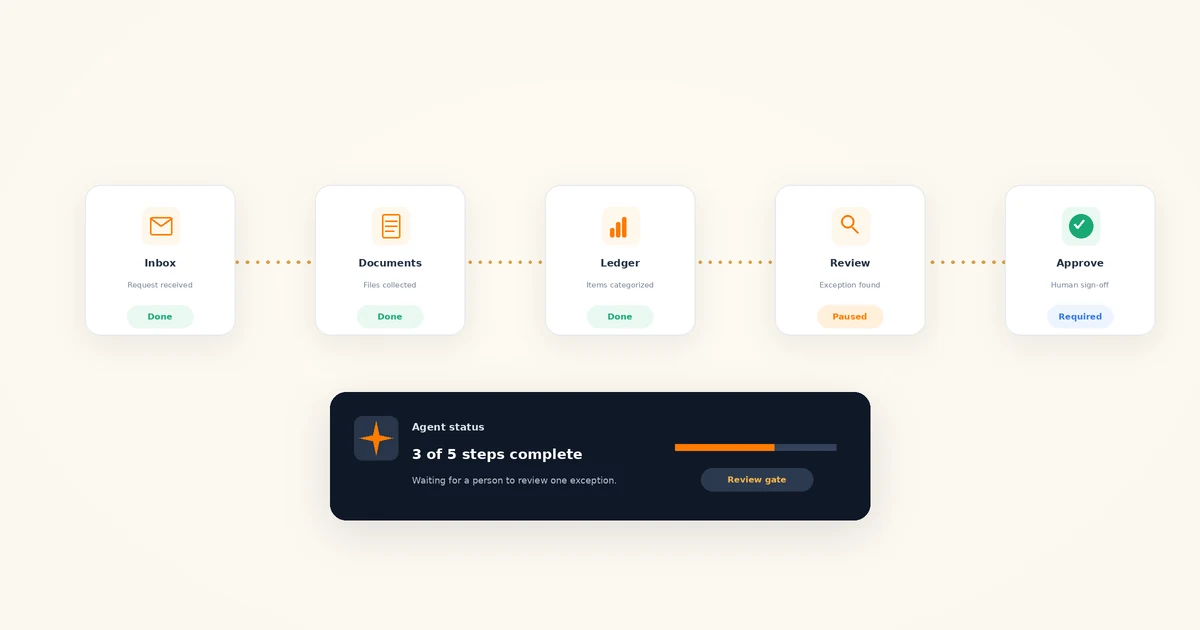
Actions, not just answers. A chatbot’s worst output is a bad draft you catch before it leaves your screen. An agent’s worst output is an email already sent to a client or a transaction already posted. The control is a review gate: anything client-facing or ledger-touching requires human approval before it happens, not after. Draft-only and suggestion modes exist for exactly this reason — use them.
Client data exposure. Never paste client-identifiable or confidential information (including names, tax IDs, bank details, payroll data, or unredacted financial statements) into a public AI tool. Anonymize inputs, and use only firm-approved tools with appropriate privacy controls. Agents raise the stakes because you’re not pasting data once — you’re granting standing access to an inbox or a document folder. Grant the minimum access the workflow needs, to the specific mailbox or folder involved, and review what the tool’s business tier does with your data before connecting anything.
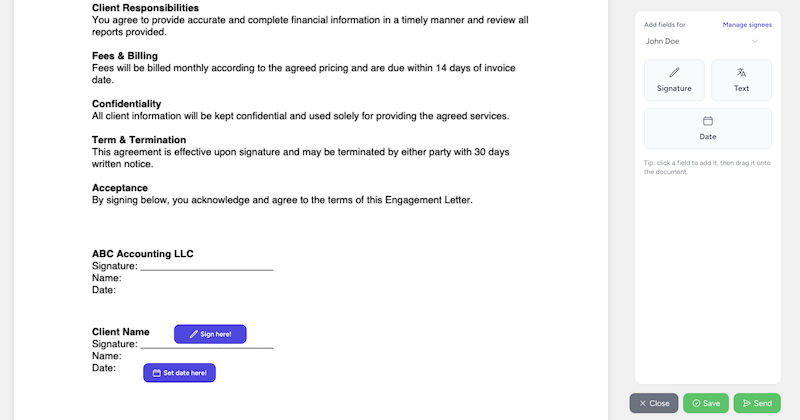
Liability stays with the firm. The engagement letter, the letterhead, and the signature are yours. If an agent miscategorizes a year of transactions or sends a client something wrong, that’s your firm’s error, professionally and legally. “The AI did it” is not a defense, which is why a qualified professional verifies every financial, tax, regulatory, and client-facing output before it’s used.
These rules only work if they’re written down before your team starts experimenting. Our AI policy template for accounting firms is a copy-paste starting point covering approved tools, prohibited data, and review requirements.
How to pilot an AI agent at your firm in 30 days
Before day one, choose a single low-risk workflow and write down the approved tool, prohibited data, required review step, and person responsible. Tax positions, ledger changes, client advice, and anything sent automatically are poor first pilots.
- Week 1: read-only. Ask for a morning workload brief or billing exception list. Check whether the agent finds the right records, explains uncertainty, and avoids changing data.
- Week 2: draft-only. Let it prepare inbox replies, follow-ups, or a proposal draft. A person reviews every word and total; the agent does not send or publish anything.
- Week 3: confirmed writes. Allow one reversible action, such as creating or updating a job, only after the agent shows the intended fields and you confirm them.
- Week 4: review the evidence. Measure accuracy, correction rate, review time, total time saved, permission scope, and any near misses. Expand, narrow, or stop based on those results.
Shortlist tools by workflow, not by the broadest feature list. Our roundup of the best AI tools for accounting firms is organized that way, and ChatGPT vs Claude for accountants covers the trade-offs between two general assistants.
Agents need structured work to act on
An agent can only act on what it can see. If your firm’s work lives in individual inboxes, spreadsheets, and people’s heads, there is no reliable answer to “which documents are outstanding?” or “what’s the status of this job?” — for a human or for an agent. Firms with structured jobs, tasks, deadlines, and client requests get more out of agents for the same reason they get more out of new staff: the work is visible and the next step is defined.
Tidyflow provides a permissioned way to test this. You can connect an MCP-compatible AI tool to Tidyflow so it can work with the clients, contacts, jobs, invoices, payments, proposals, services, and inbox threads your user is allowed to access. The connection inherits that user’s Tidyflow permissions and visible inboxes rather than offering selectable per-workflow scopes. Connected tools can create or update jobs, prepare proposal drafts, add job comments, and create email drafts. They cannot directly send inbox email, although approved job updates or comments may still trigger Tidyflow’s normal notification emails. Workspace and personal AI consent are required, and you can revoke access from AI settings.
That scope is deliberate. The agent can read, draft, summarize, and perform approved practice-management actions while your team stays responsible for the accounting and every client-facing decision.
The bottom line
AI agents in 2026 are real but narrower than the marketing. Drafting from context, categorizing transactions, chasing documents, and preparing research all work today — behind review gates, with limited access, under a written policy. Autonomous bookkeeping and end-to-end filing don’t, and the firms claiming otherwise are selling ahead of the product.
Pilot one workflow this quarter. The measurable payoff is the hours it returns; the strategic payoff is the review-and-control muscle your firm builds now, which is exactly what you’ll need as agents get more capable. This space moves quickly, and we update this guide as it does.
Frequently asked questions
What are AI agents in accounting?
AI agents are software that takes a goal — chase missing documents, categorize this bank feed, draft these client replies — breaks it into steps, and works through them using tools like email, files, and your accounting software. Unlike a chatbot, an agent acts rather than just answers, which is why it needs review gates and limited permissions in an accounting firm.
What is agentic AI in accounting?
Agentic AI describes AI systems that plan and execute multi-step work rather than answering single prompts. In accounting, that means drafting communication from context, categorizing transactions, monitoring document requests, and preparing research briefs. Today’s agentic tools work best on structured, repeatable tasks with a human reviewing output.
Can an AI agent do bookkeeping?
Parts of it. Agents handle transaction categorization, matching, and anomaly flagging well, and categorization tools improve as they learn from your corrections. They cannot reliably make accrual decisions, resolve unusual transactions, or close a period without review. Treat a bookkeeping AI agent as a fast first pass that a qualified bookkeeper reviews.
How do you use AI agents for bookkeeping services?
Start with one client and one workflow, such as transaction categorization or document collection. Run the agent in draft or suggestion mode, review every output, and track the correction rate. Write data rules first, and expand to more clients only once the error rate is consistently low and your review process is routine.
How do you implement AI agents in an accounting firm?
Begin with a read-only workflow for one week, such as a morning summary of overdue jobs. Add draft-only work in week two, then allow a small number of confirmed updates in week three. Review accuracy, corrections, time saved, and access permissions in week four before expanding. Keep email sending, ledger changes, tax positions, and client advice behind human approval.
What are the best AI agents for accounting firms in 2026?
There is no single best agent — it depends on the workflow. General assistants like ChatGPT and Claude offer agent features for drafting and research, bookkeeping platforms build categorization agents into bank feeds, and document tools automate collection and chasing. Shortlist by workflow, trial on low-risk work, and judge on accuracy, review burden, and data controls.